User Guide User Guide
Page 34 PP307 Page 34 PP307
8.0 SN-W/E INSTALLATION TO DIN RAIL
8.1 Mounting to a DIN Rail
The Land SOLOnet SN-W/E Interface Unit is designed to be DIN rail mounted.
The following instructions detail the correct method for the mounting and removal
of a unit to a standard DIN rail.
307028
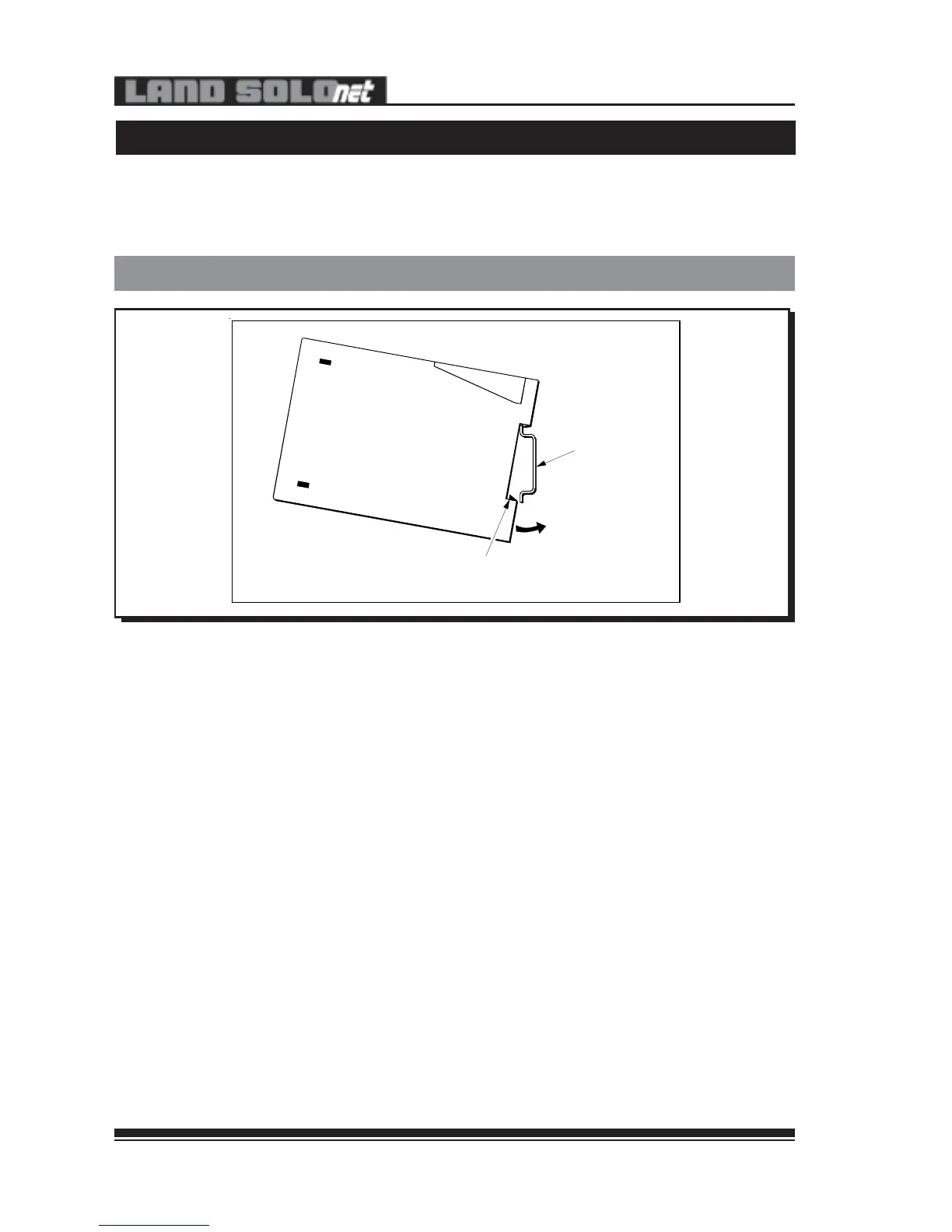
Fig. 28 - Mounting a SN-W/E Interface Unit to a Standard DIN Rail
• Ensure that the DIN rail to be used meets the standard specification
(DIN EN 50 022).
• Rest the uppermost groove on the rear of the interface unit onto the top
lip of the DIN rail (see Fig. 28).
• Push the bottom of the interface unit onto the DIN rail, ensuring that the
sliding spring clip latches over the rail edge.
DIN Rail
Clip onto DIN Rail
Sliding Spring Catch
8.0 SN-W/E INSTALLATION TO DIN RAIL
8.1 Mounting to a DIN Rail
The Land SOLOnet SN-W/E Interface Unit is designed to be DIN rail mounted.
The following instructions detail the correct method for the mounting and removal
of a unit to a standard DIN rail.
307028
Fig. 28 - Mounting a SN-W/E Interface Unit to a Standard DIN Rail
• Ensure that the DIN rail to be used meets the standard specification
(DIN EN 50 022).
• Rest the uppermost groove on the rear of the interface unit onto the top
lip of the DIN rail (see Fig. 28).
• Push the bottom of the interface unit onto the DIN rail, ensuring that the
sliding spring clip latches over the rail edge.
DIN Rail
Clip onto DIN Rail
Sliding Spring Catch


 To Next Page