User Guide User Guide
Page 10 PP307 Page 10 PP307
4.1 Web Browser Configuration
These instructions detail how to setup and configure a SOLOnet thermometer
from a laptop or PC, via the built-in webserver. ‘Java Runtime’ must be pre-
installed (see Appendix A) and any ‘Pop-up’ blockers, must be disabled (see
PP313 - PC Configuration for SOLOnet Quick-Start Guide). Typically, ‘Pop-up’
blockers can be found in ‘Internet Properties’ under ‘Privacy’.
4.0 INSTRUMENT SETUP AND CONFIGURATION
4.1.1 ‘Home’ Page Access
• Open a session of Internet Explorer (or equivalent web browser).
• Enter the IP address into the address bar, eg. ‘http://10.1.10.200’.
• When the SOLOnet index page opens, click ‘SOLOnet PC’
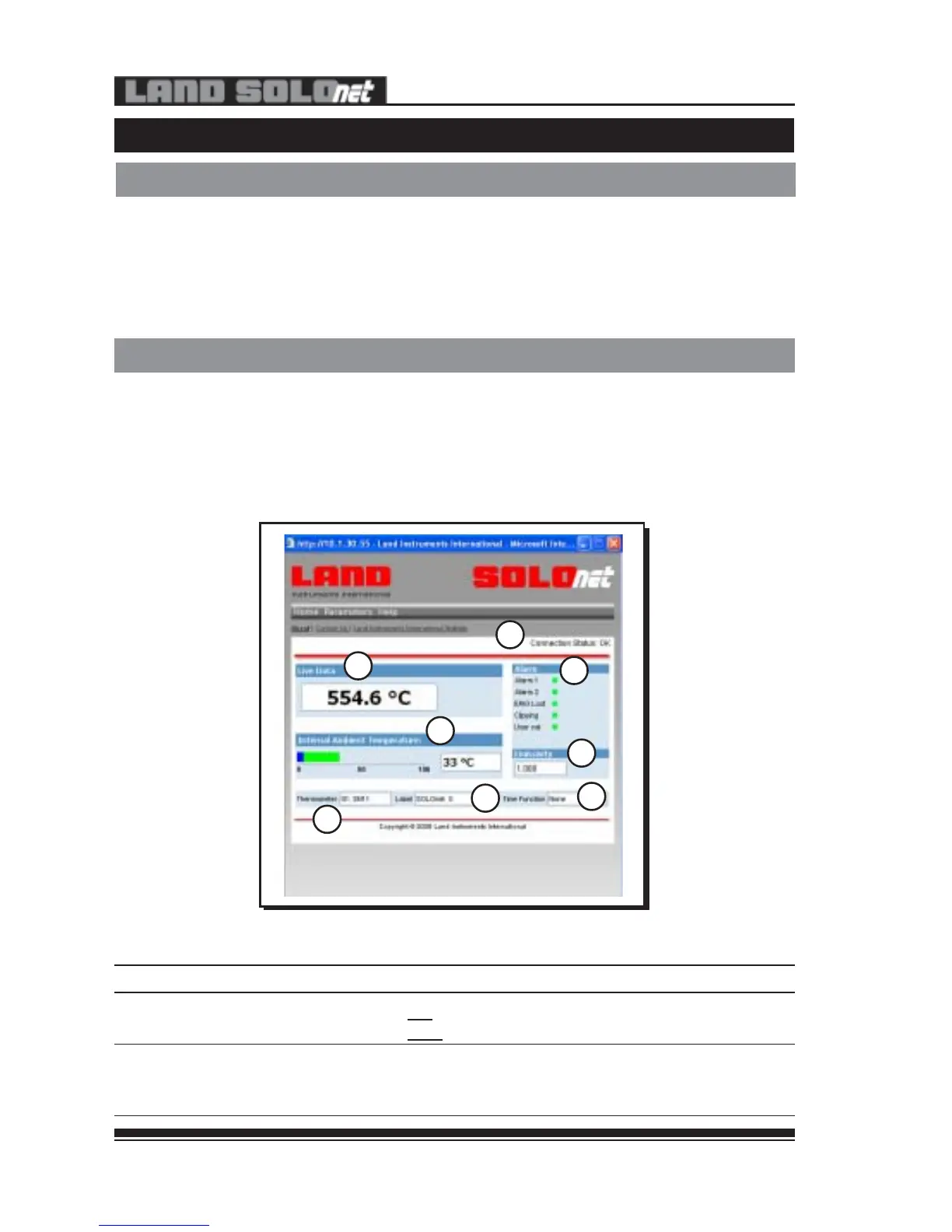
• The ‘Home’ page for that particular instrument opens (see Fig. 8).
Fig. 8 - SOLOnet web interface ‘Home’ page
<
<
<
<
<
<
<
<
1
2
3
4
5
6
7
8
307008
Item Description Function
1 Connection Status OK - Successful connection
Lost - Unsuccessful connection
2 Live Data Dynamic temperature reading from thermometer.
- Over range temperature reading
- Under range temperature reading
4.1 Web Browser Configuration
These instructions detail how to setup and configure a SOLOnet thermometer
from a laptop or PC, via the built-in webserver. ‘Java Runtime’ must be pre-
installed (see Appendix A) and any ‘Pop-up’ blockers, must be disabled (see
PP313 - PC Configuration for SOLOnet Quick-Start Guide). Typically, ‘Pop-up’
blockers can be found in ‘Internet Properties’ under ‘Privacy’.
4.0 INSTRUMENT SETUP AND CONFIGURATION
4.1.1 ‘Home’ Page Access
• Open a session of Internet Explorer (or equivalent web browser).
• Enter the IP address into the address bar, eg. ‘http://10.1.10.200’.
• When the SOLOnet index page opens, click ‘SOLOnet PC’
• The ‘Home’ page for that particular instrument opens (see Fig. 8).
Fig. 8 - SOLOnet web interface ‘Home’ page
<
<
<
<
<
<
<
<
1
2
3
4
5
6
7
8
307008
Item Description Function
1 Connection Status OK - Successful connection
Lost - Unsuccessful connection
2 Live Data Dynamic temperature reading from thermometer.
- Over range temperature reading
- Under range temperature reading


 To Next Page