User Guide User Guide
Page 19 Page 19
Fibroptic Thermometer
Fibroptic Thermometer
To connect the cable;
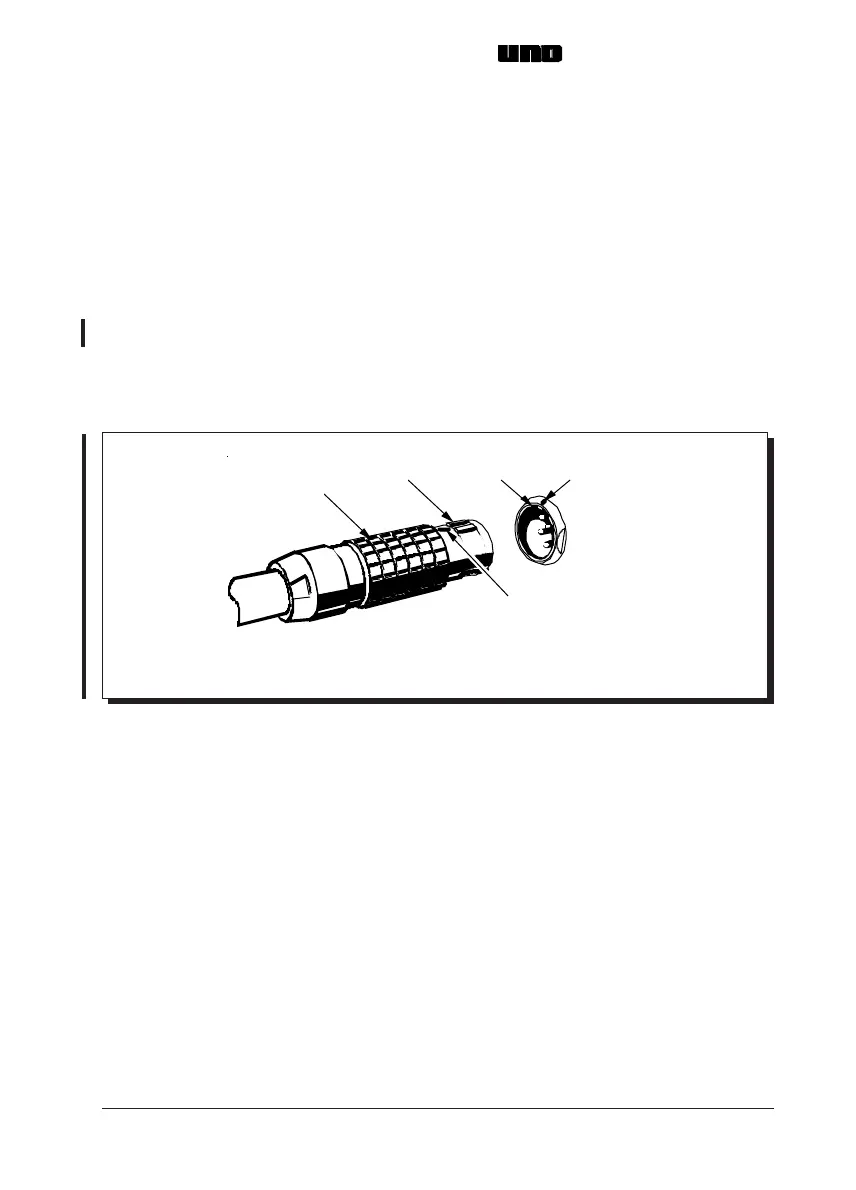
(i) Refer to Fig. 14. Align the red marker near the lugs of the pre-wired plug
with the red marker above the keyway in the socket on the thermometer.
(ii) Push the plug into the socket.
To disconnect the cable;
(i) Grip the locking sleeve section of the plug.
(ii) Pull the plug outwards to release the locking mechanism and disconnect
the cable.
To connect the cable;
(i) Refer to Fig. 14. Align the red marker near the lugs of the pre-wired plug
with the red marker above the keyway in the socket on the thermometer.
(ii) Push the plug into the socket.
To disconnect the cable;
(i) Grip the locking sleeve section of the plug.
(ii) Pull the plug outwards to release the locking mechanism and disconnect
the cable.
Fig. 14 Connection of the pre-wired cable to the thermometer
S4970229
Ke
wa
Lu
s
Marker
Marker
Locking Sleeve
Fig. 14 Connection of the pre-wired cable to the thermometer
S4970229
Ke
wa
Lu
s
Marker
Marker
Locking Sleeve



 To Next Page