2M-W1091, Commerical & Marine Electric Range Top
2M-W1091, Commerical & Marine Electric Range Top
11
2M-W1091, Commerical & Marine Electric Range Top
2M-W1091, Commerical & Marine Electric Range Top
MAINTENANCE AND CLEANING continued
Induction Troubleshooting
In the event of a possible malfunction your Lang Wave module will display an error code on the display.
See below when encountering an error code on your display. To reset error conditions remove the pan
from the unit and turn off power to the unit.
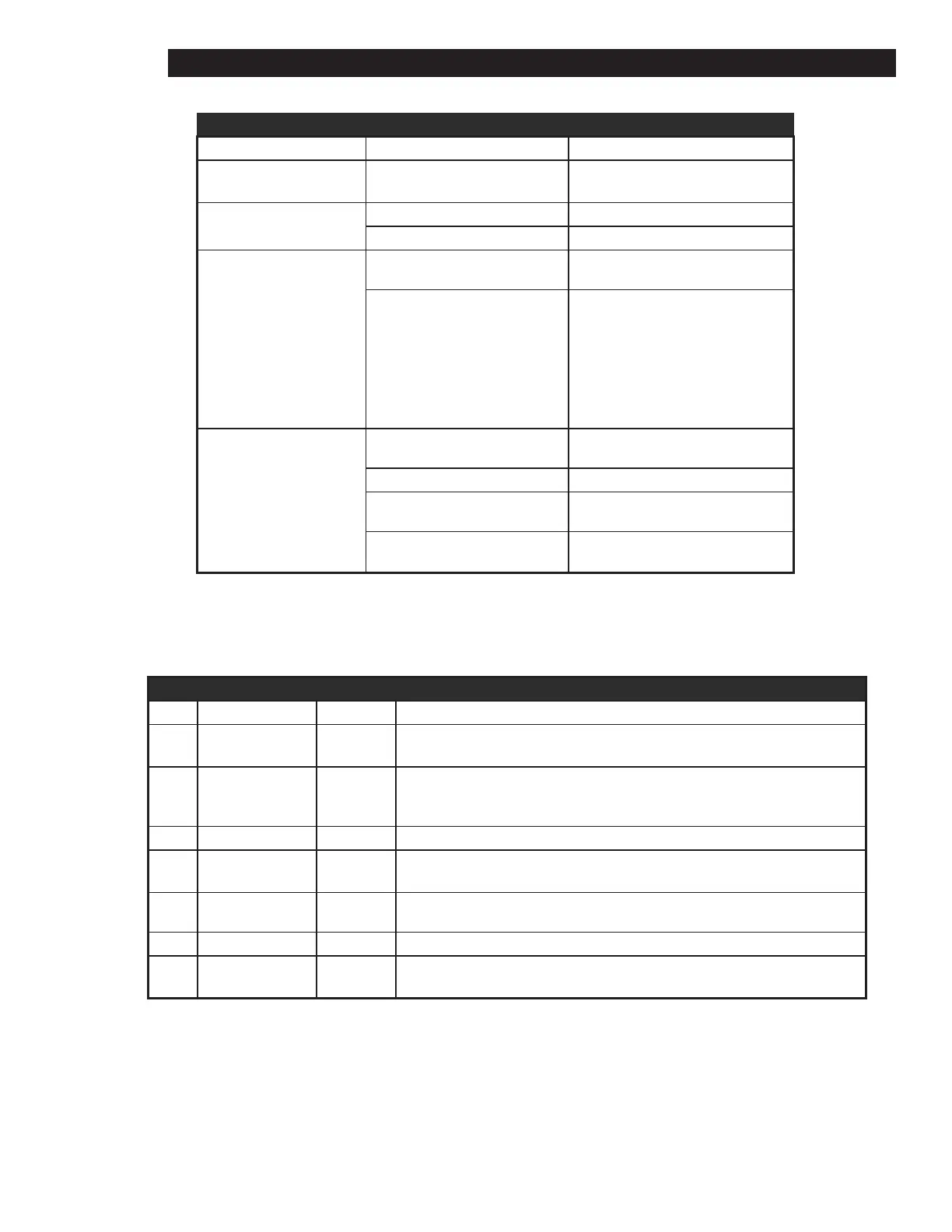
INDUCTION TROUBLESHOOTING
Symptom Probable Cause Possible Solution
No Power
(no lights or fan noise)
Power the unit, disconnecteed or
circuit breaker open.
Turn on main power switch, check
circuit breaker.
Pan does not heat
Pan is not induction efcient Use induction efcient pan
Pan not centered center pan
Unit suddenly stops
heating
Possible power brown out Verify proper voltage/power
Safety shut-off engaged
The safety shut off will engage if
an empty pan is left on the cooktop
surface while the unit is working at
full power. Make sure the cooktop
surface is clear. Wait 15-20 minutes
for the unit to reset.
Pan heats unevenly or
over heats
Pan not unduction efcient Use induction efcient pan
Pan bottom may not be at Use at pan
Pan not centered Center pan
Pan is less than 7” dia Use larger induction efcient pan.
INDUCTION ERROR CODES
Error Cause Code Troubleshooting
1
Broken Temp
Sensor
E-01 Service required to replace sensor
2
Glass Temp. to
high
E-02
Remove pans from surface & let unit cool. Turn unit power OFF & then ON. If
unit does not return to normal operation, service is required.
3 Over Current E-03 Try different cookware, current may be required
4
Over heat or air
ow restriction
Air-Flow Make sure air inlet vents in the rear are not restricted, listen for unit fan operation
6 Hig Line Voltage E-06 To reset, turn OFF unit power & turn on again. Verify power line voltage.
7 Hardware Failure E-07 Service required
8
Zero Cross
Failure
E-08 Turn OFF unit, then turn ON. If problem persists, service is required.


 To Next Page