Settings
109
9
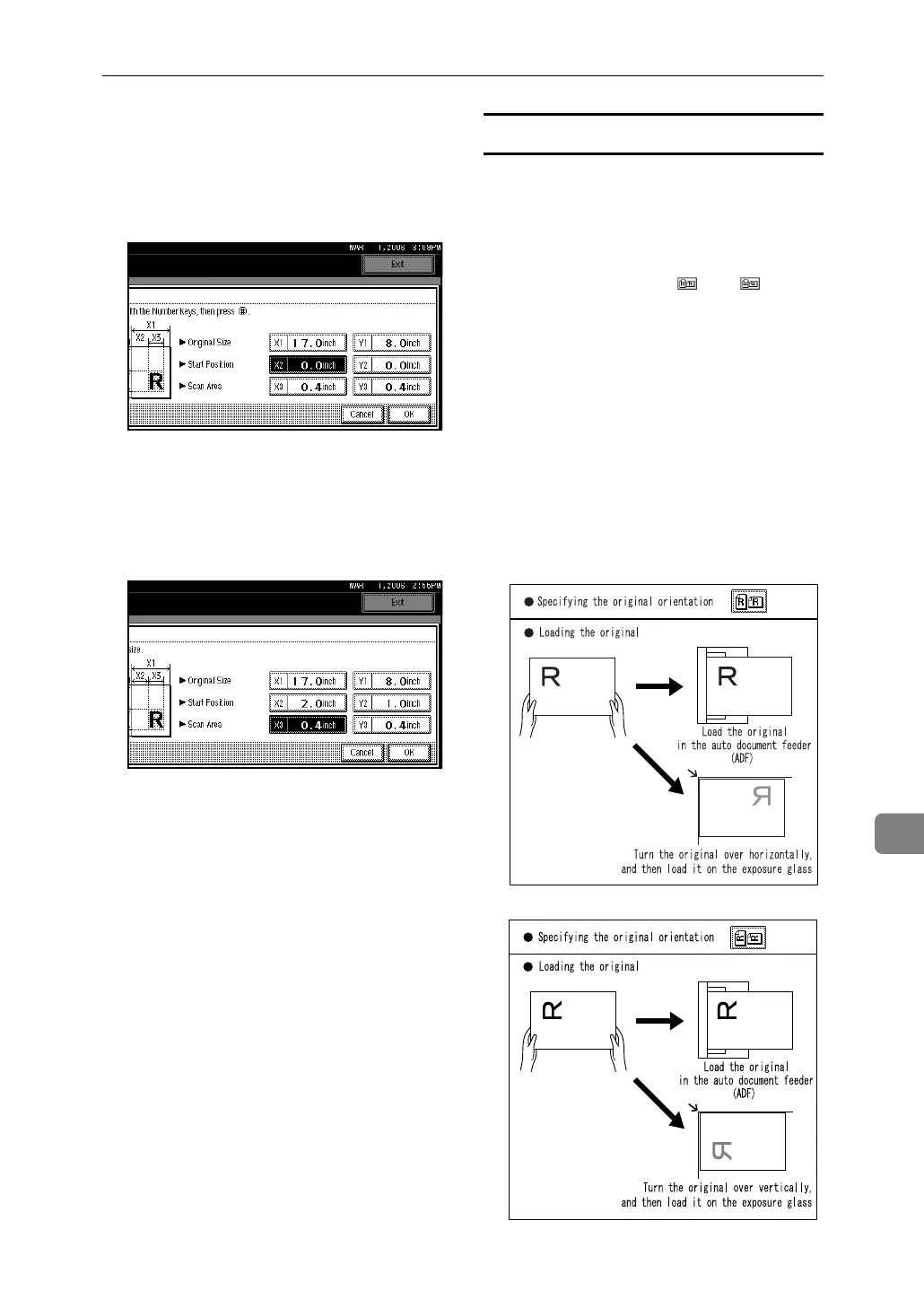
B Specify [VStart Position] (X2 and
Y2) using the number keys,
and then press the {#} key.
For example, set X2 to 2 inch
and Y2 to 1 inch.
C Specify [VScan Area] (X3 and
Y3) using the number keys,
and then press the {#} key.
For example, set X3 and Y3 to 3
inch.
B Press [OK].
C Make sure the area specified in
step C (X3 and Y3) is shown in
the [Custom Size] field, and then
press [OK].
D Press [Exit] twice.
The main menu reappears.
Specifying and loading the original
❖ Specifying the original's loading ori-
entation
Under [Original Orientation] select
the original's loading orientation
accordingly from [] or []. [Orig-
inal Orientation] appears if you press
[Original Feed Type] on the scanner
screen. See p.80 “Orientation selec-
tion”.
❖ Loading the original
To load an original in the auto doc-
ument feeder (ADF), place it top-
first, face up. To load an original
on the exposure glass, align it hor-
izontally or vertically and then
place it face down.
AHU009S
AHU010S



 To Next Page