Delivering Scan Files
66
5
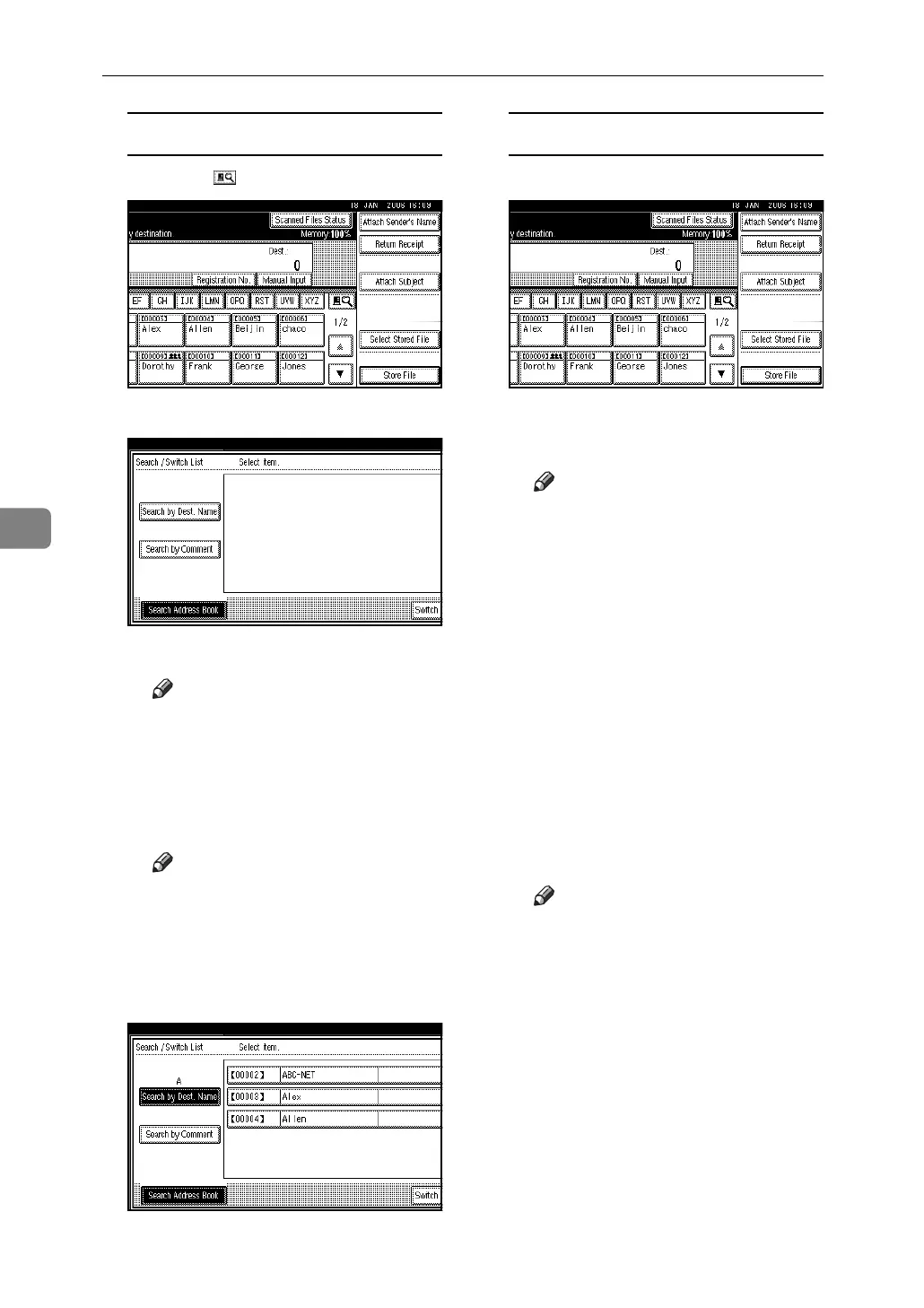
Searching for a destination
A Press [].
B Press [Search Address Book].
C Press [Search by Dest. Name].
Note
❒ To search by comment, press
[Search by Comment].
The soft keyboard appears.
D Enter part of the destination
name.
Note
❒ Enter the first character or
characters of the destination
name.
E Press [OK].
F Select a destination.
G Press [Exit].
Manual entry of a destination
A Press [Manual Input].
The soft keyboard appears.
B Enter the destination.
Note
❒ Enter the e-mail address of
the destination when send-
ing via the delivery server.
❒ For details about the maxi-
mum number of characters
that can be entered, see p.125
“The network delivery scan-
ner function”.
❒
Alphanumeric characters and
periods can be entered. The
symbols ( ) \ , ; : ” and spaces
cannot be entered. For de-
tails, see p.125 “The network
delivery scanner function”.
C Press [OK].
Note
❒
To deselect a destination, press
[UPrev.] or [TNext] to display
the destination in the desti-
nation field, and then press
the {Clear/Stop} key.
❒ To check the selected desti-
nations, press the {Check
Modes} key.
D To enter more destinations, re-
peat steps A to C.


 To Next Page