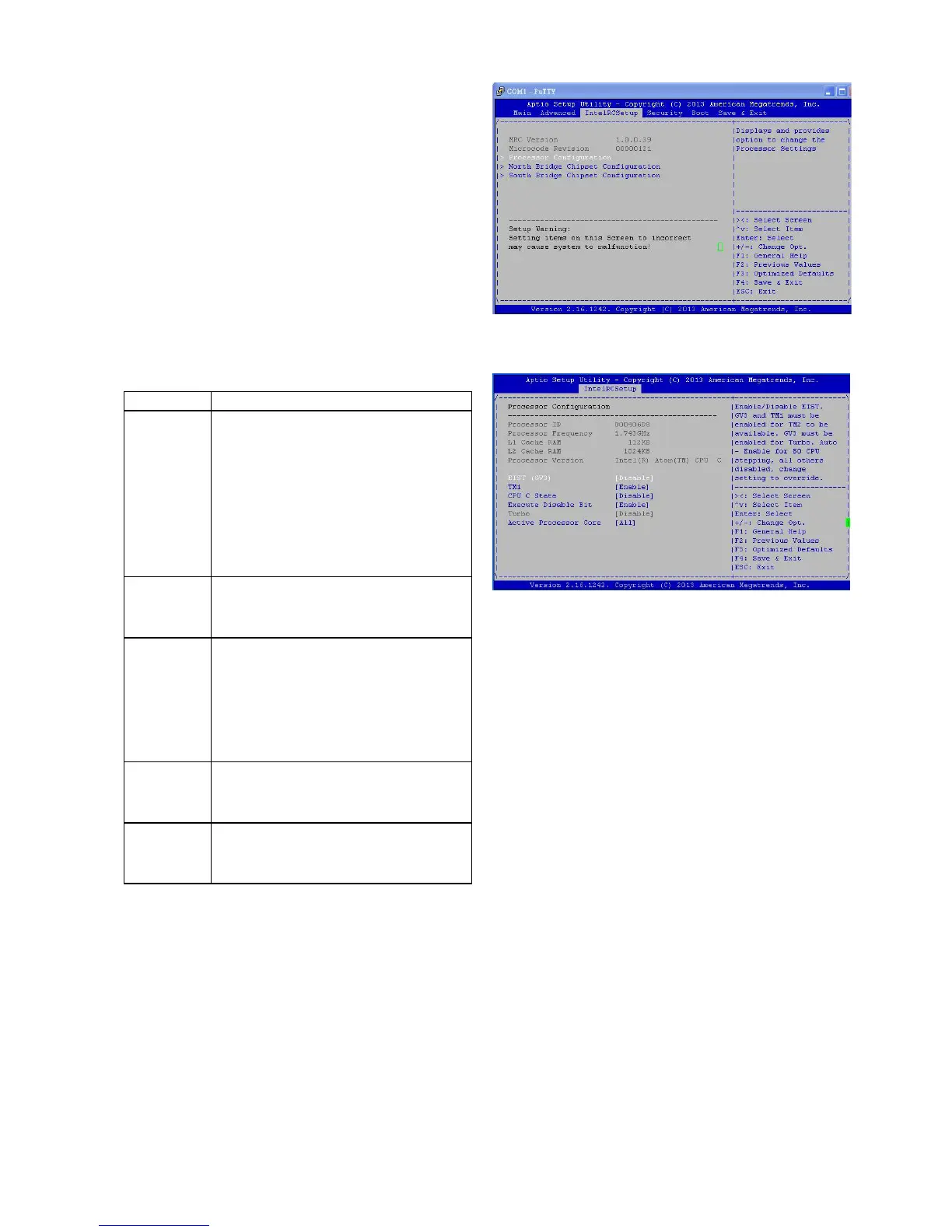
Intel RCSetup
You can use this screen to view the capabilities and of
your CPU. You can also use this menu to enable/disable
certain functions of your CPU. Use the up and down
<Arrow> keys to select an item. Use the <Plus> and
<Minus> keys to change the value of the selected option.
A description of the selected item appears on the right
side of the screen. The settings are described below.
Processor Configuration
Item Selection
Intel EIST
(GV3)
Enable/disable the Enhanced Intel
SpeedStep® technology (EIST).
It allows the operating system to
dynamically adjust the processor
voltage and cores frequency, result-
ing to a decreased average power
consumption and decreased average
heat production.
TM1 The built-in thermal monitor pro-
tects the CPU from overheating.
Enable or disable this feature.
CPU C
State
CPU operating states (C-states) are
the capability of an idle processor to
turn off unused components to save
power. Enable or disable or set it to
automatically switch to any C-state
number.
Execute
Disable Bit
Select to enable or disable the No-
Execution Page Protection Technol-
ogy.
Active
Processor
Core
Select the number of processor
cores to be active in each processor
package.



 To Next Page