EasyManua.ls Logo

Lanzar VIBE XE3 - Operation; Front Panel Operation

Lanzar VIBE XE3
11 pages
Print Icon
To Next Page IconTo Next Page
To Previous Page IconTo Previous Page
Loading...
OPERATION
FRONT
PANEL
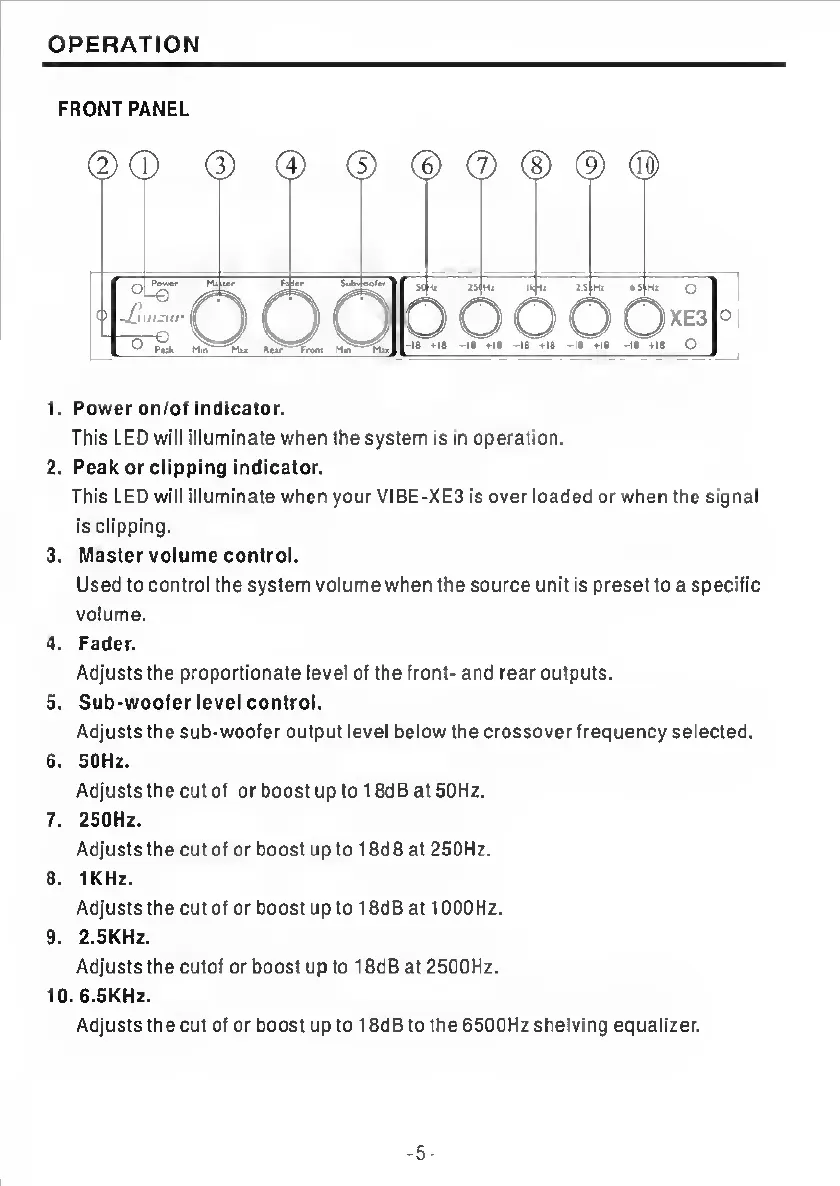
1.
Power
on/of
indicator.
This
LED
will
illuminate
when
the
system
is
in
operation.
2.
Peak
or
clipping
indicator.
This
LED
will
illuminate
when
yourVIBE>XE3
is
over
loaded
or
when
the
signal
Is
clipping.
3.
Master
volume
control.
Used
to
control
the
system
volume
when
the
source
unit
is
preset
to
a
specific
volume.
4.
Fader.
Adjusts
the
proportionate
level
of
the
front-
and
rear
outputs.
5.
Sub-woofer
level
control.
Adjusts
the
sub-woofer
output
level
below
the
crossover
frequency
selected.
6.
50Hz.
Adjusts
the
cut
of
or
boost
up
to
18dB
at
50Hz.
7.
250Hz.
Adjusts
the
cut
of
or
boost
up
to
18dB
at
250Hz.
8.
1KHz.
Adjusts
the
cut
of
or
boost
up
to
18dB
at
10OOHz.
9.
2.5KHZ.
Adjusts
the
cutof
or
boost
up
to
18dB
at
2500Hz.
10.
6.5KHZ.
Adjusts
the
cut
of
or
boost
up
to
18dB
to
the
6500Hz
shelving
equalizer.
-
5
-

Related product manuals