USER MANUAL eBook-EB370
13
SETTINGS
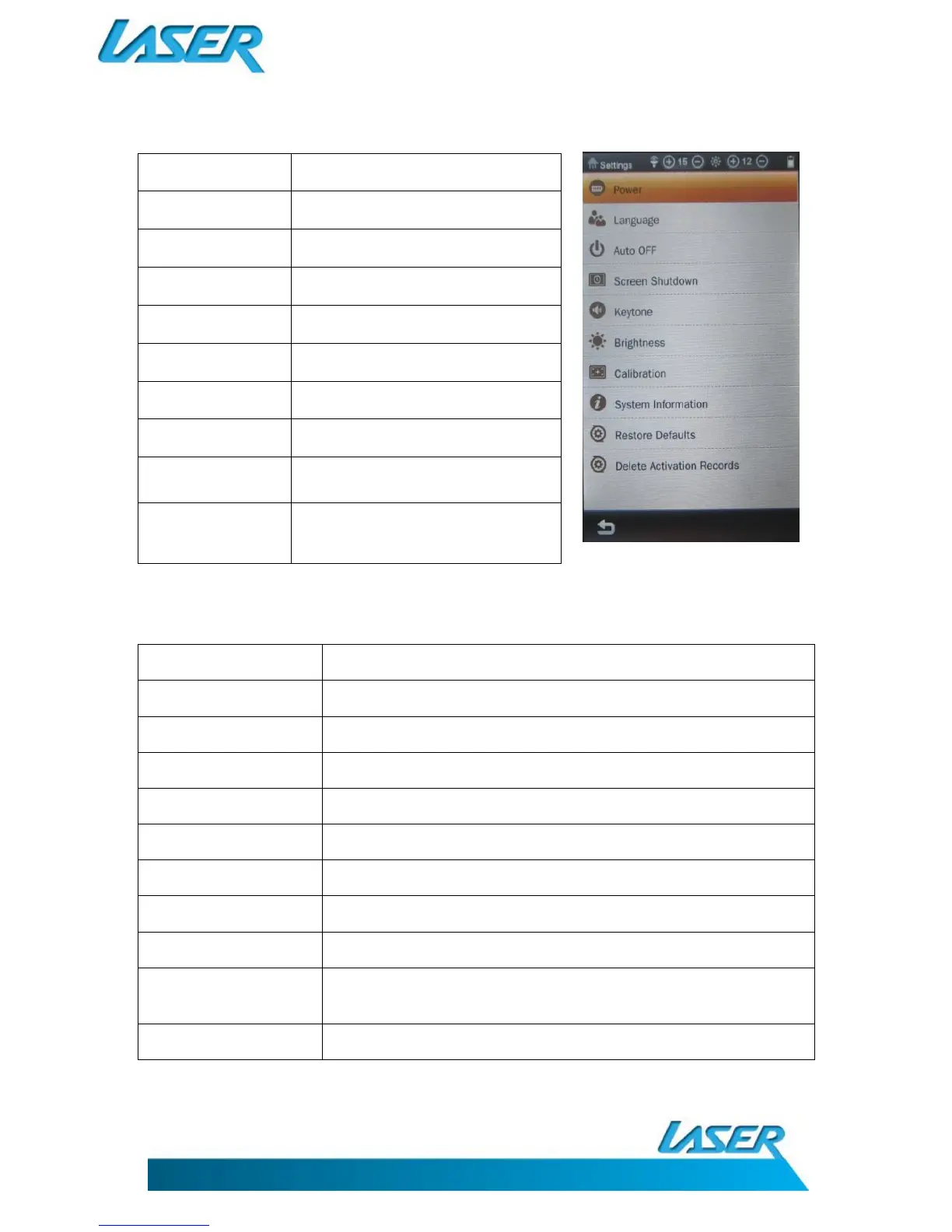
Power
Choose the different languages
Select automatic turn screen off mode
Screen shutdown
Select screen shutdown mode
Turn Key Tone on or off key tone
Calibrate the display screen
Viewing EB370 system information
Choose “yes” to restore the original
factory original settings
Delete Activation
Records
Remove previously installed activated
file records (when required)
SPECIFICATIONS
cro SD /TF Card up to 16GB
Windows2000/XP/Vista/WIN7/MAC
ID3 tag display & lyric synchronization
Nature, Bass, Pop, Rock, Classic, Jazz, Vocal, Dance
MP3, WMA, WAV, RA, FLAC, APE, OGG
Support RM, RMVB, AVI, MP4, MOV, 3GP, MKV, VOB, MPG, MPEG
Supports external subtitles and 720P video playing.



 To Next Page