USER MANUAL eBook-EB370
6
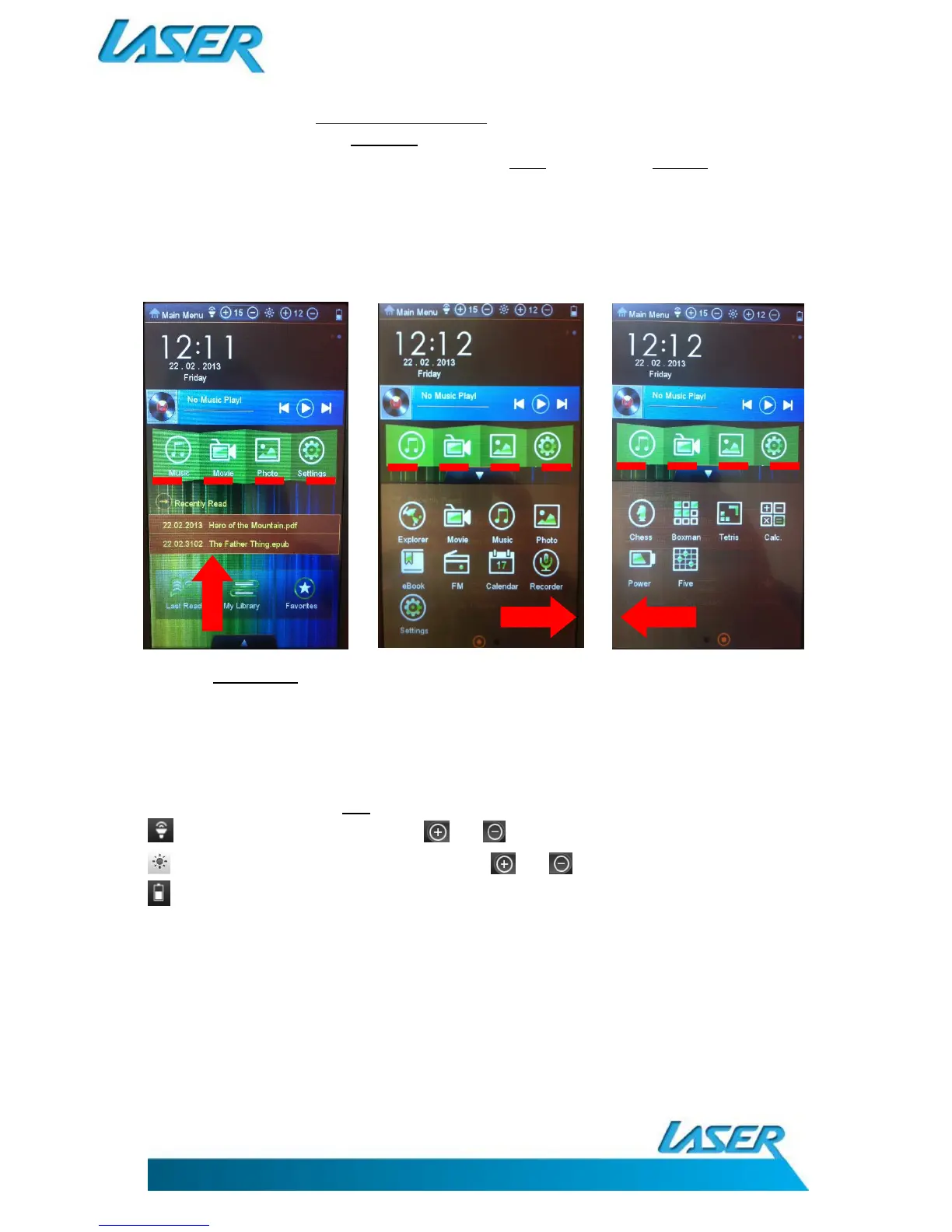
The second is the bottom MAIN MENU SLIDE PANEL as indicated below by the RED coloured dotted
line below, when your finger is DRAGGED up and across the screen on the arrow tab icon. (The red
dot in the second image below indicates that you are in FIRST screen. Tap the SECOND dot to change
the next screen and vice versa.)
The options on both MENU SCREENS are:
EXPLORER, MOVIE, MUSIC, PHOTO, EBOOK, FM (RADIO), CALENDER, RECORDER, SETTINGS, CHESS,
BOXMAN, TETRIS, CALCULATOR, POWER and FIVE.
Note. The MAIN MENU Slide Panel contains all software features of the eBook, while the GREEN
coloured media slide panel icons are used as MEDIA short-cuts only.
TOOL BAR ICONS
The upper most tool bar has four sections, as described below:
MAIN MENU The “HOUSE” icon returns you back to the main menu screen
To adjust volume, tap the and icons (also at the side of the unit)
To adjust screen brightness, tap the and icons
Power indicator to display battery charge status
IMPORTANT NOTE: This eBook device can have multiple storage locations for different files. To help
simplify file searching, a folder display is used to step you through your request. As this image shows
(below) when a media source is requested you are directed to a shortcut screen to help you locate
your file.



 To Next Page