If an alarm condition or sensor malfunction has occurred during your absence, when the
alarm will be disarmed the flashing and the acustic signal, will be shorter.indicator lights
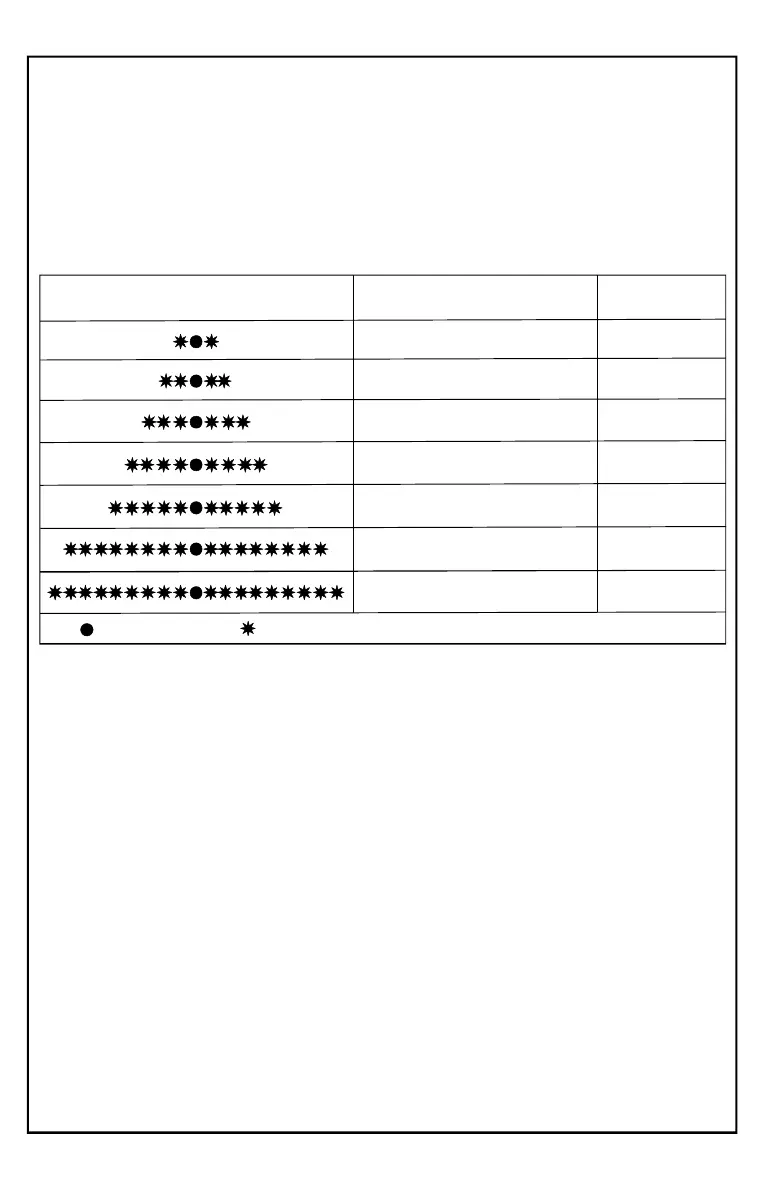
Through the status LED you can know sensors have caused the last 5 alarm the
conditions:
At any time with the system disarmed, press buttons 1 and 2 of the remote control
simultaneously.
the LED will begin to make a series of flashes encoding the relevant alarm:status
NOTE: If the LED don’t flash, means that no alarm has been triggered
Alarm memories (self-diagnosis)
LED FLASHING
ALARM CAUSE
FLASHING
NUMBER
ULTRASOUND Sensors
LEDON
LEDOFF
2
3
4
5
8
9
+15 ACC
Opening BONNET
Opening DOORS / TRUNK
WIRELESS sensors
doors / windows / IRED
Remote control battery low
Current Absorption Sensor
1
The display of alarm causes will n sequentially from the last to the first (5th / 4th show
/ 3rd / 2nd / 1st). At the end, to view again the five codes, press both buttons of the
remote control one more time.
LOW REMOTE CONTROL BATTERY WARNING
In addition to the alarm memory, you can get the same indication by pressing any key
on the remote control:
if the battery is low, the LED will flash intermittently
CLEARING ALARM MEMORY:
The memory will be cleared next time you arm the alarm
Pag.24


 To Next Page