bar. In reality this adjustment is changing the steam boiler temperature in increments of
• Press and hold the One Cup button for 3 seconds.
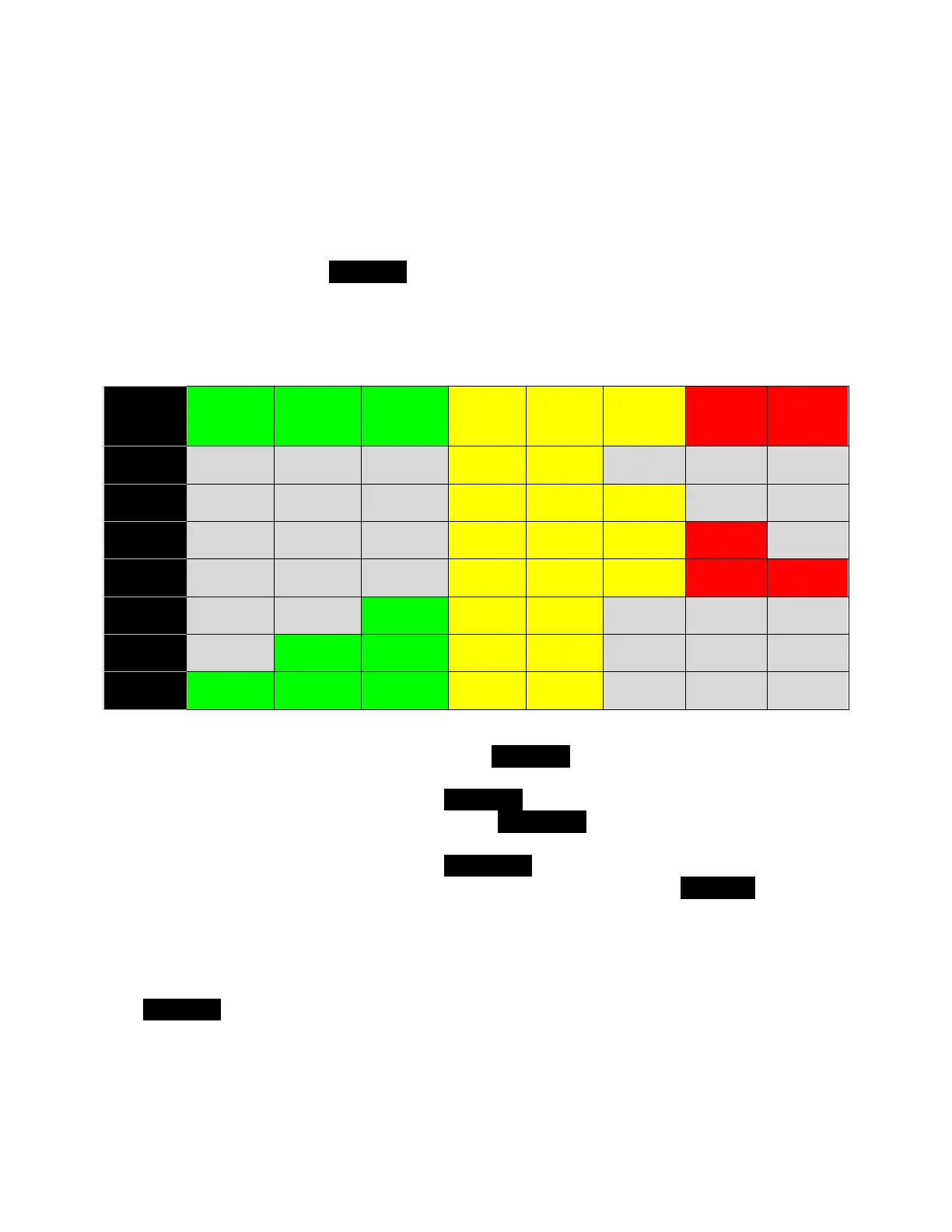
• At this point the 94 ºC and 95 ºC yellow lamps will be on solid. If no other lights
come on, your pressure is at the default settings and has not previously been
raised or lowered from that setting.
• If additional lights are blinking here is the meaning:
• To increase steam pressure, press the Two Cup button. For each button press
the blinking lights will cycle through indicating 0, +1, +2, +3, then back to 0,
repeating this sequence for each Two Cup button press.
• To decrease steam pressure, press the Hot Water button. For each press the
blinking lights will cycle through indicating 0, -1, -2, -3, then back to zero,
repeating this sequence for each Hot Water button press.
• Once the blinking lights indicate your desired value, press the One Cup button to
save the value and exit the steam pressure adjustment mode as indicated when
the 94 ºC and 95 ºC lights turn off.
To check the current value for steam pressure without changing it, enter the adjustment
mode as indicated above, check the state of the blinking lamps, then immediately press
the One Cup button to exit back to Standby mode (ON/STBY light flashing). If you
previously changed this adjustment the blinking lights reflect your last setting.


 To Next Page