EasyManua.ls Logo

LAUNCH TECH X-PROG3 - User Manual

LAUNCH TECH X-PROG3
32 pages
Print Icon
To Next Page IconTo Next Page
Loading...
I
LAUNCH
X-PROG
3
EN
Copyright
Copyright © 2020 by LAUNCH TECH CO., LTD. All rights reserved. No part of
this publication may be reproduced, stored, or transmitted in any form without
the written permission of the copyright owner.
Trademark
Launch is a registered trademark of LAUNCH TECH CO., LTD in China and
other countries. All other marks are trademarks or registered trademarks of
their respective owners.
Disclaimer
The contents of this document are subject to changes without notice due to
continued improvements in design, manufacture, and methodologies. Launch
is not liable for the damage or losses due to the use of this document.
FCC Statement
Any Changes or modications not expressly approved by the party responsible
for compliance could void the user’s authority to operate the equipment.
This device complies with part 15 of the FCC Rules. Operation is subject to
the following two conditions:
a. This device may not cause harmful interference
b. This device must accept any interference received, including interference
that may cause undesired operation.
Note: This equipment has been tested and found to comply with the limits for
a Class B digital device, pursuant to part 15 of the FCC Rules. These limits
are designed to provide reasonable protection against harmful interference
in a residential installation. This equipment generates uses and can radiate
radio frequency energy and, if not installed and used in accordance with
the instructions, may cause harmful interference to radio communications.
However, there is no guarantee that interference will not occur in a particular
installation. If this equipment does cause harmful interference to radio or
television reception, which can be determined by turning the equipment off
and on, the user is encouraged to try to correct the interference by one or
more of the following measures:
-Reorient or relocate the receiving antenna.
-Increase the separation between the equipment and receiver.
-Connect the equipment into an outlet on a circuit di󰀨erent from that to which
the receiver is connected.
www.diagtools.eu, Pernavas 43A, Riga, Latvia, LV-1009, +37129416069, info@diagtools.eu

Question and Answer IconNeed help?

Do you have a question about the LAUNCH TECH X-PROG3 and is the answer not in the manual?

Overview

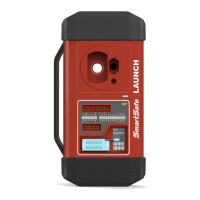
The X-PROG3 is a powerful anti-theft solution designed for professional repair shops and vehicle maintenance businesses. It serves as a next-generation upgrade to the X-PROG1, offering enhanced capabilities in vehicle key, engine, and gearbox programming. The device is capable of multiple parts reprogramming and boasts a wide range of vehicle coverage.

Function Description:

The X-PROG3's primary function is to perform various diagnostic procedures related to vehicle anti-theft systems. This includes:

  • Key Programming: The device allows users to access key chip programming functions, enabling the reading, retrieving, and writing of key information. It supports backing up existing key data and generating new keys. This involves steps such as selecting the IMMO type, performing key operations, key learning, and generating new keys by placing them in the programmer key slot.
  • Gear Box Programming: This function facilitates the restoration of old gearbox data or writing new data after a gearbox replacement. The process involves connecting the gear box, selecting the correct chassis type, and then performing an EGS Erasure, which may include downloading necessary files and confirming the erasure.
  • Engine Programming: The device supports engine data reading and writing backup data after an engine replacement. This involves retrieving the chip ID, connecting to the engine, backing up EEPROM data, and restoring EEPROM data when necessary. The process includes selecting the engine brand, searching for the ECU model, checking the ECU model on the engine sticker, and viewing wiring diagrams for proper connection.
  • ECU Information Retrieval: Users can retrieve information from the Electronic Control Unit (ECU).
  • Data Management: The X-PROG3 supports reading, erasing, and writing data for a range of chips, as indicated in the product options.

Important Technical Specifications:

  • Input Voltage: 12 V DC
  • Input Current: 500 mA
  • Working Temperature: 0 to 50 °C
  • Storage Temperature: -20 to 70 °C
  • Dimension: 39 x 107 x 298 mm

Usage Features:

  • Connectivity:
    • Hardware Connection: The device connects to the vehicle's Data Link Connector (DLC) and the Launch VCI connector using a main diagnostic cable. For engine/gearbox programming, it may also connect to a power supply or directly to the engine/gearbox via an MCU cable with multiple leads.
    • Wireless Connection: The X-PROG3 supports Bluetooth connectivity. Users can establish a wireless connection by navigating to the "Wireless and network->Bluetooth" settings on their diagnostic tool and selecting the X-PROG3.
    • USB Cable (Recommended): While not always included in the packing list, using a USB cable for connection between the diagnostic tool and the VCI connector is strongly recommended for effective data transmission.
  • Power Source: The X-PROG3 does not have an independent power supply. It can be powered by:
    • The power adapter supplied by Launch.
    • Connecting the device through the vehicle's DLC.
  • User Interface: The device operates through a connected Launch diagnostic tool, displaying menus for various functions such as "Intelligent Mode," "Key Operation," "Key Learning," "EGS System," and "Engine System." Connection diagrams are provided on-screen to guide users through hardware setup.
  • Indicators: A power indicator light shows the device's status: red for faults and orange for normal operation.
  • Slots and Connectors:
    • DB26 diagnostic connector: For connecting all anti-theft cables.
    • Benz key slot: For placing Benz car keys.
    • Key slot: For placing car keys for RF detection.
    • Key chip slot: For placing key chips.
    • Valve: To tighten loose EEPROM board.
    • EEPROM slot: To insert the EEPROM board.
    • Power port: For power charging.
    • DB15 diagnostic connector: To connect with the main diagnostic cable.
    • DIY slot: To insert vehicle DIY board.
  • Safety Grades: The manual uses specific symbols to indicate safety levels:
    • Danger (red triangle with exclamation mark): Indicates a hazardous situation that will result in death or serious injury if not avoided.
    • Warning (yellow exclamation mark): Indicates a hazardous situation that could result in possible injury if not avoided.
    • Caution (orange triangle): Indicates a hazardous situation that could result in serious equipment damage or property losses if not avoided.

Maintenance Features:

  • Software Upgrade: The device supports software updates to keep the diagnostic software and app up-to-date. Users can customize frequently used software. The update process involves checking desired software in the update center and tapping "Update." Software packages are installed automatically after downloading.
  • Troubleshooting during Updates: Users can stop and continue the update process, or retry in case of network connection failure.
  • Warranty: Launch provides a 1-year warranty against defects in workmanship and material from the date of delivery. The exclusive remedy for defective automotive meters is repair or replacement.
  • Warranty Exclusions: The warranty does not cover:
    • Products with altered, removed, or defected mechanical serial numbers.
    • Products exposed to extreme conditions (excessive temperature, moisture).
    • Damage from external causes (fire, dirt, sand, battery leakage, blown fuse, theft, improper electrical source usage).
    • Products subject to accidents, mishandling, unauthorized alteration, abnormal usage, improper installation, repair, or storage.

Safety Precautions:

  • Avoid colliding, throwing, or puncturing the equipment; prevent falling, extruding, or bending.
  • Do not insert foreign objects or place heavy objects on the device to prevent damage to sensitive internal components.
  • Avoid using the equipment in exceptionally cold, hot, dusty, damp, or dry environments.
  • Turn off the equipment in places where it might cause interference or pose a potential risk.
  • The test equipment is a sealed unit; internal repairs must be performed by an authorized repair facility or qualified technician.
  • Do not place the equipment near strong electromagnetic fields.
  • Do not attempt to replace the internal rechargeable lithium battery; contact the dealer for factory replacement.
  • Use only the included battery and charger to avoid explosion risks.
  • Do not disconnect power abruptly during formatting or uploading/downloading to prevent program errors.
  • Do not delete unknown files or change names of files/directories not created by the user, as this may cause software failure.
  • Be aware of network security risks (viruses, hackers, spyware); ensure adequate protection with firewalls and up-to-date anti-virus/anti-spyware software.
  • Avoid disconnecting the battery or wiring cables when the ignition switch is on to prevent damage to sensors or the ECU.
  • Do not place magnetic objects near the ECU. Disconnect power to the ECU before welding operations.
  • Exercise extreme caution near the ECU or sensors. Ground yourself when disassembling PROM to prevent static electricity damage.
  • Ensure ECU harness connectors are firmly attached to prevent damage to internal electronic elements.

LAUNCH TECH X-PROG3 Specifications

General IconGeneral
BrandLAUNCH TECH
ModelX-PROG3
CategoryMotherboard
LanguageEnglish