5
LAUNCH
X-PROG
3
EN
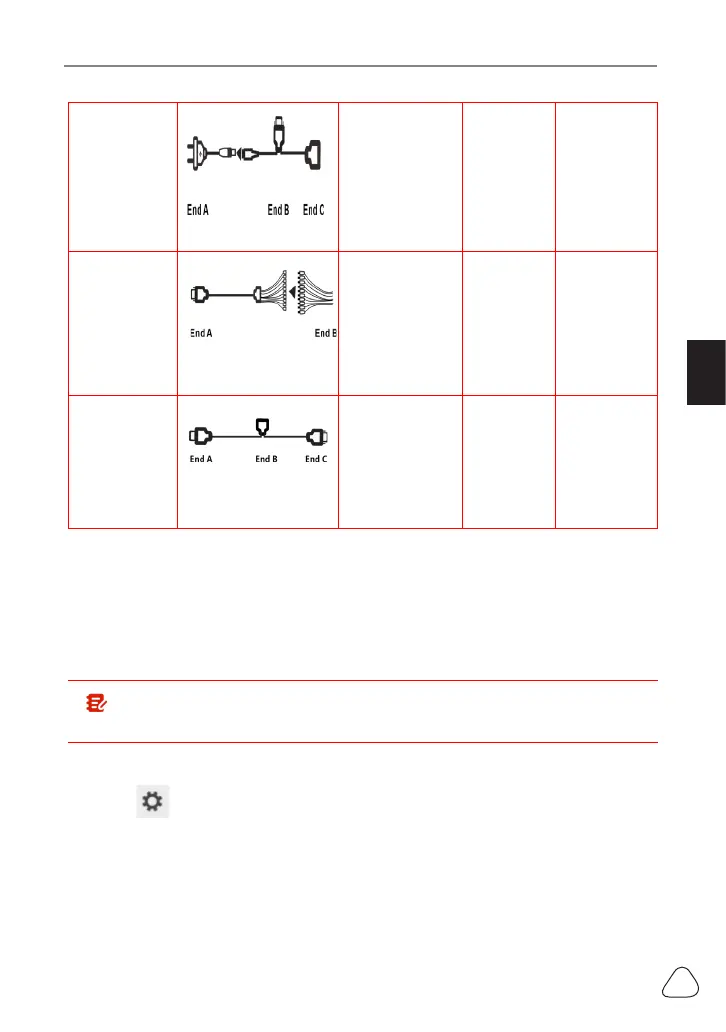
Engine/
Gearbox
programming
Power cable
Connect power
supply
N/A
Connect
with end B
the main
diagnostic
cable
Engine/
Gearbox
programming
MCU cable with
mutiple leads
Connect with
X-PROG
3
Connect
with the
engine
or gear
box to be
repaired/
replaced
N/A
Engine/
Gearbox
programming
Main diagnostic cable
Connect with
Launch VCI
connector
for data
transmission
Connect
power
supply
cable
Connect with
X-PROG
3
• 3.1.2 Establish Wireless Connection
You must make sure that your diagnostic tool is well connected with
X-PROG
3
, follow steps below to check wireless connection:
Note: It is strongly recommended to connect the diagnostic tool with
the VCI connector using a USB cable for eective data transmission.
1. Slide down the status bar from the top.
2. Touch , go to
Wireless and network->Bluetooth
.
3. Select the X-PROG
3
to be connected, wait until the connection is
successful.
www.diagtools.eu, Pernavas 43A, Riga, Latvia, LV-1009, +37129416069, info@diagtools.eu


 To Next Page