28 American Dryer Corp. 112146-61
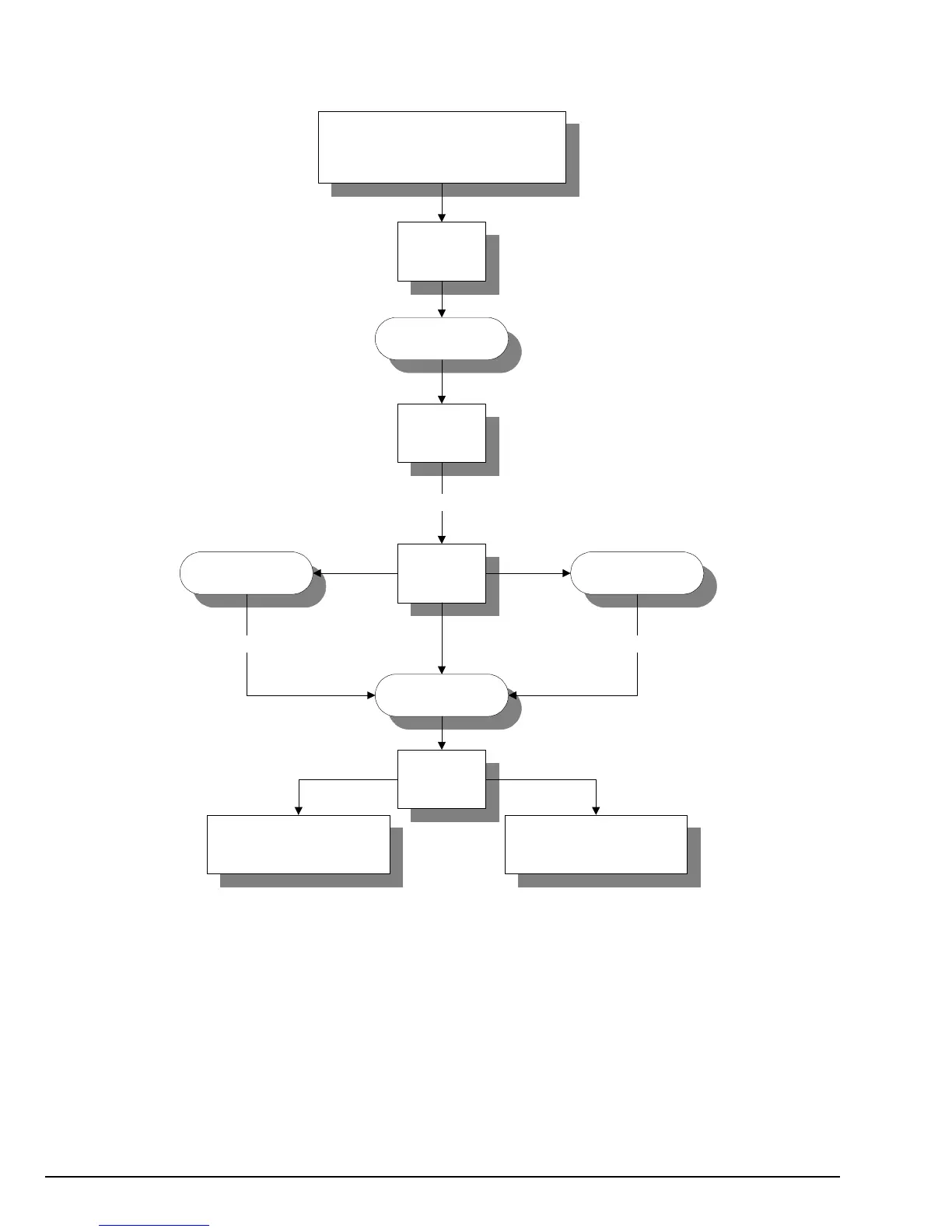
Program Location 09 (PL09)
Left Coin Denomination
Location to be viewed/changed.
Press “Perm Press” key.
Display will read “LCdE,” left coin
denomination for 3-seconds and the
left coin acceptor denomination
programmed (I.E. 25¢). If no
change, press “Perm Press” key,
otherwise press “HI” or “LO”
key and then “Perm Press” key.
Amount Decrease Amount Increase
Summary: The left coin denomination is programmable from 1 to 9999.
IMPORTANT: When the dryer is equipped with a dual coin acceptor, the value set here is the lower value denomination,
which is not necessarily the left coin portion of the acceptor.
NOTE: For single coin models this parameter must be set for the value of the acceptor. I.E. 25¢ acceptor = 25.
PL09
LCdE
Perm Press
10 HI Temp
Perm Press
LO Temp
Refer to Programming
Instructions for instructions on
entering program locations.
(Wait 3-Seconds)
("Hold In" to Accelerate) ("Hold In" to Accelerate)
PL10
Proceed to next location
to be changed
To exit program mode,
open program switch


 To Next Page