14.
Turn on the water supply. Turn the power switch to ON at the rear of the dispenser.
15.
The dispenser will self
---
check on every power up and if OK will go to the LCD home screen
and the Lavit Button halo will be red.
16.
TO FILL THE DISPENSER WITH WATER, PUSH THE LAVIT BUTTON AND THE
DISPENSER WILL START TO FILL. The screen will display a WATER TANK FILLING
SCREEN.
17.
When the water tanks are half filled, the compressor will turn on and start to chill. The soda
pump will also turn on when the water tank is half full. The HOME screen will appear.
18.
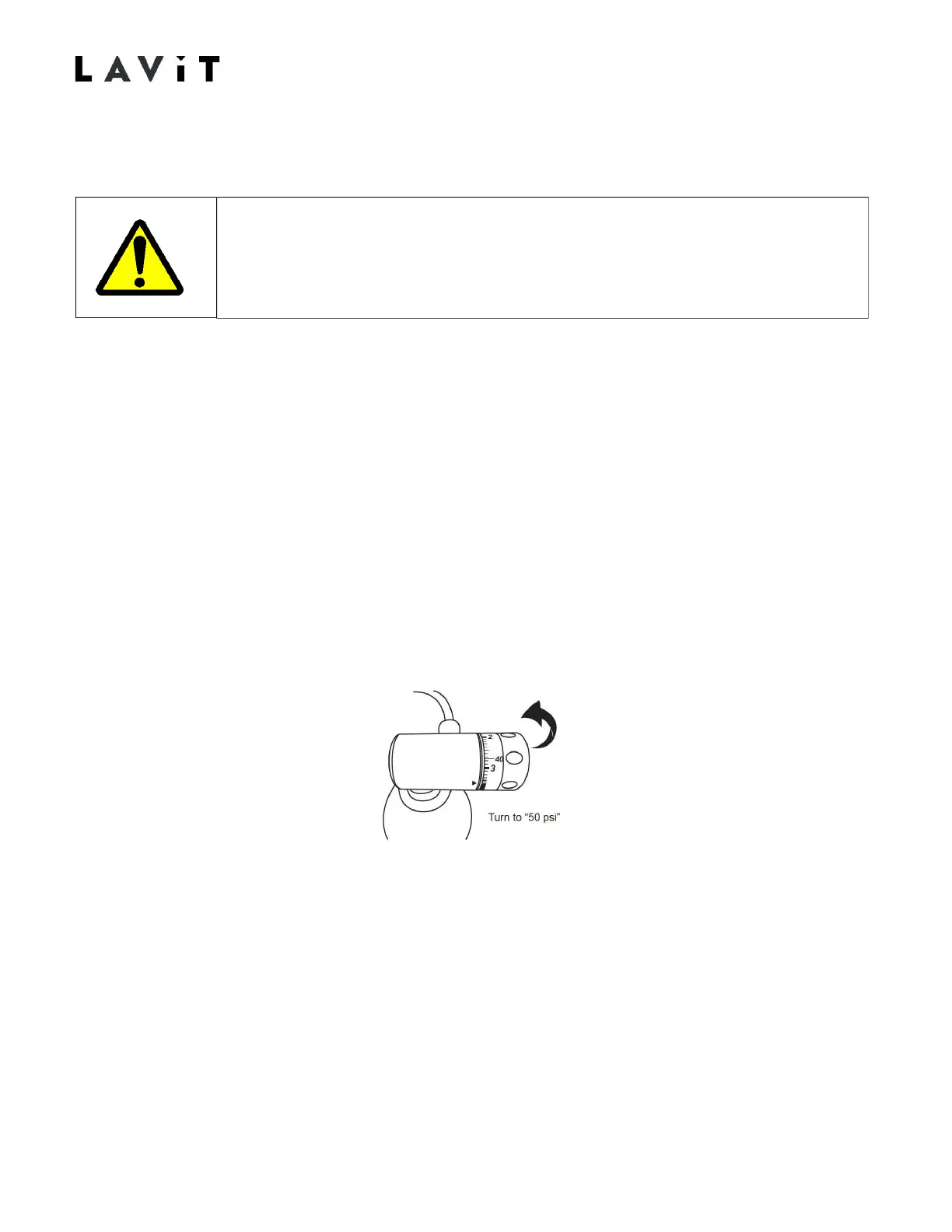
When the HOME screen appears turn the CO
2
gas pressure on. SET THE REGULATORTO
3.5 BAR OF PRESSURE BY ROTATING THE KNOB CLOCKWISE. 3.5 BAR OF PRESSURE
(50 PSI) IS INDICATED AT THE BEGINNING OF THE RED SCALE ON THE REGULATOR.
The soda tank will fill with CO
2
gas.
19.
Purge any air from the system by toggling the CO
2
Purge Valve located in the rear of the
unit. Purge gas about 3 times for 2 seconds each time.
The dispenser is now “live” and proper safety precautions should be
followed if any panels are removed from the unit.


 To Next Page