V_pro8 Manual V1.0/2 83
Operation (Web Browser Control)
SDI Out
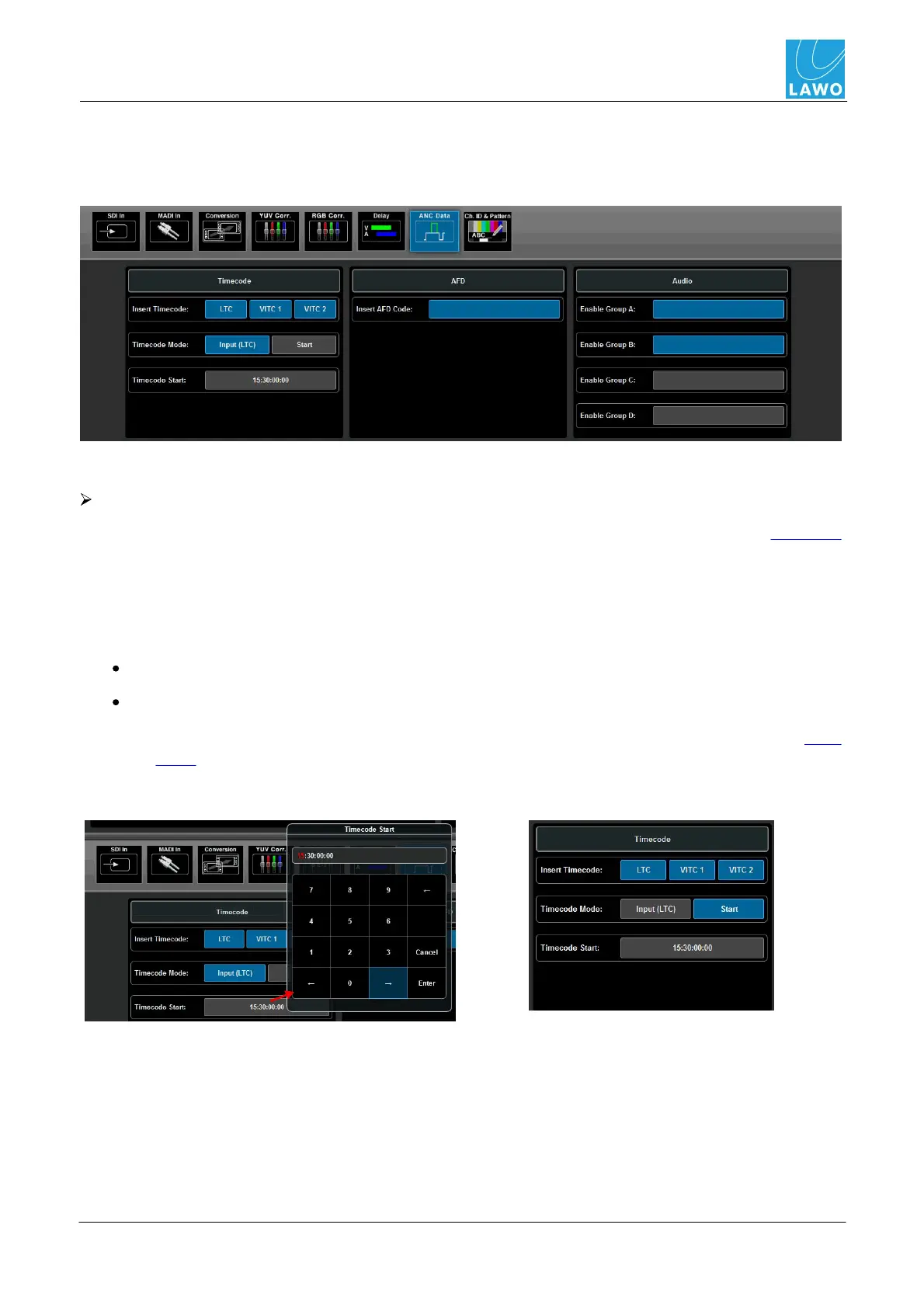
SDI Out -> ANC (Ancillary Data)
This sub menu adjusts the Timecode, AFD code and Audio groups which are embedded into the
SDI output:
Blue buttons indicate an active setting; grey buttons are inactive.
Timecode
LTC, VITC1 and VITC 2 timecode may be embedded into the SDI output from the assigned SDI input
stream:
1. Enable the LTC, VITC 1 and/or VITC 2 (Insert Timcode) buttons to embed each of the
timecode streams - all three may be selected if you wish.
2. For LTC, two Timecode Modes available:
Input - takes timecode from the assigned SDI input stream.
Start - enables a "free run" mode:
o
First, click on the Timecode Start box to enter the start timecode (for help, see Data
Entry).
o
Then click on Start to set the timecode running.



 To Next Page