D
D
C
C
S
S
8
8
1
1
0
0
S
S
D
D
i
i
g
g
i
i
t
t
a
a
l
l
D
D
C
C
S
S
e
e
r
r
v
v
o
o
D
D
r
r
i
i
v
v
e
e
r
r
M
M
a
a
n
n
u
u
a
a
l
l
R
R
e
e
v
v
1
1
.
.
0
0
Tel: (86)755-26434369 7 Website: www.leadshine.com
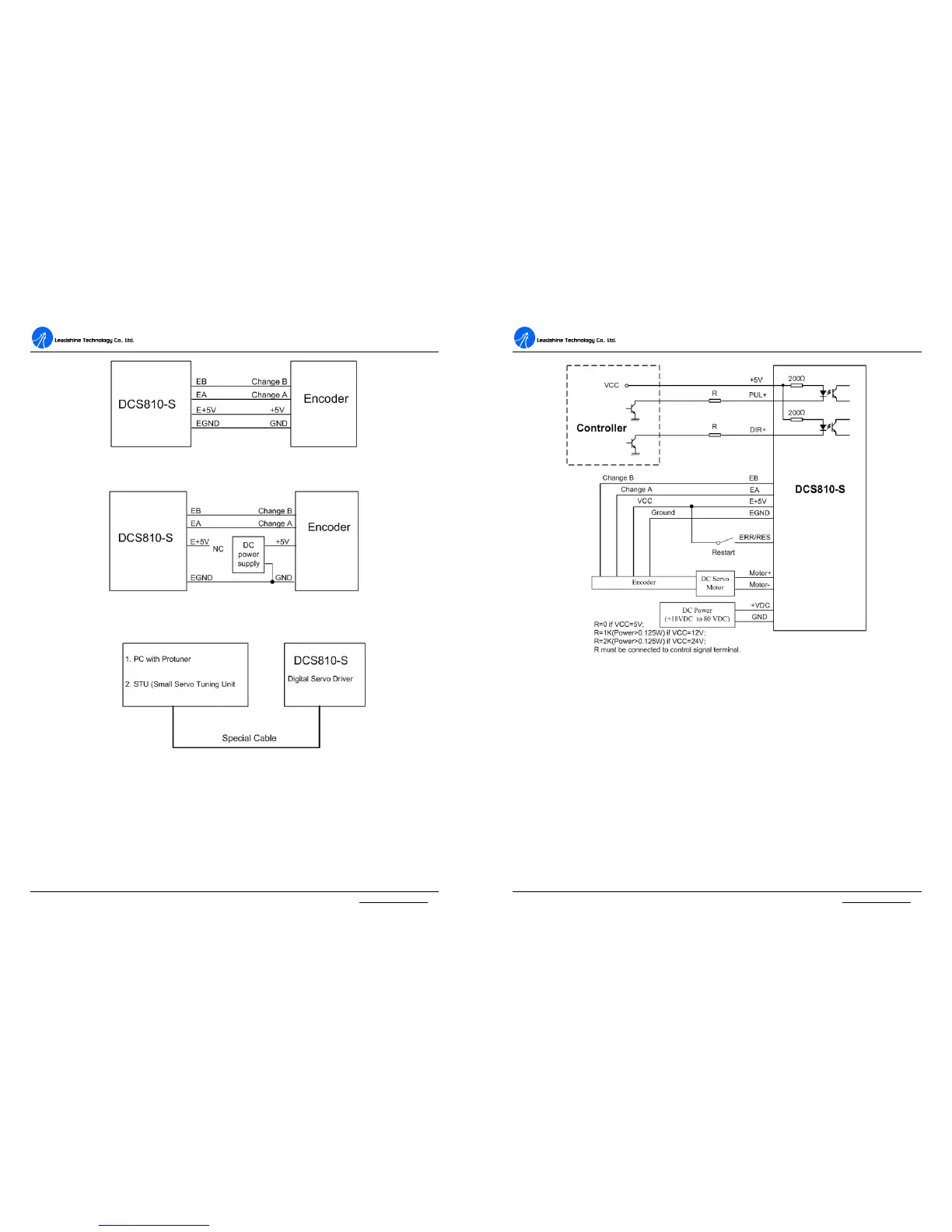
Figure 3: The DCS810S supplies the single-ended encoder directly
Figure 4: Using external DC power supply to supply the encoder
RS232 Interface Connection
Figure 5: RS232 interface connection
Typical Connections
Two typical connections of the DCS810S are shown as Figure 6. Please consult
“Control Signal Connections” and “Encoder Connections” for more information
about controller and encoder connections.
D
D
C
C
S
S
8
8
1
1
0
0
S
S
D
D
i
i
g
g
i
i
t
t
a
a
l
l
D
D
C
C
S
S
e
e
r
r
v
v
o
o
D
D
r
r
i
i
v
v
e
e
r
r
M
M
a
a
n
n
u
u
a
a
l
l
R
R
e
e
v
v
1
1
.
.
0
0
Tel: (86)755-26434369 8 Website: www.leadshine.com
Figure 6: Typical connection (Open-collector control signal and single-ended encoder.)
4. Servo Setup
Before you start the servo, you can follow the below steps.
Install Encoder
If your motor has no encoder, you must have an encoder (more than 200 lines)
properly mounted on the motor before you start. And please assemble the encoder
according to its factory manual. Please use shielded cables and separate encoder
signal cable from interference sources, such as motor wires and power wires at least
5 cm.


 To Next Page