Hardware installation manual of the ES-DH series drives
14
Configuration Example via the on-board HMI
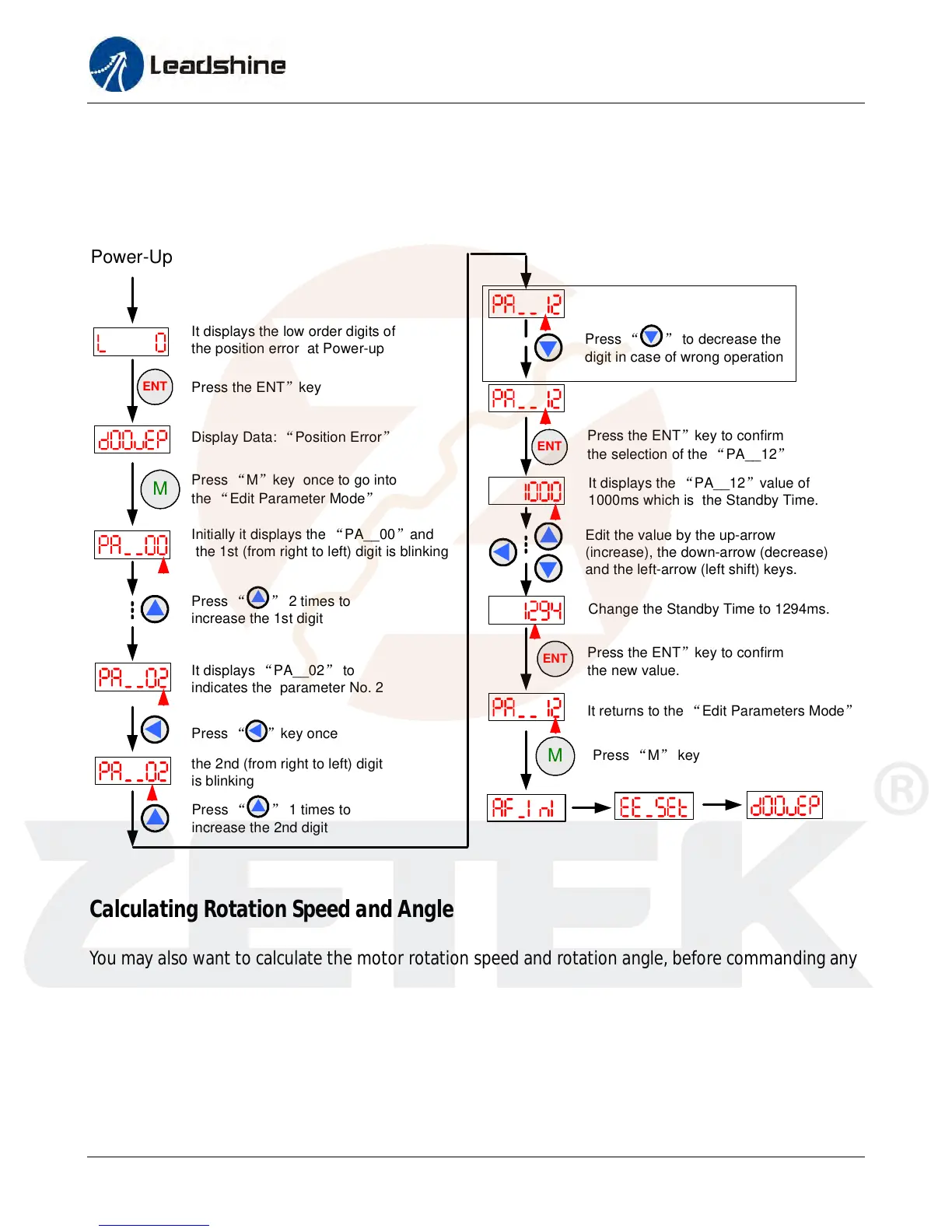
The following figure illustrates how to set the “Pulses/Revolution” via the on-board HMI. Looking up
the table in the “Edit Parameter Mode” section, this parameter refers to “PA__12” item. So the
setting procedure is shown as follows:
Display Data: “Position Error”
M
Press “M”key once to go into
the “Edit Parameter Mode”
Initially it displays the “PA__00”and
the 1st (from right to left) digit is blinking
Press “ ” 2 times to
increase the 1st digit
It displays “PA__02” to
indicates the parameter No. 2
Press “ ”key once
ENT
It displays the low order digits of
the position error at Power-up
Press the ENT”key
Power-Up
the 2nd (from right to left) digit
is blinking
Press “ ” to decrease the
digit in case of wrong operation
ENT
Press the ENT”key to confirm
the selection of the “PA__12”
It displays the “PA__12”value of
1000ms which is the Standby Time.
Edit the value by the up-arrow
(increase), the down-arrow (decrease)
and the left-arrow (left shift) keys.
Change the Standby Time to 1294ms.
ENT
Press the ENT”key to confirm
the new value.
Press “ ” 1 times to
increase the 2nd digit
It returns to the “Edit Parameters Mode”
M
Press “M” key
Calculating Rotation Speed and Angle
You may also want to calculate the motor rotation speed and rotation angle, before commanding any
motion. If the pulse frequency and counts are known, they can be calculated as follows:
Rotation Speed (RPM) = 60 * Pulse (Step) Frequency / (Pulses/Revolution)
Rotation Angle (°) = 360 * Pulse (Step) Counts / (Pulses/Revolution)
www.servosystem.ru +7(495) 407-01-02



 To Next Page