
EasyManua.ls Logo

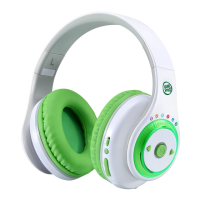
LeapFrog LeapPods Max - User Manual

LeapFrog LeapPods Max
17 pages
Print Icon
To Next Page IconTo Next Page
Loading...
Instruction Manual
This manual contains important information. Please keep it
for future reference. Ce guide contient des informations importantes.
Veuillez le conserver pour toute référence future.

Questions and Answers

  • C
    Christina HuffJul 29, 2025
    What to do if my LeapFrog LeapPods Max cannot connect with Bluetooth?
    • E
      Edward ParkerJul 29, 2025
      If your LeapFrog Headphone isn't connecting via Bluetooth, try these steps: First, go to the Bluetooth settings on your device and 'forget' or 'unpair' the LeapFrog Headphone if it's listed. Next, restart Bluetooth on your device. Finally, turn your LeapFrog Headphone off and on, and then repeat the Bluetooth pairing process.
  • B
    Benjamin YoungAug 5, 2025
    How to fix LeapFrog LeapPods Max Headphone that has stopped working?
    • J
      Jennifer RamirezAug 5, 2025
      If your LeapFrog Headphone has stopped working, follow these steps: First, slide the On/Off Switch to the Off position for 30 seconds. Then, slide the On/Off Switch to the On position again. If the headphones still don’t work, recharge the battery and repeat these steps.
  • A
    Alisha ThorntonAug 12, 2025
    What to do if my LeapFrog LeapPods Max cannot connect with 3.5mm Audio Cable?
    • C
      christopherzamoraAug 12, 2025
      If you cannot connect your LeapFrog Headphone with a 3.5mm Audio Cable, ensure the following: First, make sure the headphones are powered on. Second, check that the 3.5mm Audio Cable is correctly connected to both your headphones and the external device. Finally, inspect the 3.5mm Audio Cable for any signs of damage.
  • L
    Lisa WhiteAug 21, 2025
    Why can't I control the volume level on my LeapFrog Headphone?
    • G
      Gregory HatfieldAug 21, 2025
      If you cannot control the volume level on your LeapFrog Headphone, especially when using external devices, ensure that the volume settings on both the LeapFrog Headphone and the external device are appropriately adjusted and not set to the lowest level. The LeapFrog Headphone might not be able to override the volume settings on some external devices.

Summary

Introduction

Included in the Package

Getting Started

Battery Charging Instructions

Step-by-step guide for charging LeapPods Max using the provided Micro-USB cable.

Charging Guidelines and Battery Management

Information on charging time, battery life, maintenance, and optimal ambient temperature for the headphones.

Product Features

Headphone Control Buttons Overview

Details on the On/Off Switch, Pairing Button, Mode Select Dial, and Play/Pause Button functions.

Headphone Ports and Adjustments

Explanation of Next/Back buttons, Volume Button, Adjustable Headband, USB Charging Port, and Audio Port.

Play Modes

Bluetooth Pairing and Line-In Connection

Instructions for establishing a Bluetooth connection and using the 3.5mm audio cable for playback.

Activities and Content

Content Categories Explained

Overview of the six distinct content categories available for interactive play and learning.

Care and Maintenance

Important Safety Information

Troubleshooting and Disclaimers

Environmental Phenomena and Liability

Notes on static electricity, product liability, and disclaimer of responsibility.

Common Operational and Connection Issues

Solutions for problems like headphones not working, Bluetooth connection failures, and audio issues.

Regulatory Compliance

FCC Declaration and Notes

Information on FCC compliance, warnings, and the supplier's declaration of conformity.

LeapFrog LeapPods Max Specifications

General IconGeneral
BrandLeapFrog
ModelLeapPods Max
CategoryHeadphone
LanguageEnglish