____
LEAR
SIEGLER, INC.
DATA PRODUCTS DIVISION
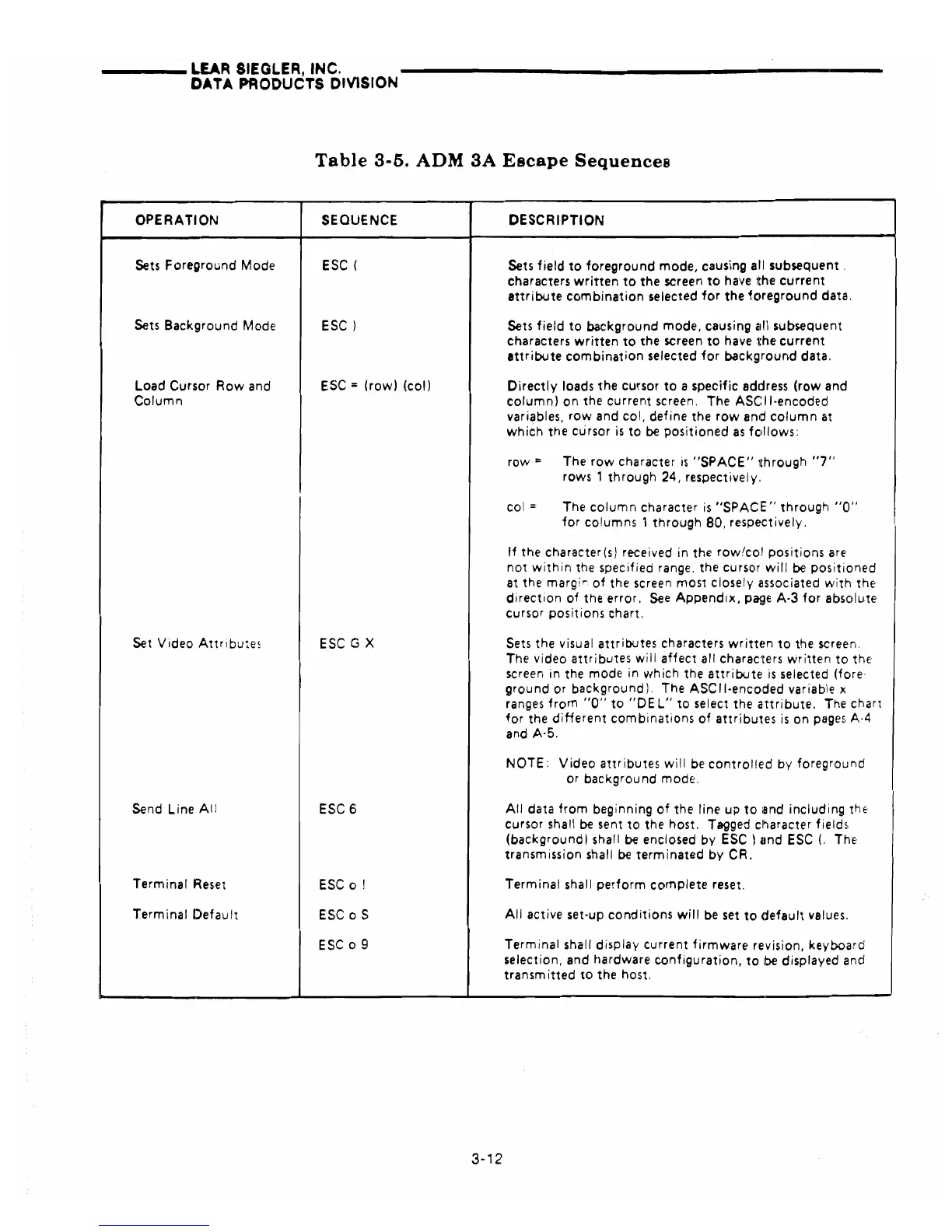
Table
3-5.
ADM
3A
Escape
Sequences
OPERATION
SEQUENCE
DESCRIPTION
Sets Foreground Mode
ESC
(
Sets
field
to
foreground
mode, causing all subsequent.
characters
written
to
the
screen
to
have
,the
current
attribute
combination
selected
for
the
fc~reground
data.
Sets Background Mode
ESC)
Sets
field
to
background mode, causing all subsequent
characters
written
to
the screen
to
have the
current
attribute
combination
selected
for
background
data.
Load Cursor
Rowand
ESC
=
(row)
(coil
Directly
loads
the
cursor
to
a specific address
(row
and
Column
columnl
on
the
current
screen. The ASCII-encoded
variables,
row
and col, define the
row
and
column
at
which
the cursor
is
to
be
positioned
as
fedlows:
row
=
The
row
character
is
"SPACE"
through
"7"
rows 1
through
24, respectively.
col
=
The
column
character
is
"SPACE"
through
"0"
for
columns 1
through
80, respectively.
If
the character(sl received in the
row/col
positions
are
not
within
the specified range. the cursor
will
be
positioned
at the
margi!'"'
of
the screen most closely clssociated
with
the
direction
of
the error.
See
Appendix,
p~~e
A-3
for
absolute
cursor positions chart.
Set Video
Attribute5
ESC
G X
Sets the visual
attributes
characters
writtE~n
to
the screen.
The video
attributes
will
affect
all characters
written
to
the
screen in the mode in
which
the
attribute
is
selected (fore·
ground
or background), The
ASCII·encoded
variable x
ranges
from
"0"
to
"DEL"
to
select the
attribute.
The chart
for
the
diHerent
combinations
of
attributes
is
on
pages
A·4
and A·5.
NOTE:
Video
attributes
will
be
controlle'd
by
foreground
or background mode.
Send Line
All
ESC
6
All
data
from
beginning
of
the line
up
to
iand
including
thE'
cursor shall
be
sent
to
the host. Tagged
cl~aracter
fields
(background) shall
be
enclosed
by
ESC}
lind
ESC
(.
The
transmission shall
be
terminated
by
CR.
Terminal
Reset
ESC
0 !
Terminal shall
perform
complete
reset.
Terminal
Default
ESC
0 S
All
active set-up
conditions
will
be
set
to
default
values.
ESC
09
Terminal shall display
current
firmware
revision, keyboard
selection, and hardware
configuration,
to
be
displayed and
transm
itted
to
the host.
3-12



 To Next Page