EasyManua.ls Logo

Lear Siegler ADM 3A - Set Terminal Configuration Parameters; Exiting Set-Up Mode; Save Current Terminal Configuration Values

Default Icon
54 pages
Print Icon
To Next Page IconTo Next Page
To Previous Page IconTo Previous Page
Loading...
____
LEAR SIEGLER, INC.
DATA
PRODUCTS DiViSION
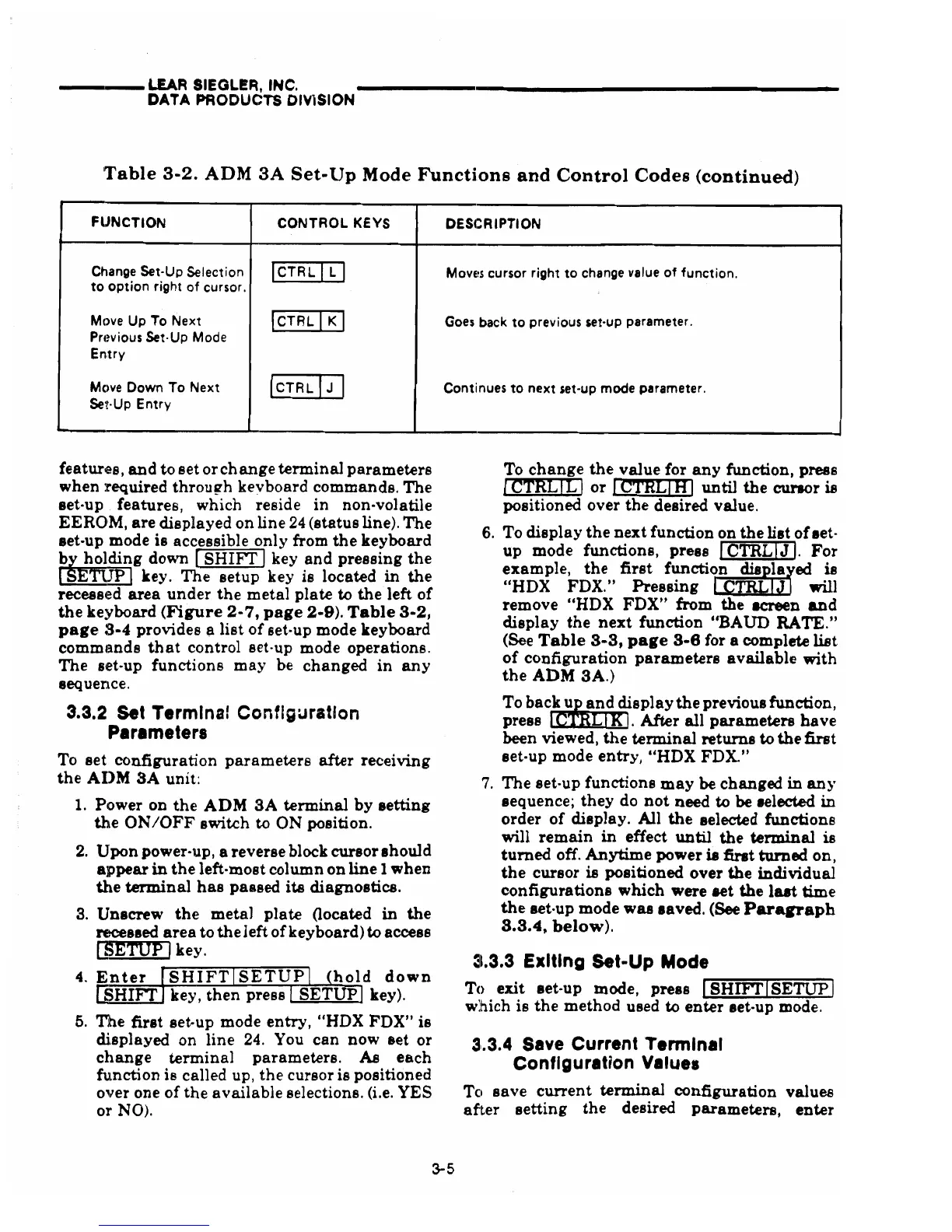
'Table
3-2.
ADM
3A
Set-Up
Mode
Functions
and
Control
Codes
(continued)
FUNCTION
CONTROL
KEYS
DESCRIPTION
Change Set-Up Selection
ICTRL
[0
MOVE~S
cursor right to change value of function.
to
option right of cursor.
Mc)ve
Up
To Next
ICTRL
[KJ
Goes back
to
previous set-up parameter.
Prl~vious
Set·Up
Mode
Entry
Mc)ve
Down
To Next
~
Continues to next set-up mode parameter.
Set·Up Entry
features,
and
to
set
or
change
terminal
parameters
when
required
through
kevboard
commands.
The
set-up features,
which
reside
in
non-volatile
EEROM,
are
displayed
on
line
24
(status
line).
The
set-up mode
is
accessible
only
from
the
keyboard
~ding
down [
SHIFT
Ikey
and
pressing
the
IE] key.
The
setup
key
is
located
in
the
recessed
area
under
the
metal
plate
to
the
left
of
the
keyboard
(Figure
2-7,
page
2-9).
Table
3-2,
page
3-4
provides a
list
of
set-up mode keyboard
commands
that
control set-up mode operations.
The
set-up
functions
may
be
changed
in
any
sequence.
3.3.2
set
Termlna! Configuration
Perameters
To
set
configuration
parameters
after
receiving
the
AIlM
3A
unit:
1.
Power on
the
ADM
SA
terminal
by
setting
the
ON/OFF
switch
to
ON
position.
2.
Upon
power-up, a reverse block
cursor
ahould
appear
in
the
left-most column
on
line
1
when
the
terminal
has
passed
its
diagnostics.
3.
Unscrew
the
metal
plate
(located
in
the
recessed
area
to
the
left
of
keyboard)to access
l]SETUP
Ikey.
4.
En
t er
"'S~H""""I
F""'"'"=T"""S~E=-=T~U~P~
hoI
d
dow
n
SHIFT key,
then
press SETUP key).
5.
The
first
set-up mode
entry,
HHDX
FDX"
is
displayed
on line
24.
You
can
now
set
or
change
terminal
parameters.
As
each
function
is
called up,
the
cursor is positioned
over one
of
the
available
selections. (i.e. YES
or
NO).
3-5
To
change
the
value
for
any
function,
press
I
CTBb[JJ
or
I
CTRLrnJ
until
the
CW"8Or
is
positioned over
the
desired value.
6. To
display
the
next
function
on
the
lilt
of
aet-
up
mode functions,
press
ICTRLI1J.
For
example,
the
first
function
:iJJrl~ed
is
uHDX FDX."
Pressing
l C
will
remove uHDX
FDX"
from
the
acreen
and
display
the
next
function
UBA
un RATE."
(See
Table
3-3,
page
3-8
for a complete
list
of
configuration
parameters
available
with
the
ADM
SA.)
To
bac~nd
display
the
previousfunction,
press
tOO.
After
all
parameters
have
been viewed,
the
terminal
returns
to
the
first
set-up mode
entry,
uHDX FDX."
7.
The
set-up
functions
may
be
changed
in
any
sequence;
they
do
not
need to
be
.elected
in
order
of
display. All
the
selected functions
will
remain
in
effect
until
the
terminal
is
turned
off.
Anytime
power
is
first
turned
on,
the
cursor
is positioned
over
the
individual
configurations
which
were aet
the
last
time
the
set-up mode
was
aaved.
(See
Pararraph
8.3.4,
below).
~~.3.3
Exiting Set-Up Mode
To
exit
set-up mode,
press
J~S~H=IFT~""ls~E~TUP~~1
which
is
the
method
used to
enter
set-up mode.
31.3.4
Save Current Terminal
Configuration Values
To
save
current
terminal
configuration
values
after
setting
the
desired
parameters,
enter