10
EN
browning is required and “sealing” the juices in, such as steaks,
hamburgers, some vegetables etc.
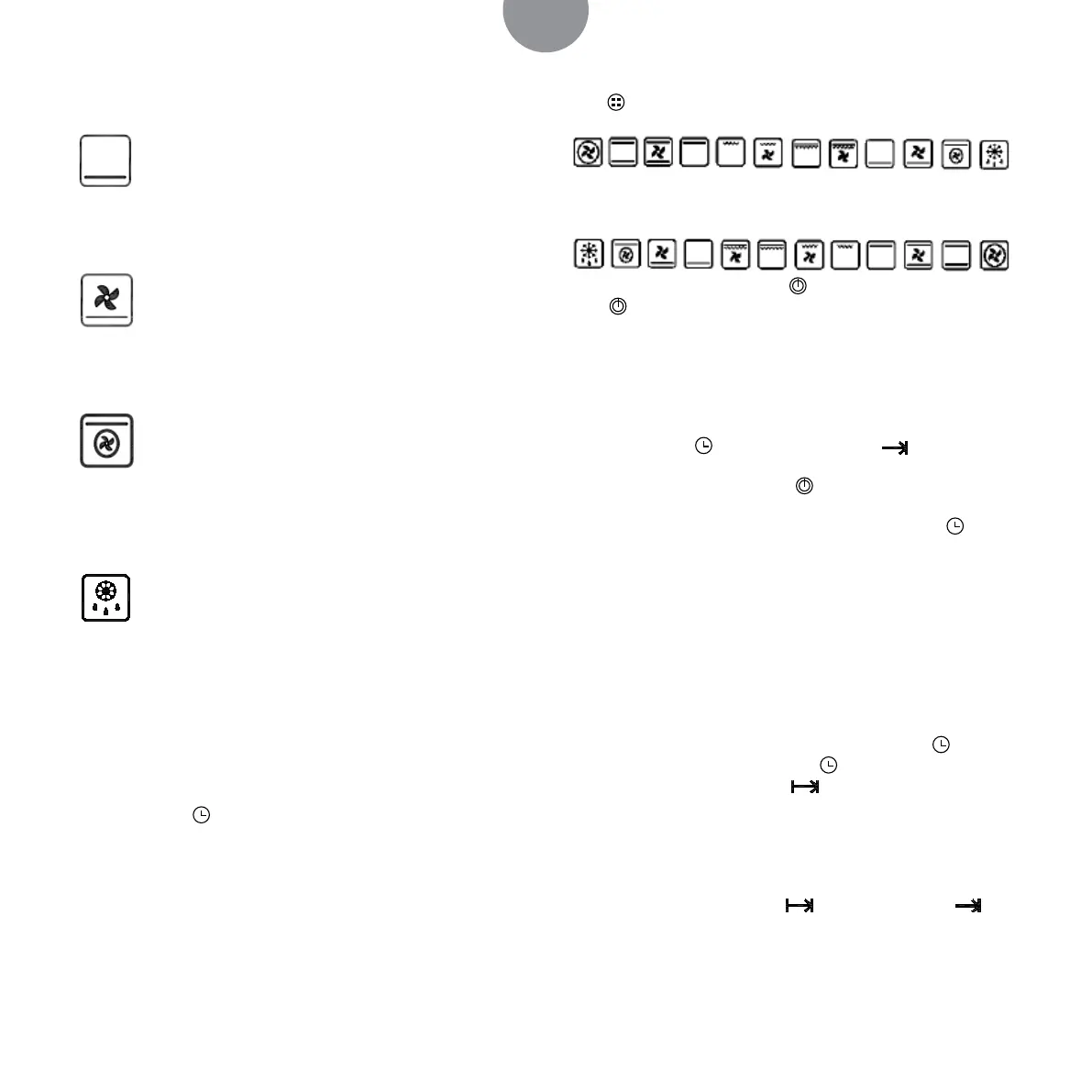
LOWER ELEMENT: This method of cooking utilises the
bottom element, which heat upwards onto the food. Ideal when
additional cooking is required for the bottom of the food being
cooked.
FAN AND LOWER ELEMENT: This method of cooking
utilizes the bottom element in conjunction with the fan, which
helps to circulate the heat. This function is suitable for sterilizing
and preserving jars.
FAN OVEN AND GRILL: This method of cooking utilizes the
top element and the circular element in conjunction with the fan,
which helps to provide a quick circulation of heat. The fan oven
allows food to be cooked simultaneously on dierent shelves; This
function is suitable where quick browning is required.
DEFROST MODE: The fan runs without heat to reduce
the defrosting time of frozen foods. The time required to defrost
the food will depend on the room temperature, the quantity and
type of food. Always check food packaging for the defrosting in-
structions.
OVEN CONTROL USING SINGLE KNOB
AND BIG SCREEN SERIES
Clock setting:
Push the button
for 3s, and come into the hour setting mode,
turn the knob in clockwise or anticlockwise to set the time, (0-23).
After 3 seconds, come into minute setting mode, turn the knob
in clockwise or anticlockwise to set the time,(0-59). If there is no
setting during 3s, the shining will stop, and the time is setted.
Note
when setting the clock, the functions of timing roast and delayed
roast are canceled.
Choose function setting:
Push
, if turn the knob in clockwise, you can choose the function
if turn the knob in anticlockwise, you can choose the function
After choose the function, push
to start the heating, and if you
push
again, to stop the heating.
Note
Only after choose stall mode, timer roasting function and delay
roasting function can be set.
Timer cooking function setting:
Press the button
for one time, show “h” icon and hour
number hose blinks. The setting way as the same as CLOCK set-
ting way. At this moment, push
entering timer roasting, and
it shows countdown of timer roasting. As the priority to display
countdown of alarm, so at this moment, press one time
to look
at the countdown of timing. When the time is up, the oven will
turn o automatically.
If it is set 01:20, meaning oven will turn o until 1 hour and 20
seconds later.
Note
when setting the clock, the functions of timing roast and delayed
roast are canceled.
Delayed cooking function setting:
After timer cooking function is set, press the button
again; or
timer cooking function is set, press
continually twice for set-
ting cooking end time, showing icon. The setting is the same
way as provided in the CLOCK instructions. After setting cooking
end time , it shows delayed end time. Due to priority to display
countdown interface of alarm, so if setting alarm time, it have pri-
ority to display countdown interface of alarm. Then it will display
timer or delayed end time.
When delayed time arrive half, icon disappear, and icon
appear, and countdown of timer cooking. As setted mode, oven
works, and work as timer cooking function.
In this modus duration and stopping time must be set as follow:
Start time = Stop time – Set time


 To Next Page