DCR822
LECTROSONICS, INC.
8
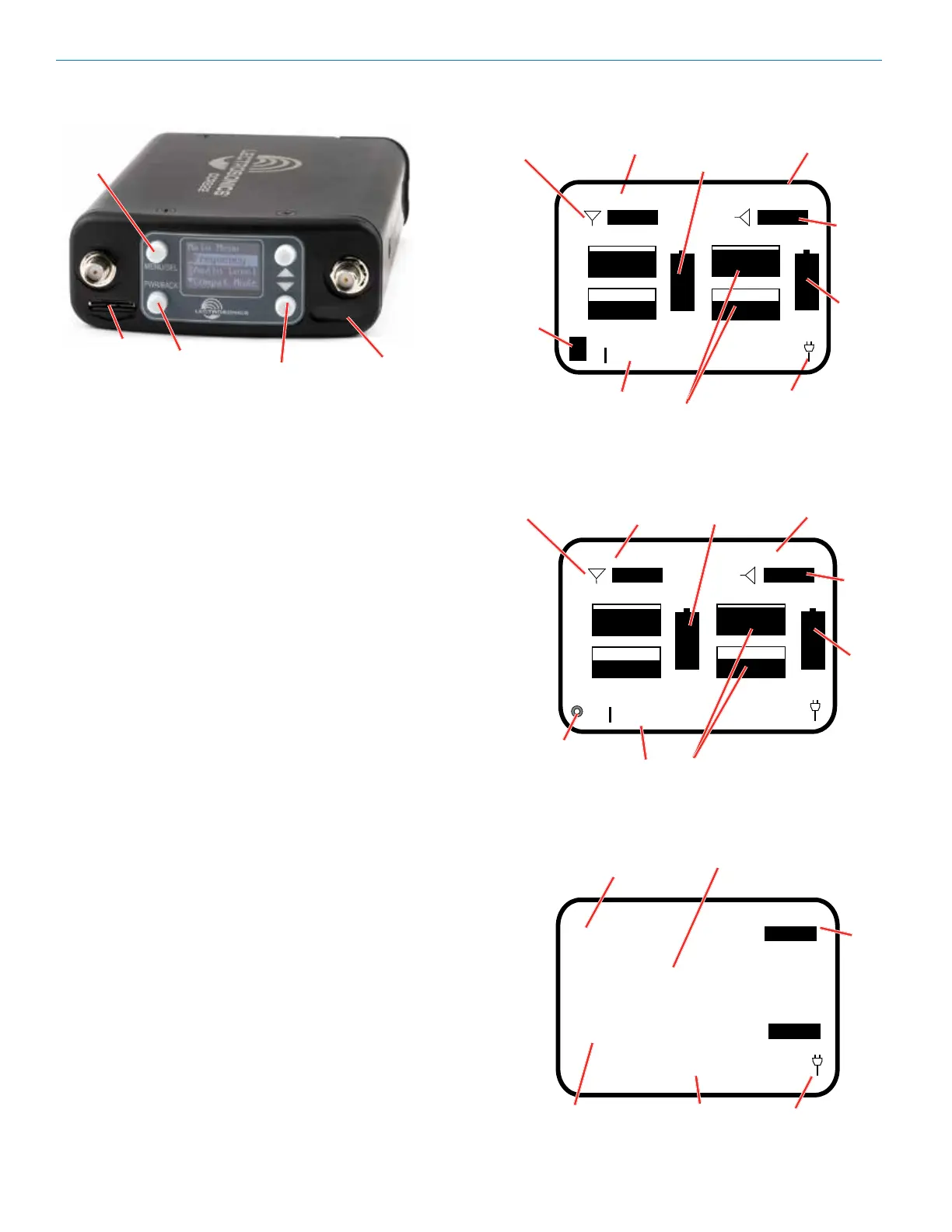
LCD Main Window
Navigating the Menus
From the Main Window, press MENU/SEL to enter the
menu, then navigate with the UP and DOWN arrows to
highlight the desired setup item. Press MENU/SEL to
enter the setup screen for that item. Refer to the menu
map on pages 10-12.
Main Window Screens
The Main Window displays information concerning the
RF levels at each antenna per channel, audio modula-
tion levels, the condition of the Pilot Tone (Hybrid) or
Link (digital), and battery conditions for both the receiv-
er and the associated transmitters. It is also the access
portal to menu selections for setting up the receiver
and searching for clear frequency channels.(See Menu
Selections from Main window and Frequency Scan
Mode). The PWR/BACK button will cycle the display
through four different, additional screen configurations,
containing various combinations of transmitter names,
RF signal strength meters and audio meters, depending
on user preference.
• Receiver Battery icon changes to a plug icon
when external power is supplied.
• SD Card Status: No card, card error, data card,
stopped (ready to record), recording.
• Antenna Icons: Status of the vector diversity sys-
tem.
• Transmiter Battery Status Icons: Appear when
the receiver’s battery status is known and can take
on different appearances, depending on user set-
tings.
• RF Signal Strength Strip Charts: RF signal
strength indicators.
• Channel Status Indicator: Pilot tone, link and
encryption system status.
• Keypad Shortcut: Can start or stop recording from
the Main Window: MENU+UP to begin recording
and MENU+DOWN to stop recording.
SD Card Slot
PWR/BACK
button
IR Port
MENU/SEL
button
UP/DOWN
buttons
537.600
LINK
LINK
|-60 |-40 |-20 0|
|-60 |-40 |-20 0|
537.600
CH1
Frequency
CH2
Frequency
CH1
Audio Level
CH2
Audio Level
Plug (or battery)
Icon
Channel
Status
indicator
Plug (or battery)
Icon
CH1
Frequency
LINK
LINK
|-60 |-40 |-20 0|
CH2
Frequency
Audio Level
RF Signal
Strip Charts
Antenna
Status
Transmitter 2
Battery Status
Transmitter 1
Battery Status
Channel
Status
Indicator
SD Card
Status
(recording
stopped)
LINK
LINK
|-60 |-40 |-20 0|
CH1
Name
CH2
Name
Antenna
Status
Channel
Status
indicator
RF Signal
Strip Charts
Transmitter 2
Battery Status
Transmitter 1
Battery Status
Audio Level
SD Card
Status
(recording)



 To Next Page