9
1x
2x
3x
10
User Manual P6R Work | P7R Work V.01 06.2021
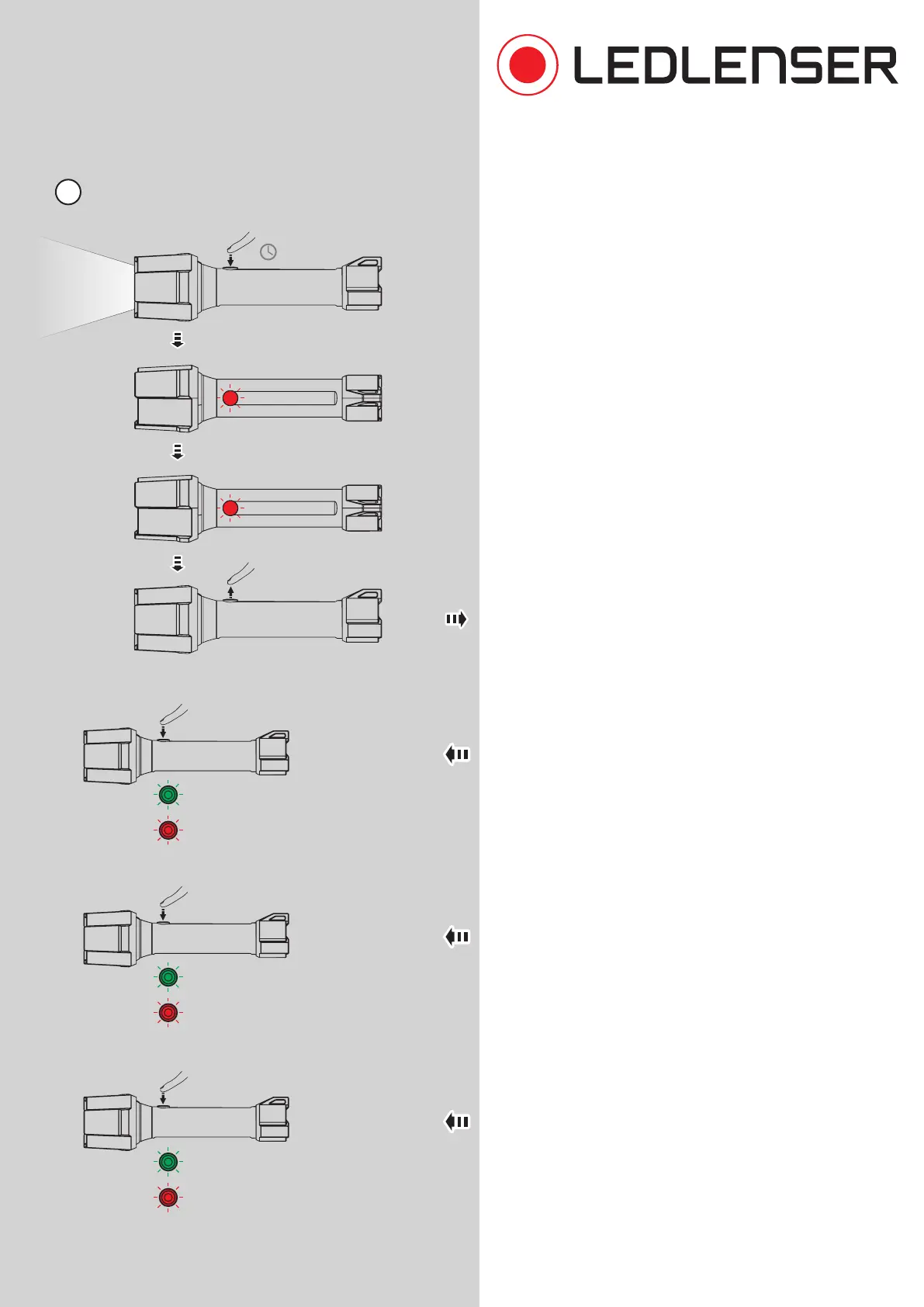
10. You can use the advanced settings to switch additional
functions on or o. To do this, switch on the lamp. Hold
down the switch for about eight seconds. The switch
flashes once, then twice. Release the switch when it
has blinked twice.
Now tap the switch briefly several times to activate
or deactivate functions. If you want to activate or
deactivate another function, start the process again
from the beginning (10.).
With a single tap, the Memory Mode is switched on or
o (see also No. 5).
If you tap it twice, the Low Battery Warning is switched
on or o (see also No. 8).
If you tap it three times, the Emergency Mode is
switched on or o. When the emergency mode is
active, the lamp is switched on automatically if it is
disconnected from the power supply while charging.
This means that the lamp comes on automatically in
the event of a power failure or is immediately active
when it is removed from the holder.
Additional Functions
hold
=8s
On
2x red blink: Memory Mode OFF
2x green blink: Memory Mode ON
2x red blink: Low Battery Warning OFF
2x green blink: Low Battery Warning ON
2x red blink: Emergency Mode OFF
2x green blink: Emergency Mode ON
2x blink
1x blink



 To Next Page