15 HOMEDEPOT.CA
Please contact 1-877-527-0313 for further assistance.
Maintenance (continued)
□ If the cutting device is worn or blunt it must be replaced
immediately.
□ If the machine starts to suffer from excessive vibrations,
this means that the cutting device has not been balanced
correctly or has suffered deformation due to impacts. In this
case it must be repaired or replaced.
REPLACING/CHANGING CUTTING DEVICE
WARNING: Always switch the machine off, disconnect it
from power supply and let it cool down before changing/
replacing the cutting device.
WARNING: Cutting devices are very sharp and become
hot during use. Handle them carefully.
WARNING: Wear safety gloves when handling cutting
devices in order to avoid injuries like burns and cuts.
WARNING: Make sure all bolts are completely tightened
before operating the machine. Don’t operate the machine if
any bolts are missing, loose, or damaged.
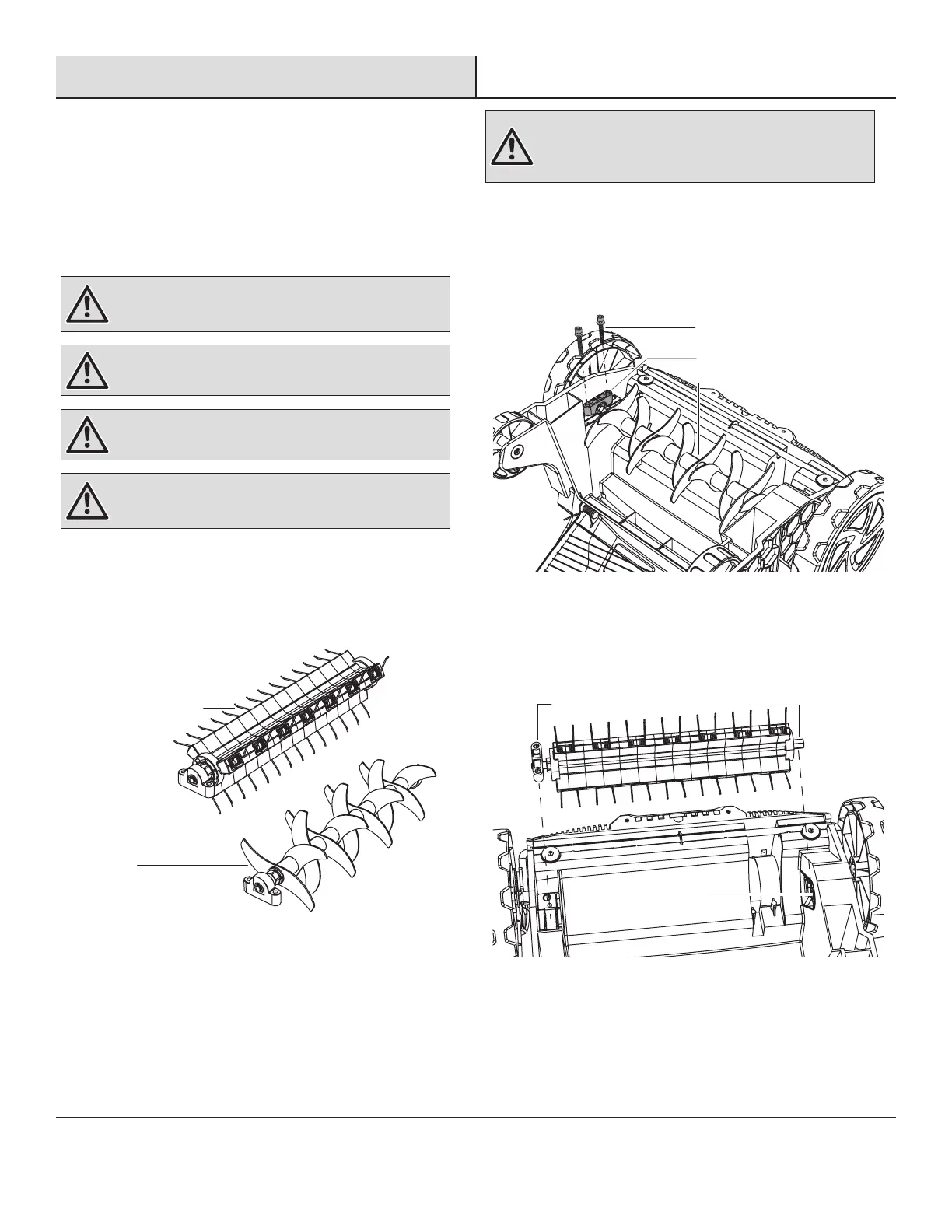
The product has two functions, scarifying or raking. The scarifying
cylinder is preassembled on the machine. The dethatcher cylinder is
included in the supply box. The cylinder can be changed according
to the application (Fig. 5).
Scarifying
cylinder with
blades
Dethatcher
cylinder with
spring metal tines
Fig. 5
WARNING: Before performing any maintenance, always
disconnect the power supply to the unit and wait until the
tine cylinder comes to a complete stop. Wear protective
gloves when handling the tines.
1. Remove the thatch collection bag.
2. Place the machine upside down on a flat stable surface to
access the underbody.
3. Loosen the two locking bolts with the provided hex key wrench,
remove them together with the attached cutting device (Fig. 6).
Locking bolt
Scarifying cylinder
Bearing seat
4. To remove the cutting device, first lift the bearing seat and then
pull it out from the drive shaft.
5. Align and insert the respective cutting device: Slide the hex nut
into the socket of the drive shaft and fix the bearing seat to the
support with the locking bolts (Fig. 7).
Hex nut
Socket
Bearing seat



 To Next Page