7 Rack Control Interface Operation (RCI)
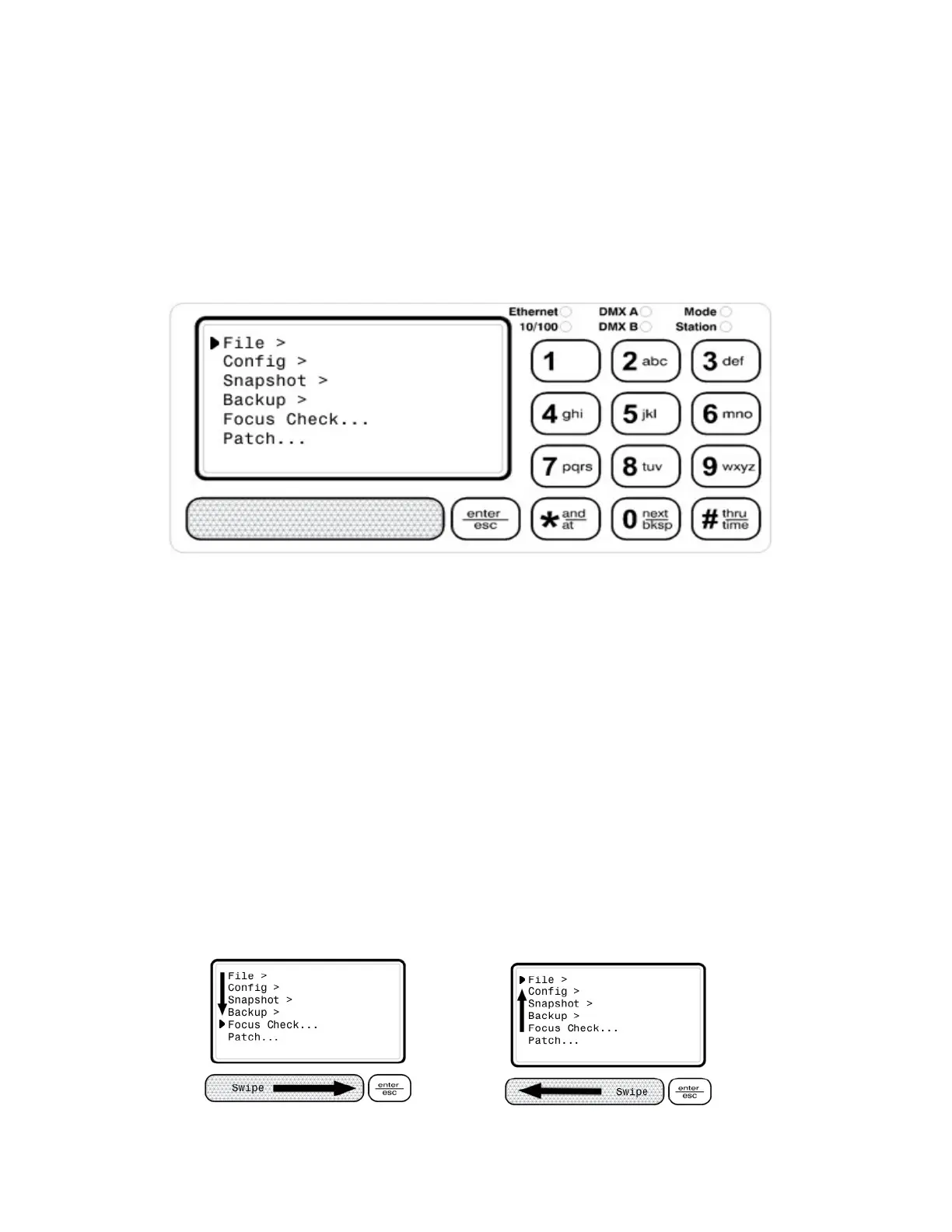
This section describes the user interface for the DX3 dimming system. The RCI, rack control interface
includes a 128 X 64 monochrome graphic LCD, capacitive touch buttons and slider for user input, as
well as LED status indicators for Ethernet, DMX, mode, and architectural controls. The RCI also has a
piezo annunciator to provide audible feedback on touch pad entry.
The user interface includes menus with a list of menu items. Menu items can be either sub-menus or
dialog selections. Dialogs provide a user input or control interface for rack configuration or control.
Figure 17: Rack Control Interface
7.1 Enter/Esc Button
The “enter/esc” button is multi-function.
Enter - Touch and release quick for enter. The piezo emits a single chirp. This is used to go to a menu
item or dialog.
Escape – Touch and hold until piezo emits a double chirp, then release for escape function. This is
used to return to a previous menu or dialog.
7.2 Menu Navigation
There is a main menu with a list of sub-menus or dialog selections. Sub-menus are indicated by a '>'
symbol on the right, while dialog selections are indicated by '…' on the right. Likewise sub-menus can
also contain a list of sub-menus or dialog selections.
To navigate the menus, use the slider, swiping either left or right to move up or down the list of menu
items.
DX3 Manual 22



 To Next Page