2.2 Control Panel Detail
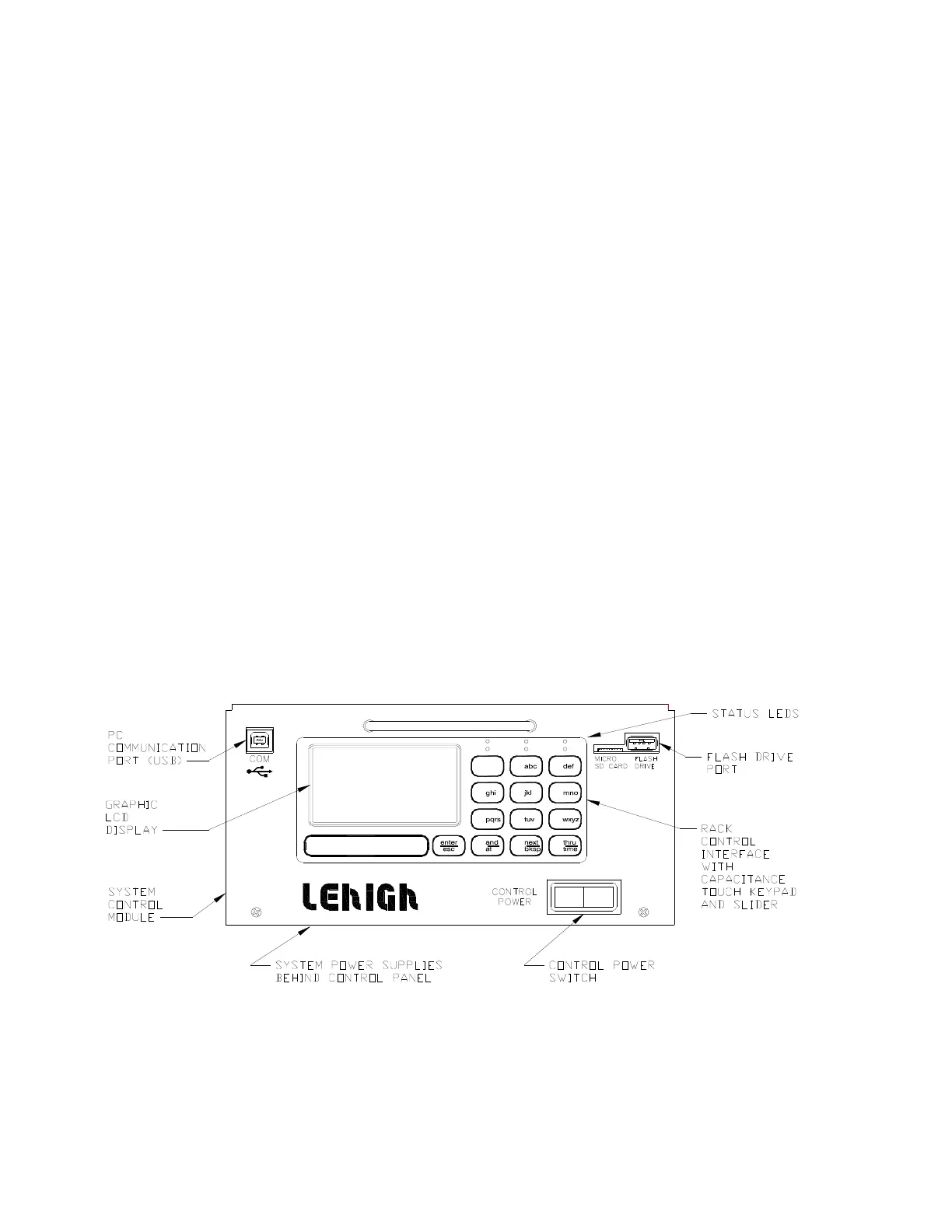
The SCM control module consists of a plug-in assembly with an integral Rack Control Interface. This
interface uses a capacitance touch keypad and data entry slider to allow simple navigation through the
menus. Control operation is described in Section 7 of this manual. Details of the features are as
follows:
• PC Communications USB Port – A USB type B port to allow connection to a computer running
the DxDirector DX3 software for use in setting up configuration, testing and control of the
system
• Graphic LCD Display – A multi-line graphic LCD display to list the menus and commands for
control of the various functions
• Status LEDS
◦ DMXA or DMXB LEDS will be lit whenever these DMX ports are active
◦ MODE will be lit when communication is present between the SCM and Rack Control
Interface
◦ ETHERNET will blink when an Ethernet source is connected and the '10/100' LED will be
lit solid
◦ STATION is not implemented
• Flash Drive Port – A USB port used for off-line storage of the rack configuration on a USB
flash drive. Multiple files can be stored, and recalled, all with unique file names
• Micro SD Card Port – A factory port used to install the operating system software
Figure 3: Control Panel Details
DX3 Manual 8
6
3
#
9
1 2
4
7
*
5
O
8
10 / 100
Ethernet ModeDMX A
DMX B Station



 To Next Page