Leica E Series User Manual Photography Using the Leica EZ4 E or Leica EZ4 W 43
Your Leica HD camera has many possibili-
ties for various applications and condi-
tions of use. Below are some basic concepts to
help you get the most performance for your
application.
Modes of use
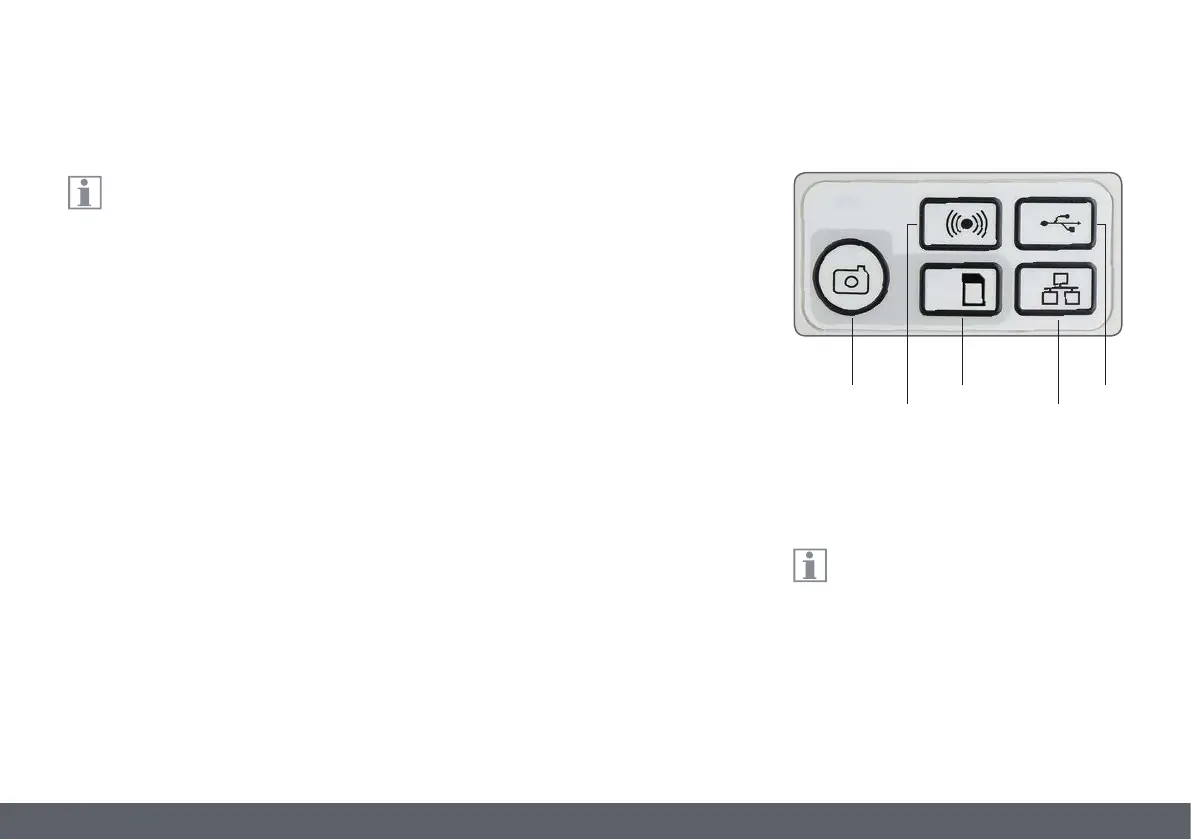
1. SD mode
O capture onto SD card
O use remote control
2. WiFi mode (only available for EZ4 W)
O Wireless connection to wireless device (tablet,
phone, PC)
3. USB mode
O Cabled connection to PC
4. Ethernet mode
O Cabled connection to external network
5. Capture button
O Captures image onto the SD card
The Basics
Note direct connection to an HD display
is possible in all modes. Aspect ratio is
16:9 except in USB mode where the aspect ratio
is 4:3.
1 3
2
4
5


 To Next Page