Leica E Series User Manual The Camera Remote Control (Optional) 56
The remote control can only work in SD
mode except for the "i" button which
will display information about the camera on an
HD display. The remote must be pointed at the
IR receiver of the camera without obstructions.
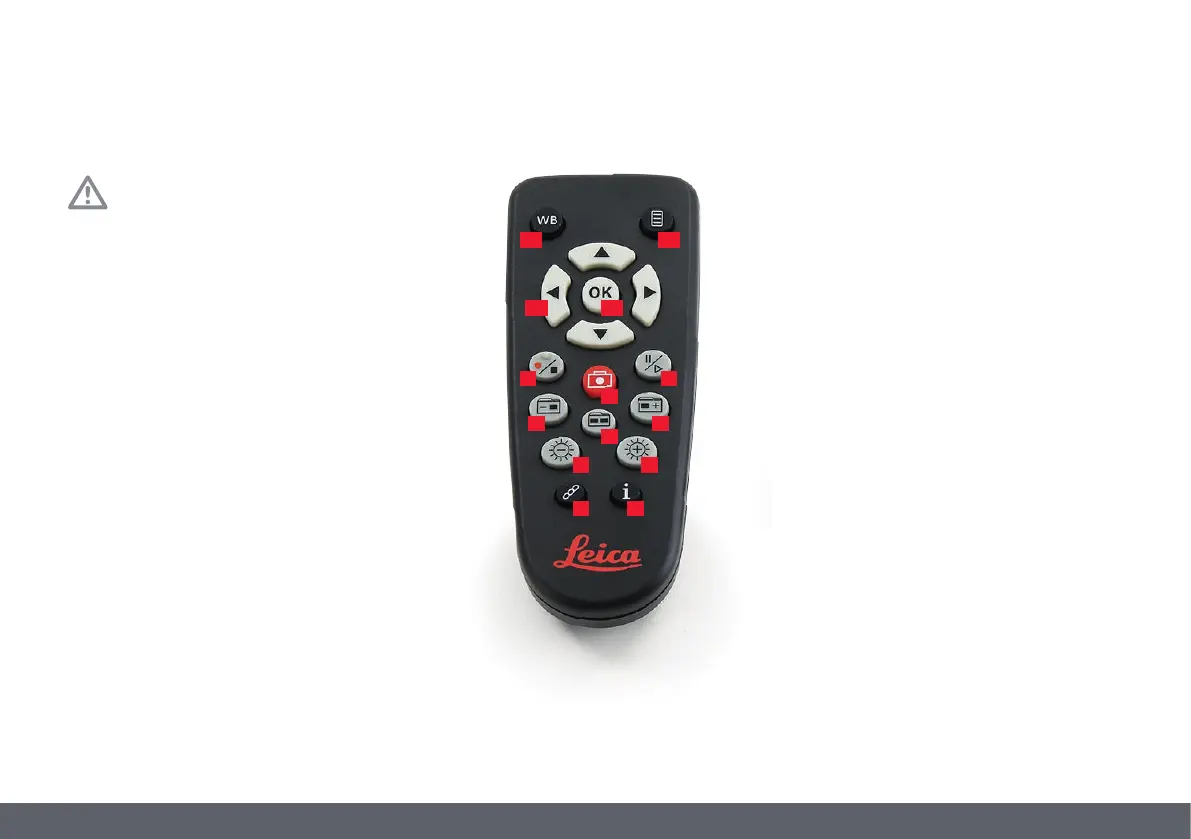
1. Start/stop video recording
The max. recording time of a movie is
23.00 min. After this time you have
to restart the recording again.
2. Save still image to SD card
3. Pause/play movie clip
4. View files on SD card
5. Move to previous image on SD card
6. Move to next image on SD card
7. Brightness adjustment up or down
8. Pairing button
9. Show/hide information box
10. White balance set button
11. Call up the camera menu
12. Arrow keys for navigation
13. OK to confirm
1 3
5
2
4
6
7
8 9
Optional Remote Control
10 11
12 13
7


 To Next Page