10
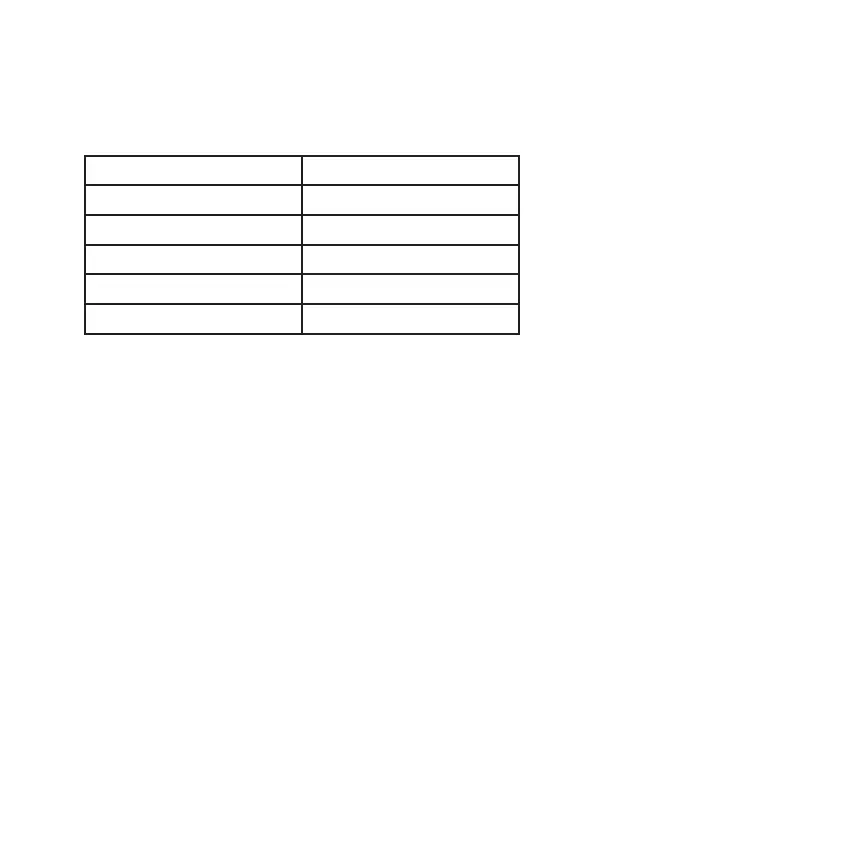
3.10 Battery level indication
The four LEDs on the top of the headset base indicate the battery level of your headset
battery
3.11 Training mode and making a conference call
Your Leitner LH280 headset allows a second headset to be temporarily connected to the base
for training or conference calls.
• Set up the call using the primary headset
• Once on the call, place the second headset on the base charger*
• After about one second, the Online Indicator on the secondary headset will turn on
and the primary base’s 2nd LED light will ash to indicate that the headset is registering
with the base unit
• Once the registering has completed, the LED light on the base will stop ashing
• Immediately remove the second headset from the base. Wait 6 seconds and then press
the 2nd headset’s ON/OFF button to join it to the call
NOTE: The additional headset will only remain registered to the base for the duration of the
call. After the primary headset has ended the call, the second headset will return to its normal
state. Returning either headset to its original base will also end conference mode
*Your Leitner LH280 headset can only be conferenced with another LH280 headset
Indication Battery level
One LED ashing < 20%
One LED on 20%-40%
Two LEDs on 40%-60%
Three LEDs on 60%-80%
Four LEDs on 80%-100%



 To Next Page