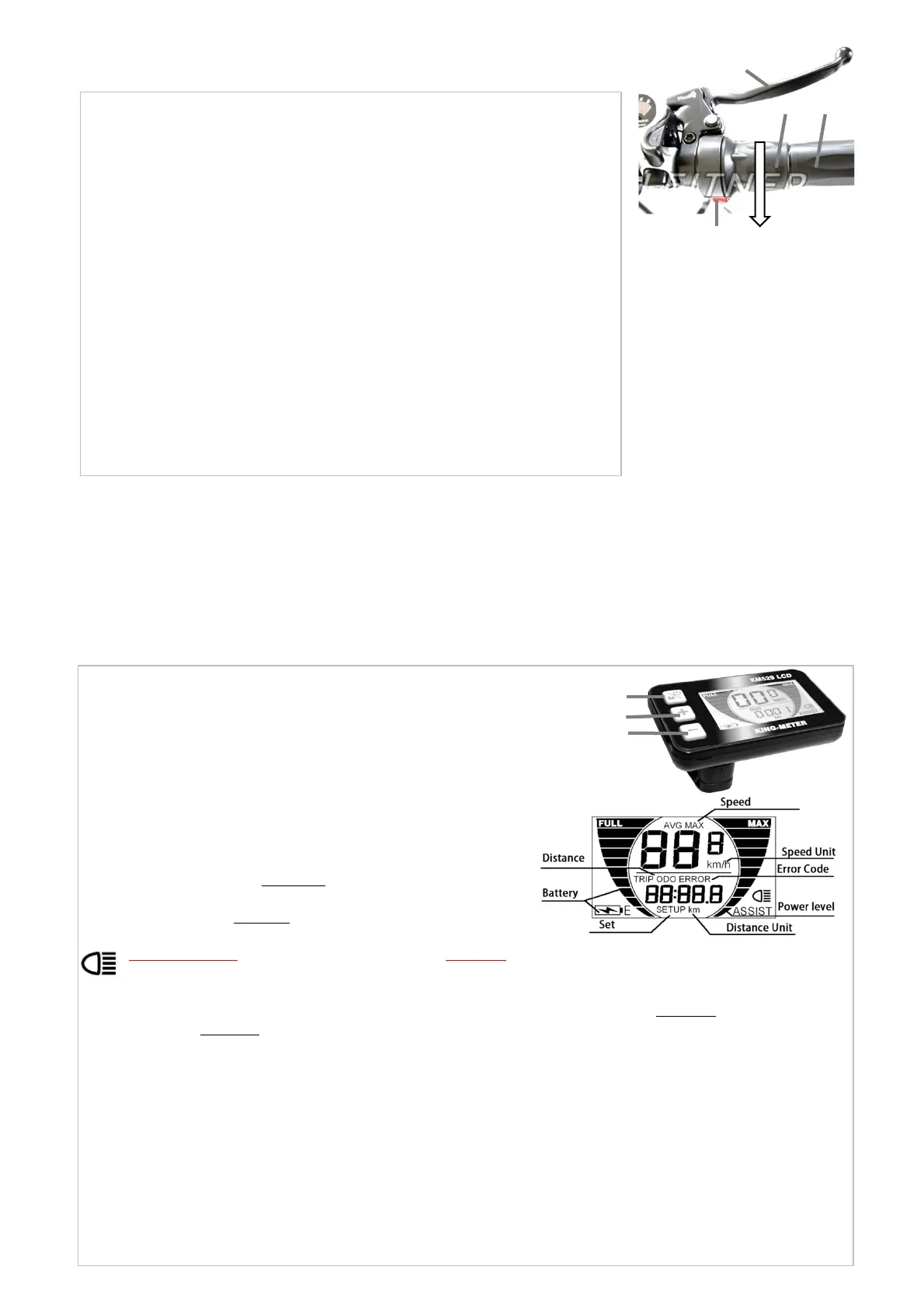
Figure C1: The twist‐and‐go
throttle (2) is located on the
right hand side of the
handlebar, next to the handle‐
grip (3). Push the red button
(1) IN to switch the throttle on.
Push the red button (1) again,
so that it moves OUT to disable
throttle.
Grabbing the throttle with your
right index finger and thumb
wrapped around it and twisting
OPERATIONOFYOURELECTRICBIKE
• Your e‐bike is driven by a motor embedded in the hub (centre) of the rear
wheel. The motor is powered by a battery. The amount of power delivered to
the motor and hence the accelerating force on the e‐bike is controlled by you.
• There are two systems to activate the motor: Throttle and Pedal Assist.
• The throttle can be twisted by hand and activates the motor (Figure C1).
• In Pedal Assist mode (Figure C2), the motor is triggered when you pedal
forward, and power assist will stop when you stop pedaling. In other words,
power assist happens as long as you pedal. You don’t need to pedal hard. All
you need is to apply a light force to the pedals continuously to maintain
continuous rotation. When you apply one of the brakes, power‐assist will
automatically stop, allowing the e‐bike to slow down or stop. Power assist will
turn itself off before the e‐bike has reached the maximum speed of
approximately 25 km/h
• You should use the gear shifter at the handlebar to set the gears appropriately
according to road conditions and pedal as usual. Please refer to relevant section
in this manual how to use gears.
• Note that the Battery level indicators on the display (Figure C2, 5) will only
show an estimate of the battery charge level when power is not being drawn
from the battery (bike standing still). While using motor assistance voltage will
decrease.
1
2
3
WARNING!OnlyswitchthrottleONifyouintendtoridethebike.AlwaysswitchthrottleandbikeOFFwhenwalking
nexttobikeandpushingthebiketopreventaccidentalacceleration.Alwaysbereadytopressbrakelever(4) tostop
bike.
4
6
FigureC2:LCD
Displaypanel.
The LCD display panel (Figure C2) controls a number of features on
your ebike.
WARNING! Only switch Pedal assist ON if you intend to ride the
bike. Do not pedal when turning! Always switch bike and Pedal
assist OFF when walking next to bike and pushing the bike to
prevent accidental acceleration. Always be ready to press brake
lever (Figure C1, 4) to stop bike.
WARNING! Pushing and holding the “‐” button will activate the
motor to travel at approximately 6km/h (walking speed).
‐Switch bike ON: First switch battery ON (refer to relevant section
in this manual), then push and hold “M” button on display until
LCD screen switches on.
‐Switch bike OFF: Push and hold “M” button until display switches
off.
‐Turn on lights and back‐light on LCD: push and hold
______the “+” button until lights are on.
‐Push “M” button briefly to cycle through menu. ODO:Odometer,
total distance travelled. TRIP: distance travelled in one trip. To
reset to zero push and hold “M” and “‐” button. The trip distance is
saved as whole number without decimals: For example a trip of
4.2km will be saved as 4km when powered off. AVG:Average
speed. MAX: Maximum speed.
‐To activate “Pedal Assist” push “+” button briefly to increase the
power and speed, push “‐” button briefly to decrease the power
and speed. “Pedal assist” means that the motor will be activated
when you start pedalling and the bike will move forward with
motor assistance while you are pedalling. The more black bars on
the right side of the Display (Figure C3), the higher the pedal
assistance level. At lower assistance levels the motor will
accelerate to lower speeds. At maximum assistance the motor will
accelerate to approximately 25 km/h.
Figure C3: Screen of LCD Display panel. If error
code is displayed stop riding bike and contact
customer service at sales@leitner.com.au
‐Setup Menu: Push and hold “+” and “‐” button
until screen changes. Menu 1) Use “+” and “–”
button to select correct wheel diameter size,
e.g. 20 inch for folding bikes and 26 or 24 inch
forcruiserbikes.Push“M”buttontoconfirm
selection and go to Menu 2) top speed in km/h.
Set to 25 km/h. WARNING: Make sure top
speed is at 25km/h. Any higher top speeds will
make bike illegal for use on public roads! Push
“M” button to get to Menu 3) backlight. 1 is
default backlight brightness. Push “M” button
to get to Menu 4) to display units in kilometres,
set to “k”. Push and hold “M” to save settings
and return to main menu.
“M”Button
“+”Button
“‐”Button
it down in the direction of the white arrow will activate the motor and the ebike will move forward. The twist
acceleration is gradual: Twist it down only a little bit for moderate acceleration. Twist it down all the way for maximum
acceleration. The throttle will accelerate the bike to a maximum speed of about 6 km/h (walking speed). If your throttle
overrides the pedal assist system meaning if you twist the throttle you can only go 6km/h, even if you use pedal assist,
then release throttle to use the pedal assist system.
The throttle can be unlocked to about 25 km/h for use on private property. If the throttle is unlocked the bike must not
be ridden on public roads. Please refer to the relevant section of this manual how to unlock the throttle.



 To Next Page