9
RECORD MODE
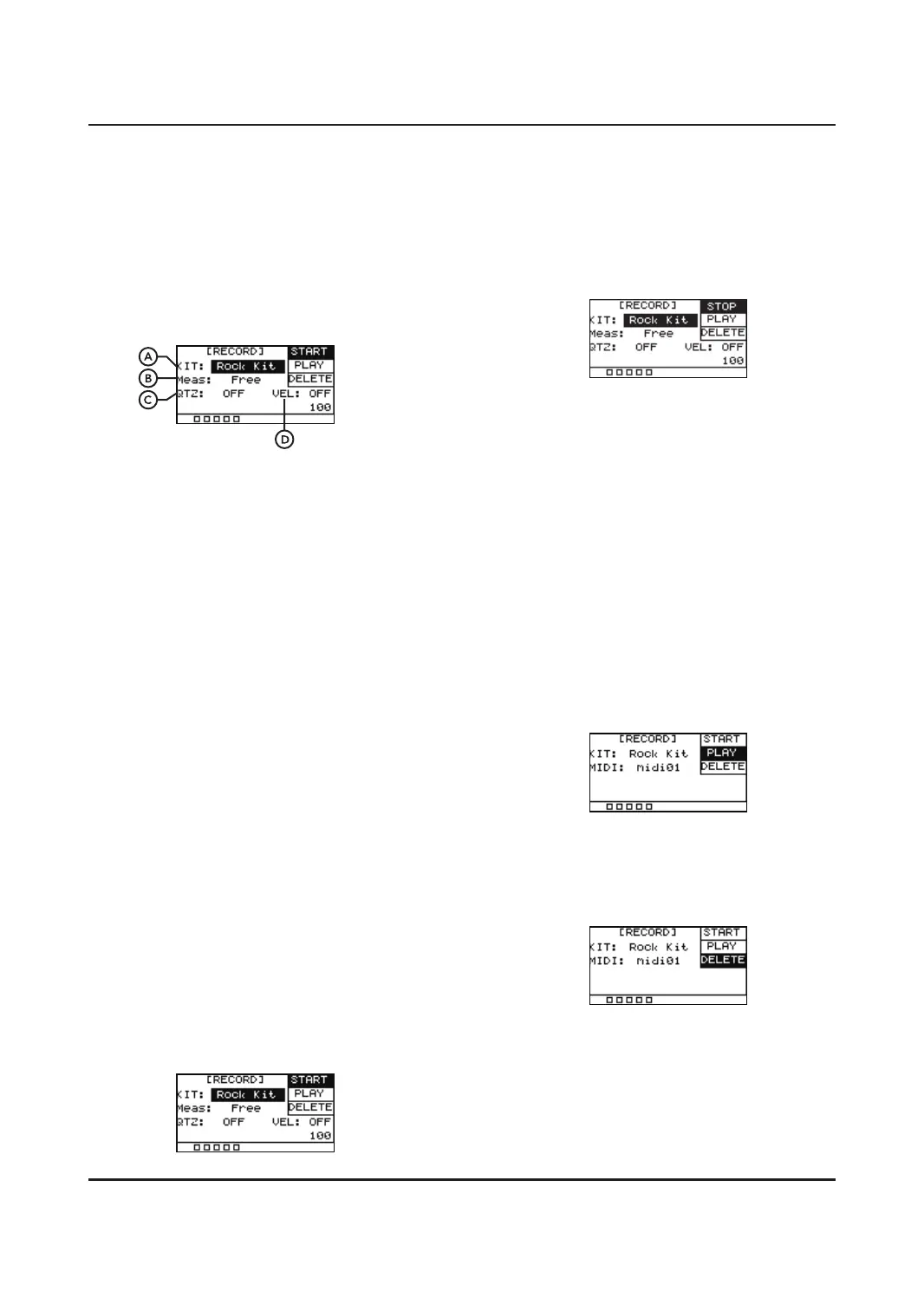
Allows you to record MIDI patterns within the
UNIT. Pressing the [REC] button once will
display the following menu. The value in the
lower right corner is the tempo of the
metronome. It is recommended to go to the
[CLICK] button to set the metronome tempo
and beat before recording.
A. KIT
This drum kit is used as the sound
department when playing the recorded
MIDI.
B. Meas
The number of Measures that will be
recorded.
Value: Free/*1/*2/*4/*8/*16
C. QTZ
Quantize note. Automatically corrects
the beats as the setting value. This allows
you to get cleaner performances without
the tiny time discrepancies felt in natural
performances.
Value: OFF, 1/4, 1/8, 3/8, 1/16, 3/16, 1/32,
1/64
D. VEL
Quantize velocity. Automatically corrects
thevelocity of your recording as the setting
value. If set OFF, that means quantize
velocity is o and it will record your
playing velocity as normal.
Value: OFF, 0-127
START
Press the [REC] button again so the RECORD
icon is flashing, the UNIT is now in RECORD
MODE and will capture the next notes played.
The metronome will automatically turn on, you
can disengage it using the [CLICK] button.
STOP
When you are finished press the [REC] button
again, the RECORD icon will stop flashing. The
UNIT is now in STOP mode and will stop
capturing your performance.
NOTE:
1. The maximum amount of hits able to be
recorded is 5000, the recording feature will
automatically stop after that.
2. If you immediately start to record a new
performance without saving, the original
will be deleted.
3. If you change to a dierent function instead
of saving the recording will be deleted.
B. Meas
The number of Meas that will be recorded.
Value: Free/*1/*2/*4/*8/*16
PLAY
Press [OK] to play and press again to pause.
DELETE
Press [OK] to delete the MIDI .


 To Next Page