4
QUICK USE
To prevent damage to your hearing, speakers
and other audio equipment, reduce the volume
and have the power o before connecting to
any other equipment. Please make sure you are
using the headphone output for headphones
and the main output when connecting to
amplifiers or mixers.
MAKE A PERFORMANCE
Connect any devices to the UNIT according to
the descriptions on the rear panel. (Ref page 2)
Turn on the UNIT. When the [KIT] button
indicator is on, the unit is in drum kit mode and
ready to play. Use drumsticks to hit any of the 9
drum pads to make a sound.
MODE
Use [UP]/[DOWN] to navigate the menus on
the LCD screen.
Use the SCROLL WHEEL or [+]/[—] buttons
to change value.
HOME
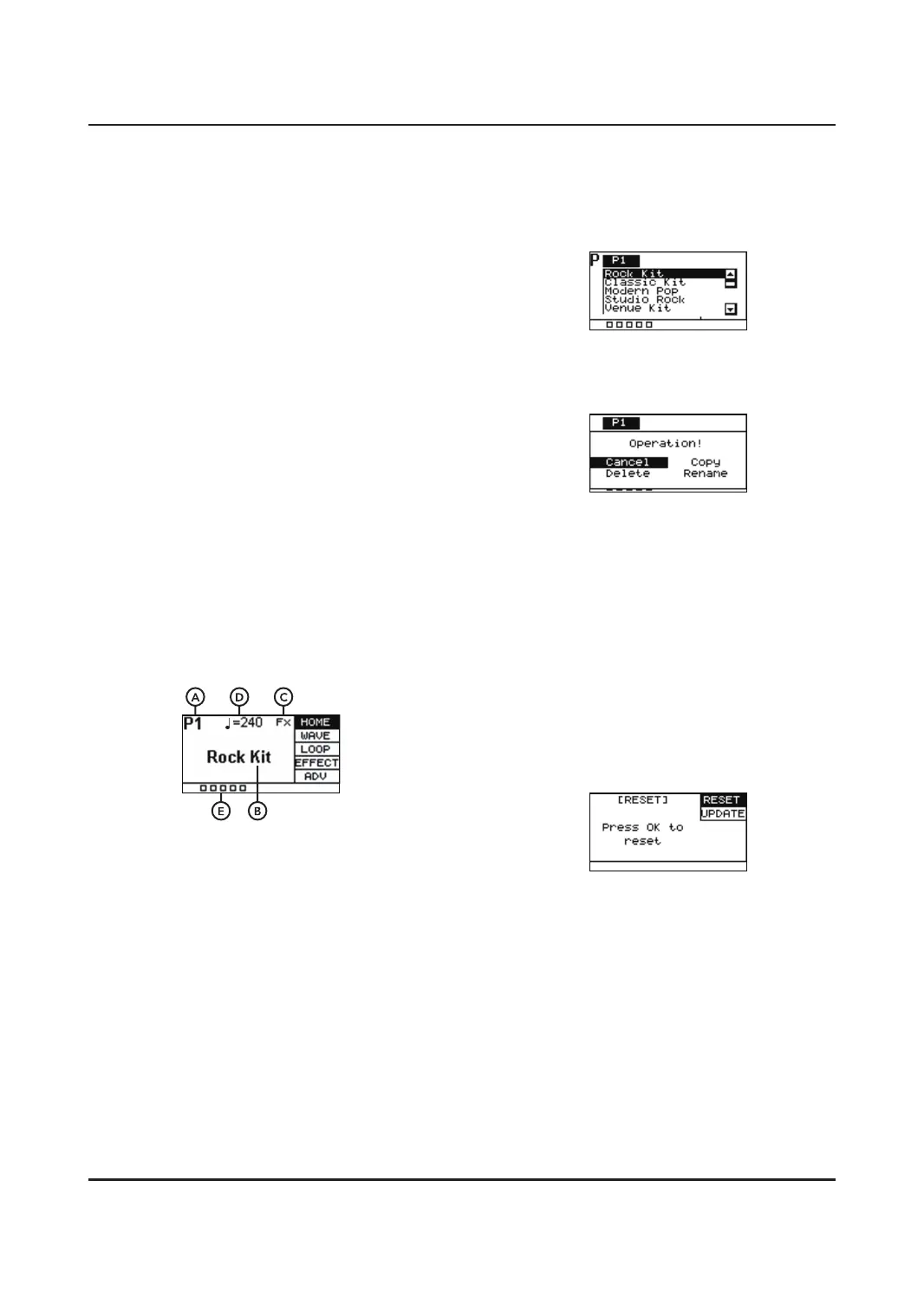
A. Shows P1-30, which is one of the 30 preset
kits.
C1-20 are user kits imported via USB
memory stick.
B. Displays the name of the currently active
preset.
C. If you have FX in use, the FX symbol will
show in the top right.
D. The musical note symbol displays what
tempo the metronome is set to.
E. The squares displayed at the bottom left of
the screen show how hard you are hitting a
pad. One light illuminated = soft hit. All the
lights illuminated = hard hit.
Use the SCROLL WHEEL or [+]/[—] buttons
to select a preset.
Pressing [OK] gives you access to all
presetkits in list format.
When in list view, press [SELECT]. This allows
you to copy, delate or rename the preset.
Leave this menu by selecting cancel or
pressing [KIT] again.
NOTE:
You can only delete user imported preset kits,
you cannot delete default kits.
RESET
Used to restore to factory settings. Press [OK]
to initiate this process, the UNIT will restart
automatically after this has been completed.
Do not press any other buttons during this
process.
NOTE:
If any of the drum pads do not work correctly
due to accidents, please press the [POWER] +
[UP] + [DOWN] to reset.


 To Next Page