14
ADVANCED APPLICATIONS
/USB MEMORY STICK
Press and hold [SETUP] and [OK] button
together to access the memory stick option
menus. From here you can import and export
sounds to the UNIT. Please note that only
EXFAT/FAT32/FAT formats are supported.
If your memory stick is not configured for this,
you can format it in the UNIT, The UNIT can
only read files in the root menu of your USB
stick.
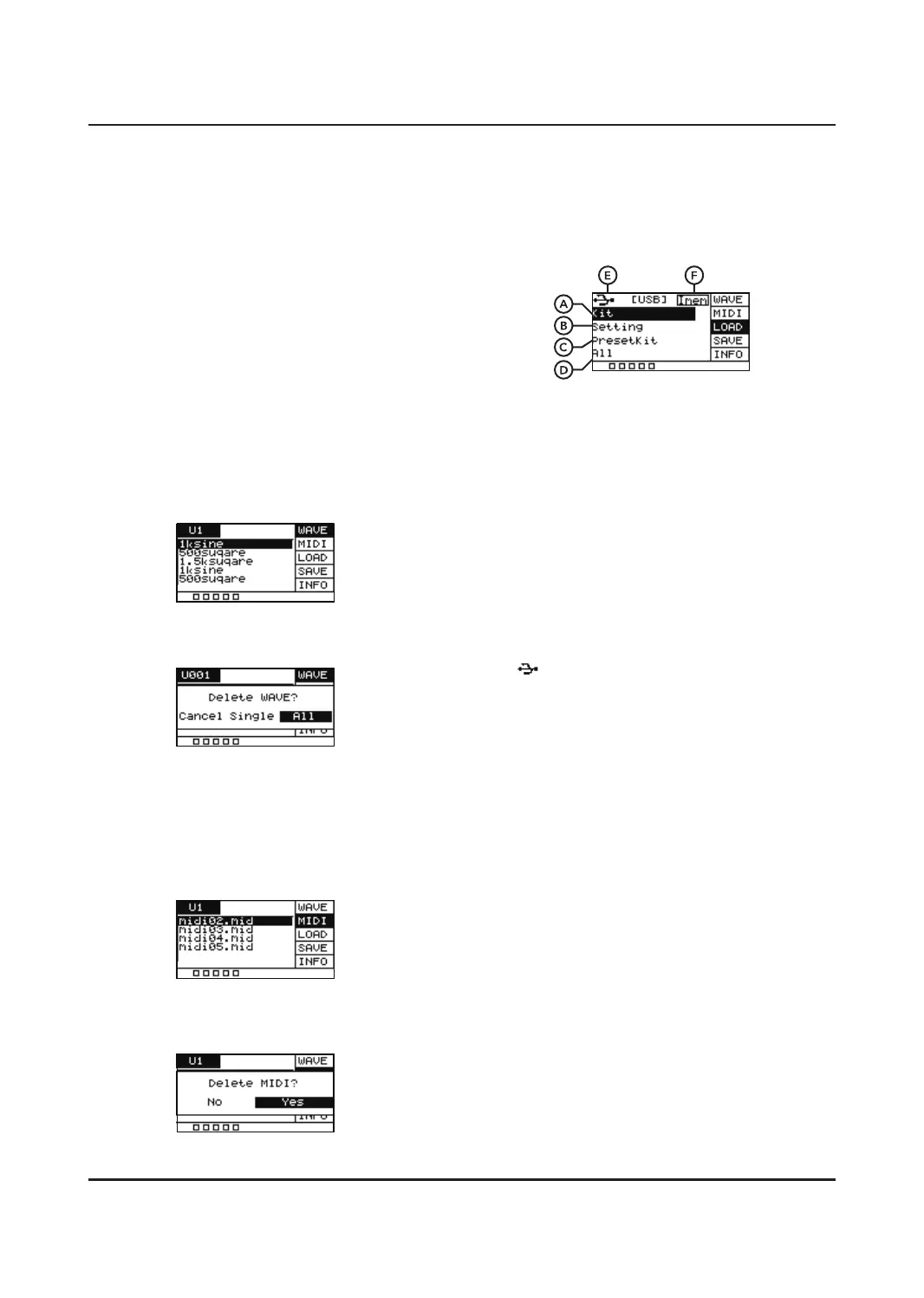
WAVE
Sounds files you have saved in the root
directory of your USB stick will appear here.
You need to import them before previewing.
(explained in the LOAD section)
Press [SELECT] to delete a single wave or all
the Wave files. Press [OK] to confirm.
MIDI
A preview of MIDI file data on the UNIT. You
can use the SCROLL WHEEL or [+]/[-]
buttons to scroll through the MIDI files. The
MIDI files on your memory stick will not be
shown until you load them.
You can use [SELECT] to delete a MIDI file on
the UNIT.
LOAD
For importing user sounds, kits and settings
into the UNIT.
A. Kit
A.Uploads user sounds, drum kit
configurations and MIDI file data.
B. Setting
Uploads the pad's setting information.
C. PresetKit
Uploads the unit’s built- in preset drum kits.
Please check our website for further
information on this function.
D. All
Uploads kits and settings
E.
The Icon shows that the memory stick is
connected. If the icon is not displayed, then
the memory stick was not connected
correctly.
F. IMEM
Displays the memory usage of the user
sounds. You can delete user sounds when
you need more space.
There are two ways to importing user sounds,
kits and settings into the UNIT.
a. You can create a folder exactly named
" pad_wave " in the root directory of the
USB stick, and then put your WAVE files in
it. Import it to the unit by Kit option under
LOAD interface.
b. Generate a "pad-content.hppd" file by using
the wavemanager software provided at
website and put the file in the root directory
of the USB stick. Import it to unit by using
the corresponding option in the LOAD
interface.


 To Next Page