1
TOP PANEL
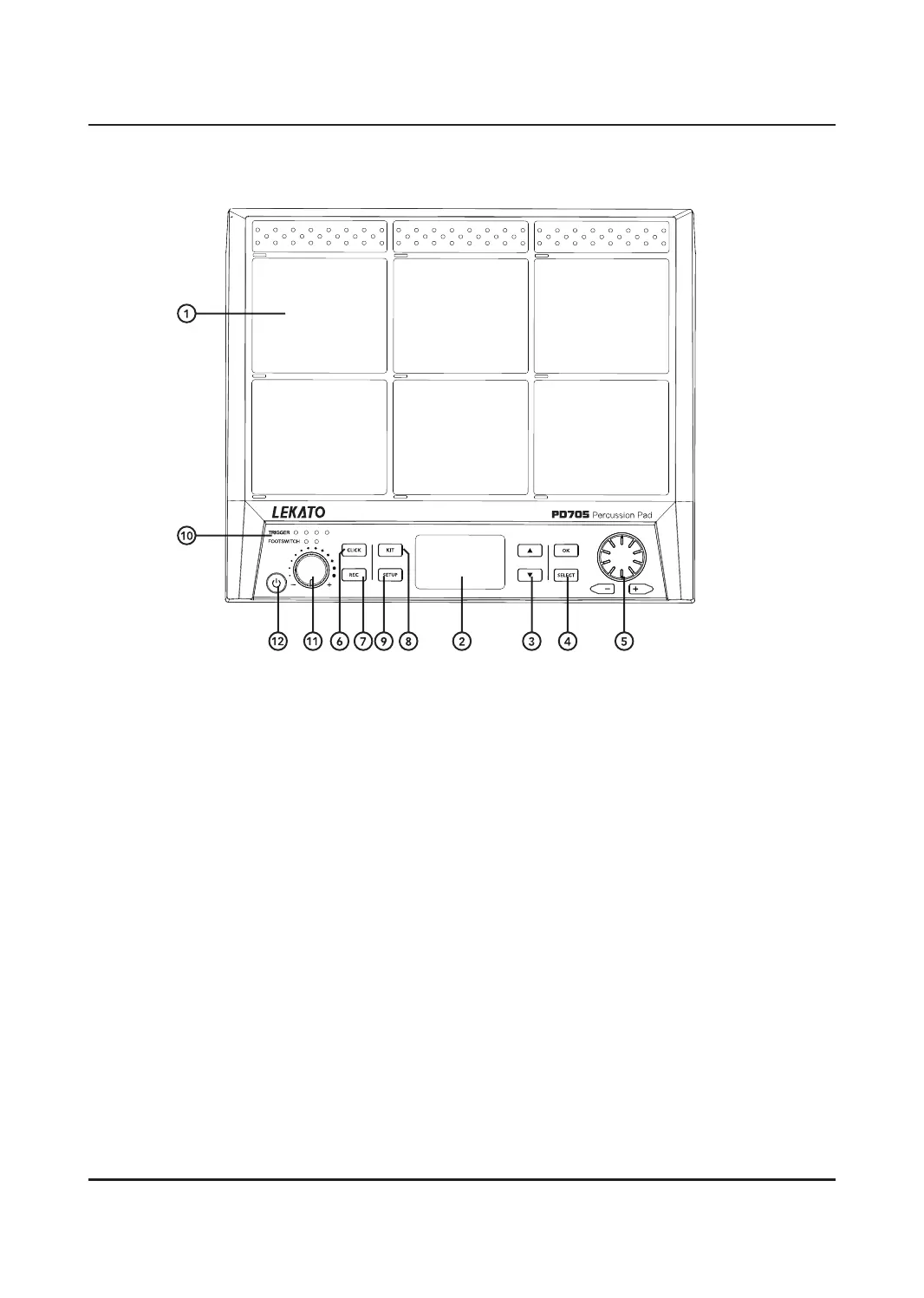
1. DRUM PADS
Percussive pads which trigger sounds or MIDI
when hit with a drumstick. When struck, the
pads corresponding LED will illuminate. Each
pad has an individual number which will be
shown within the menu when editing certain
settings.
2. LCD SCREEN
Displays information, menus and current
parameters of the UNIT. Changes made by
using the [+]/[-] buttons and SCROLL WHEEL
appear on this screen.
3. UP/DOWN BUTTONS
Used to navigate menus visible on the LCD
screen.
4. OK/SELECT BUTTONS
OK confirms selections made in the menus,
the [SELECT] button cycles through options
in the menu.
5. SCROLL WHEEL/+/- BUTTONS
Use to quickly increase and decrease values
as well as to scroll through multiple selections.
6. CLICK BUTTON
Pressing the [CLICK] button activates the
metronome and takes you to the CLICK
menu. In the SETUP menu you can access
the SoundGroup, Beat, Rhythm and Pan
submenus.
7. REC BUTTON
Activates the RECORD mode within the UNIT.
8. KIT BUTTON
Used to access the KIT menu, which allows
you to adjust and select dierent preset kits.
You can access the submenus using the [UP]
and [DOWN] buttons. Pressing this button
gives you access to the Home, Wave, Loop,
Eect, ADV, ADV2 and KITCH submenus.
9. SETUP BUTTON
Allows you access to the MIDI, PAD, Trigger,
Display, Version, Reset and Update submenus.
10. TRIGGER/FOOTSWITCH LED INDICATORS
lluminates when external triggers and
footswitches are used, they are connected
via the inputs on the rear panel of the UNIT.


 To Next Page