7CH Essential Instructions R1.0 2022/11/08
10
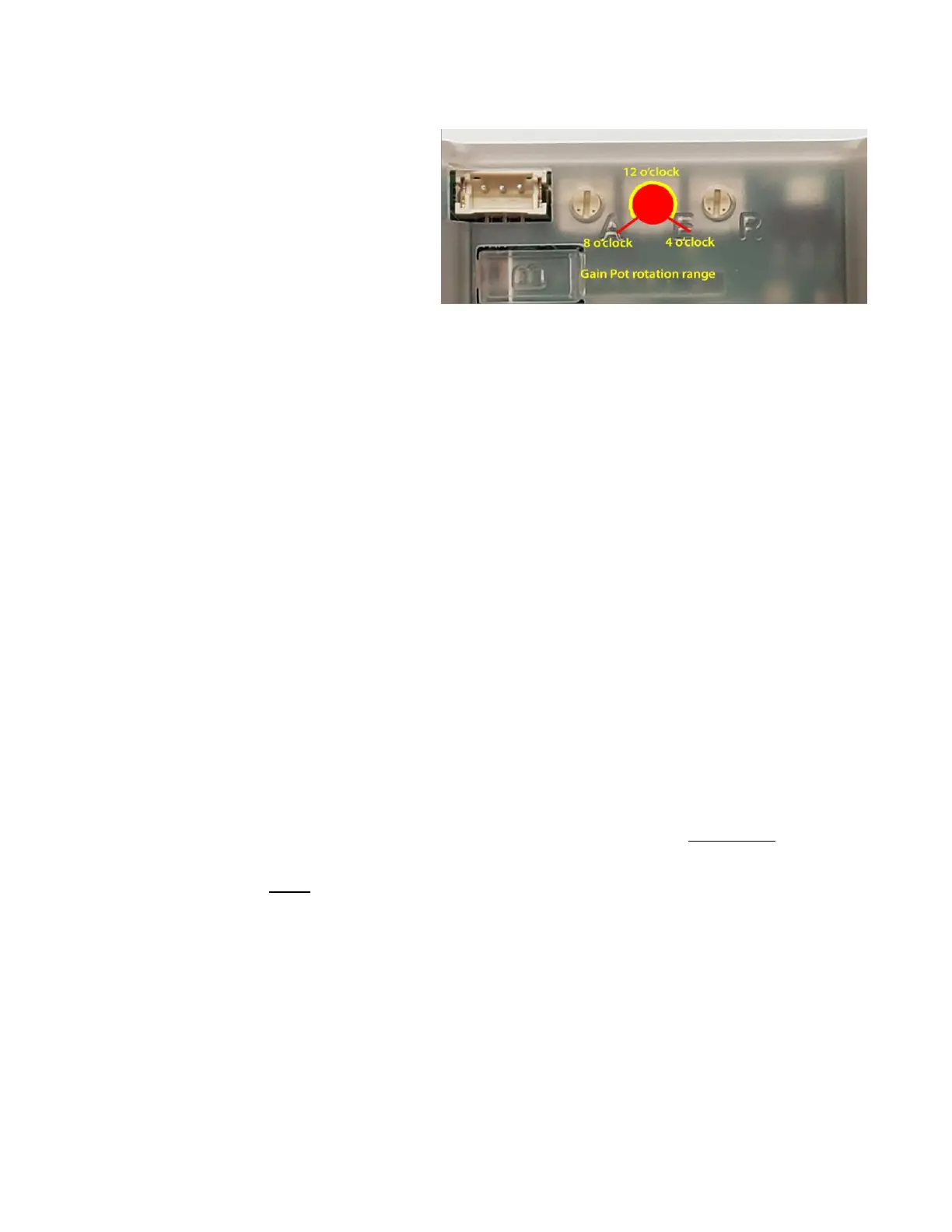
10. Adjust the stabilizer gain pots
As delivered the stabilizer gains are normally at
the 12 o’clock position. For first flights set the
three gain pots at about the 10 o’clock position.
This is a good conservative starting point that
should produce noticeable stabilization. For
most models, at least one or two gain
adjustments will be needed during flight testing
to achieve optimum stabilization.
11. Prepare for flying
Check that the balance of the model is correct according to the manual.
Check the control directions and stabilization functions one more time.
Do a reduced-power range test as directed in the transmitter manual (should give at least 30m/100 feet range
with full control).
Check that the switch is operating correctly to turn stabilization OFF (red Status light only) and ON (green and
red Status lights). Yet again, make sure you know which way is OFF!
Test failsafe operation by running the model (well secured) at about half throttle and turning off the transmitter.
With the default No-pulse setting, the motor of an electric-powered model should stop after a couple of seconds
and the control surfaces should stay in their current positions. User-set Failsafe (as described in Step 3 on page
3) moves ALL channels to pre-set failsafe positions. This may be preferred for an electric model and is
mandatory for an IC (fuel-powered) model.
If you have Master Gain (channel 8), check that it is set it to the middle of its range and that increasing the
control knob or slider increases the resulting stabilizer reaction. Reverse the channel output if not.
12. Test fly
For safety, always start a test flight with the stabilizer turned OFF (green Status light OFF).
Power ON the model.
Take off and fly around, adjusting trim as necessary to make sure the model flies properly without stabilization.
If trim is very far off neutral, land and make mechanical adjustments.
When satisfied, and at a safe height, turn the stabilizer ON. If the model rolls, dives or turns suddenly, at least
one of the gyro directions (LEDs G1, G2, G3) is incorrectly set. Switch OFF the stabilizer immediately! Land and
fix.
Likewise, if you encounter major oscillation, usually in high-speed flight, either land and reduce gain on the
axis/axes involved, or, if Master Gain is available, dial it down to the point where oscillation stops.
Assuming the model does nothing scary that you can’t deal with, continue flying to explore the action of the
stabilizer. Do a shallow dive to pick up speed and watch for oscillation on one or more axes. If it happens, just
throttle back and slow down (oscillation is quite different from control surface flutter and is generally not
destructive unless extreme).
Notice how the model handles with the stabilizer turned on. It may be less responsive on one or more axes. Try
out your dual/triple-rate settings. Turn stabilization off and on to get familiar with its effects. If you have Master
Gain, cautiously explore higher gains.



 To Next Page