- 13 -
BASIC OPERATION
OUTER AUDIO INPUT
Correctly connect the PC computer and Tape cassette with this unit, then press the
Input
button to enter PC status or TAPE status to enjoy the outer audio source.
Mp3 DISC PLAYING FUNCTION
1). Press the
Eject
button on the panel or remote controller to open the deck, put in an
Mp3 disc, then press
Eject
button to close the deck. This
unit begins to read it, and the
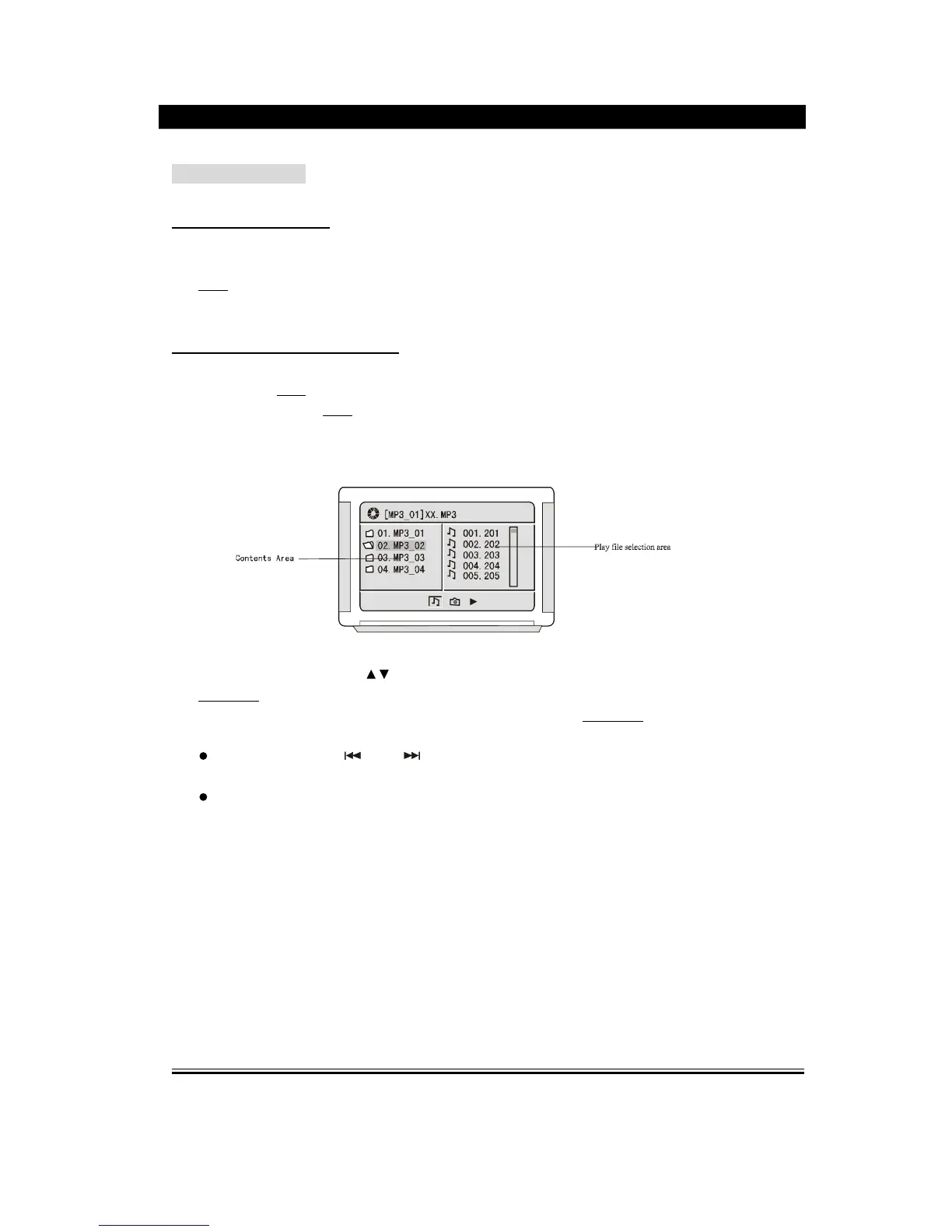
TV screen will display the following figure,
2). Press the directive keys
to move the cursor to a certain directory, and press
Play/Enter
button to enter the directory. Press the direction buttons to enter the
subdirectory or the file area, select a song with the cursor, press Play/Enter
button to
play the song.
During playing, press
or
button to select other songs under the current
directory.
During playing, press the left direction button, the icon will skip to the directory
symbol , press the up/down direction button to select other directories, press
Play/Enter buttons for confirmation.
Note: When play MP3 discs, this unit also has the functions such as mute, pause,
previous and next selection. The operation are identical with CD playing.


 To Next Page