Page 4 of 31
2.QuickStartGuide
2.1.FirstTimeInstallation
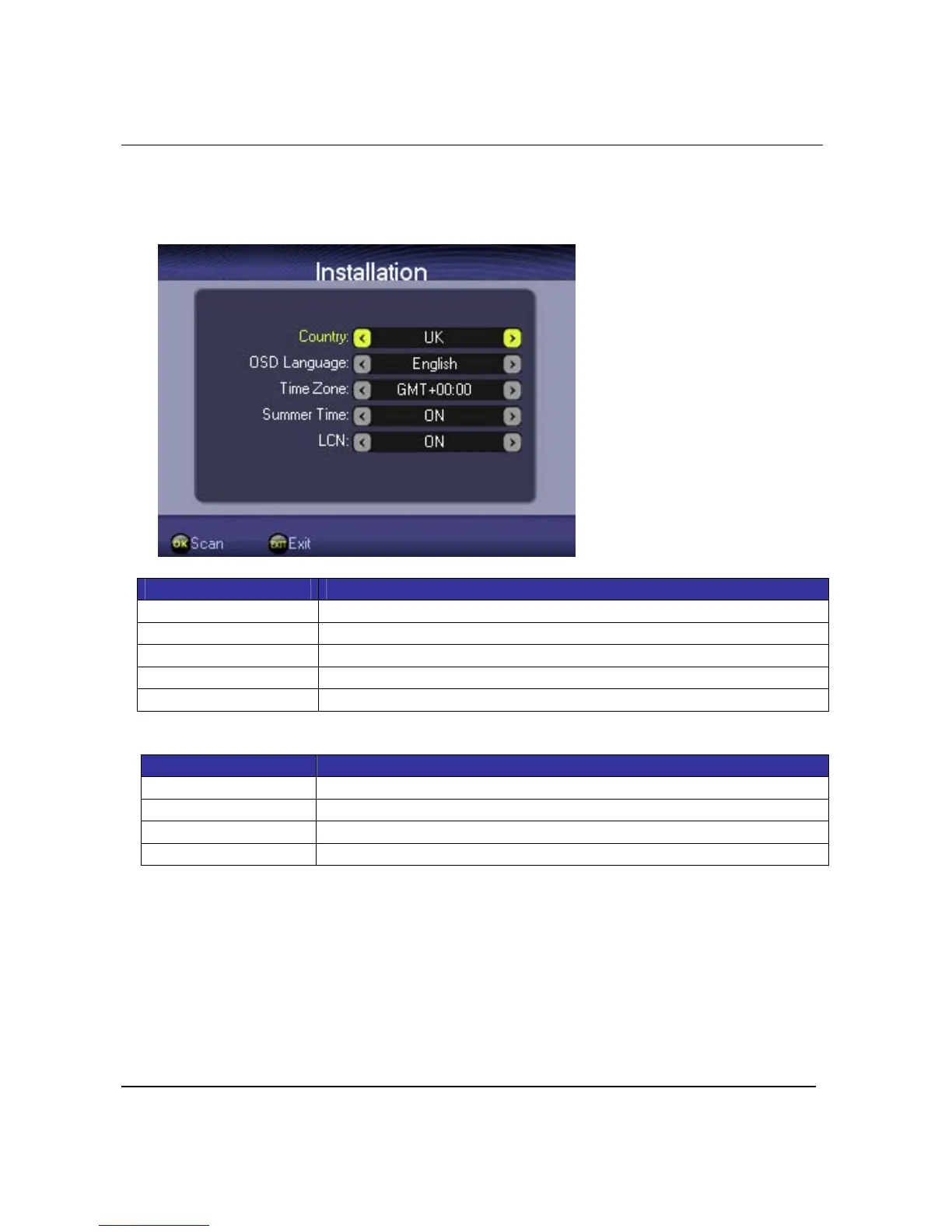
AfterthefirstswitchͲonofyourdevice,aneasyinstallationmenuisdisplayedforsettingof
differentparameters:
Item Description
Country Press<Left>or<Right>toselectcountry
OSDLanguage Press<Left>or<Right>toselectOSDlanguage
TimeZone Press<Left>or<Right>toselectTimezone
SummerTime Press<Left>or<Right>toadjustdaylightsavingtimesetting
LCN Press<Left>or<Right>toadjustLCNsetting
KeyDefinition:
Key Function
<Up><Down> Press<Up>or<Down>toselect
<Left><Right> Press<Left>or<Right>toselect
<Exit> Press<EXIT>keytoreturntoMainMenu
<OK> Press<OK>keytosavesettingsandswitchscanmode
Afterpress<OK>keyintheinstallationwindow,scanmodeselectionisdisplayed:



 To Next Page