Home
Lenovo
Laptop
20ND
Page 72 (1040 Thermal Fan Assembly)
Lenovo 20ND - 1040 Thermal Fan Assembly
103 pages
Manual
Save Page as PDF
To Next Page
To Next Page
To Previous Page
To Previous Page
Loading...
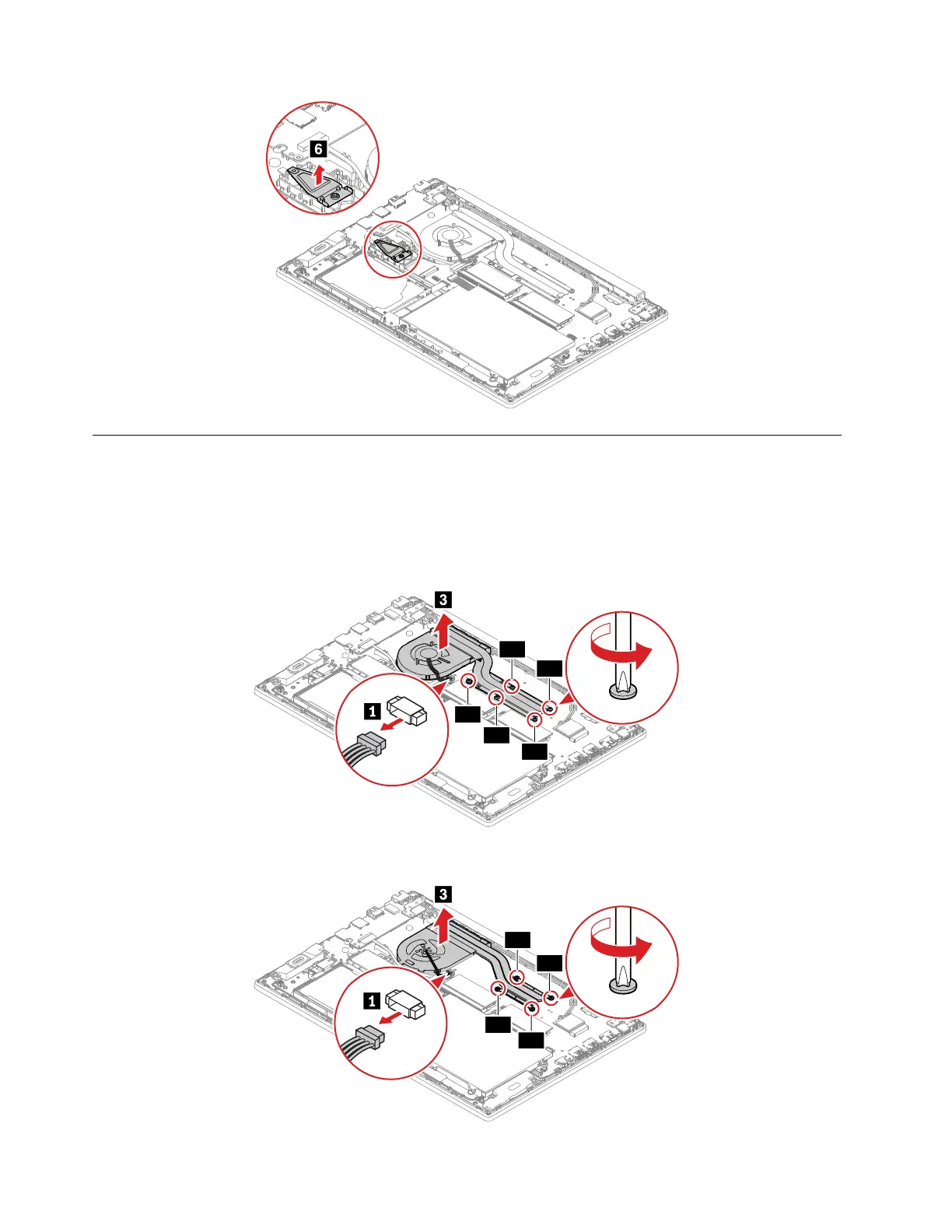
1040
Thermal
fan
assembly
For
access,
remove this
FRU:
•
“1010 Base
cover
assembly”
on
page
60
Removal
steps of
the thermal
fan
assembly
ThinkPad
E590/R590
2a
2d
2b
2c
2e
ThinkPad
E595
2a
2d
2b
2c
66
E590, R590,
and
E595
Hardware Maintenance
Manual
71
73
Table of Contents
Main Page
default chapter
3
Table of Contents
3
About this Manual
5
Chapter 1. Safety Information
7
General Safety
7
Electrical Safety
7
Safety Inspection Guide
9
Handling Devices that Are Sensitive to Electrostatic Discharge
9
Grounding Requirements
10
Safety Notices (Multilingual Translations)
10
Chapter 2. Important Service Information
27
Strategy for Replacing Frus
27
Strategy for Replacing a Hard Disk Drive or a Solid-State Drive
27
Important Notice for Replacing a System Board
28
How to Use Error Codes
28
Strategy for Replacing Frus for CTO, Special-Bid, and Standard Models
28
Product Definition
28
FRU Identification
29
Chapter 3. General Checkout
31
What to Do First
31
Checkout Guide
32
Diagnosing Problems
32
Quick Test Programs
32
UEFI Diagnostic Program
33
Bootable Diagnostic Programs
33
Power System Checkout
34
Checking the Ac Power Adapter
34
Checking Operational Charging
35
Checking the Built-In Battery and Operational Charging
35
Checking the Coin-Cell Battery
36
Chapter 4. Related Service Information
37
Recovery Overview for the Windows 10 Operating System
37
Resetting Your Computer
37
Using Advanced Startup Options
37
Recovering Your Operating System if Windows 10 Fails to Start
38
Creating and Using a Recovery USB Drive
38
Passwords
39
Power-On Password
39
Hard Disk Password
39
Supervisor Password
39
How to Remove the Power-On Password
40
How to Remove the Hard Disk Password
40
Power Management
41
Sleep Mode
41
Hibernation Mode
41
Symptom-To-FRU Index
42
Numeric Error Codes
42
Error Messages
44
Beep Errors
44
No-Beep Symptoms
46
LCD-Related Symptoms
46
Intermittent Problems
46
Undetermined Problems
47
Chapter 5. Special Keys
49
Chapter 6. Locations
51
Locating Computer Controls, Connectors, and Indicators
51
Front
51
Base
51
Left
52
Right
52
Locating Frus and Crus
52
Major Frus and Crus
54
LCD Frus and Crus
56
Miscellaneous Parts
57
Connector and Cable Guide
57
Looking up FRU Information
59
Chapter 7. FRU Replacement Notices
61
Service Tool Kit
61
Screw Notices
61
Retaining Serial Numbers
62
Restoring the Serial Number of the System Unit
62
Retaining the UUID
63
Chapter 8. Removing or Replacing a FRU
65
General Guidelines
65
Before Servicing the Computer
66
Disabling the Built-In Battery
66
Removing the Microsd Card
66
1010 Base Cover Assembly
66
1020 Built-In Battery
68
1030 M.2 Solid-State Drive and Brackets
69
1040 Thermal Fan Assembly
72
1050 Memory Module
73
1060 Internal Storage Drive, Cable and Bracket
74
1070 Wireless LAN Card
75
1080 Coin-Cell Battery
76
1090 Keyboard
76
1100 USB Card Cable
79
1110 USB Card
79
1120 Speaker Assembly
81
1130 Fingerprint Reader Cable, Bracket and Card (for E590/R590)
82
1140 Trackpad and Cable
83
1150 System Board
85
1160 LCD Unit
87
1170 Keyboard Bezel Assembly
89
2010 LCD Bezel
89
2020 LCD Panel
90
2030 LCD Hinges
91
2040 Camera/Microphone Module
91
2050 LCD Cable
92
2060 Wireless-LAN Antenna Assembly
93
2070 LCD Cover Assembly
95
Appendix A. Notices
97
Appendix B. Abbreviation and Acronym Table
99
Related product manuals
Lenovo 20NT
108 pages
Lenovo 20XY
99 pages
Lenovo 20FQ
116 pages
Lenovo 20U5
114 pages
Lenovo 20JA
132 pages
Lenovo 20SE
95 pages
Lenovo 20Q0
116 pages
Lenovo 20Y3
58 pages
Lenovo 20JD
148 pages
Lenovo 20L5
114 pages
Lenovo N22-20
2 pages
Lenovo 20TG001WIX
64 pages



 To Next Page