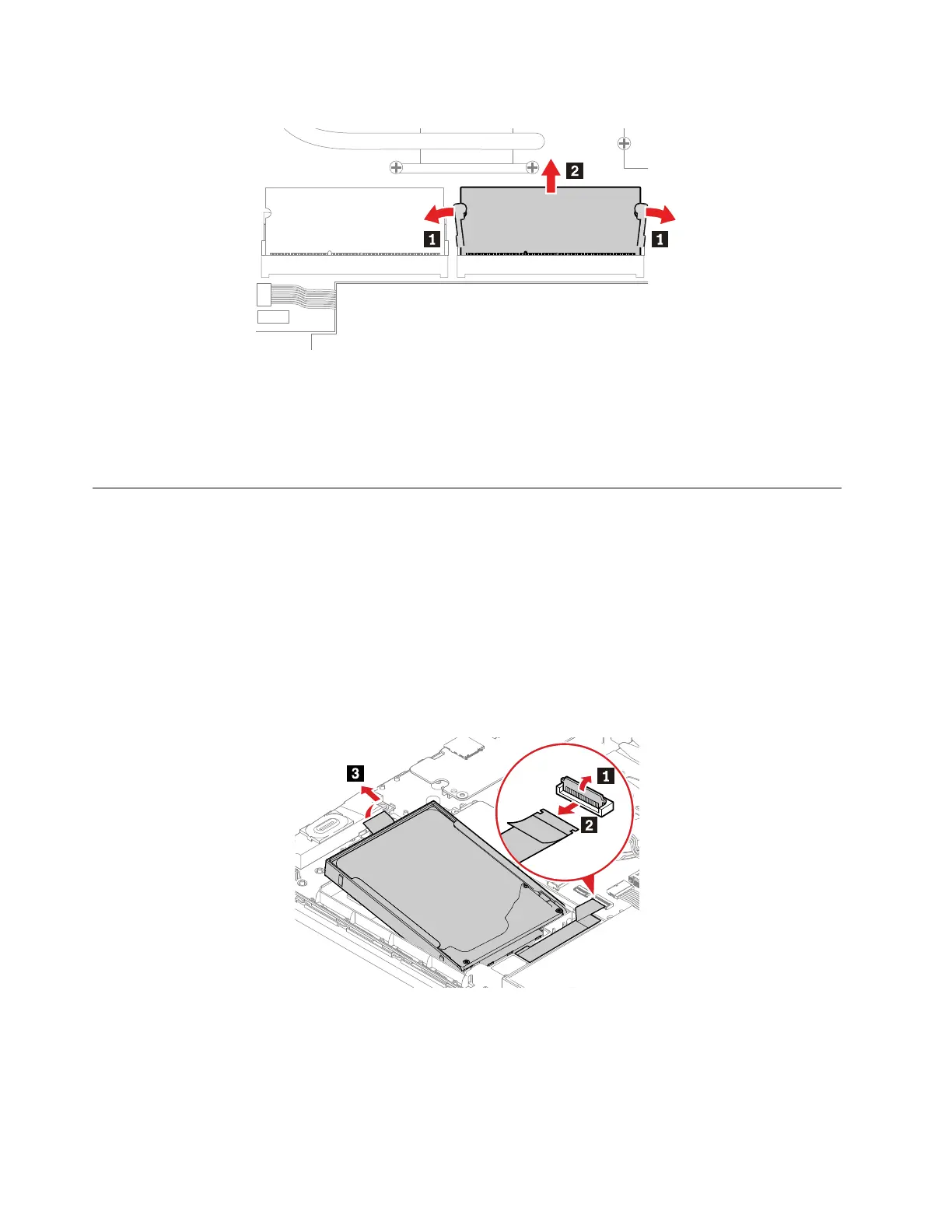
Removal steps of the memory module
When installing:
Insert the notched end of the memory module into the slot at an angle of about 20 degrees. Press the
memory module firmly, and pivot it downwards until it snaps into place. Ensure that the memory module is
firmly installed in the slot and does not move easily.
1060 Internal storage drive, cable and bracket
For access, remove this FRU:
• “1010 Base cover assembly” on page 60
Attention:
• Do not drop the drive or apply any physical shock to it. The drive is sensitive to physical shock. Improper
handling can cause damage and permanent loss of data.
• Before removing the drive, have the user make a backup copy of all the information on it if possible.
• Never remove the drive while the computer is operating or is in suspend mode.
Removal steps of the internal storage drive, cable and bracket
68 E590, R590, and E595 Hardware Maintenance Manual



 To Next Page