When installing: Plug the gray cable into the main connector, and the black cable into the auxiliary
connector on the card.
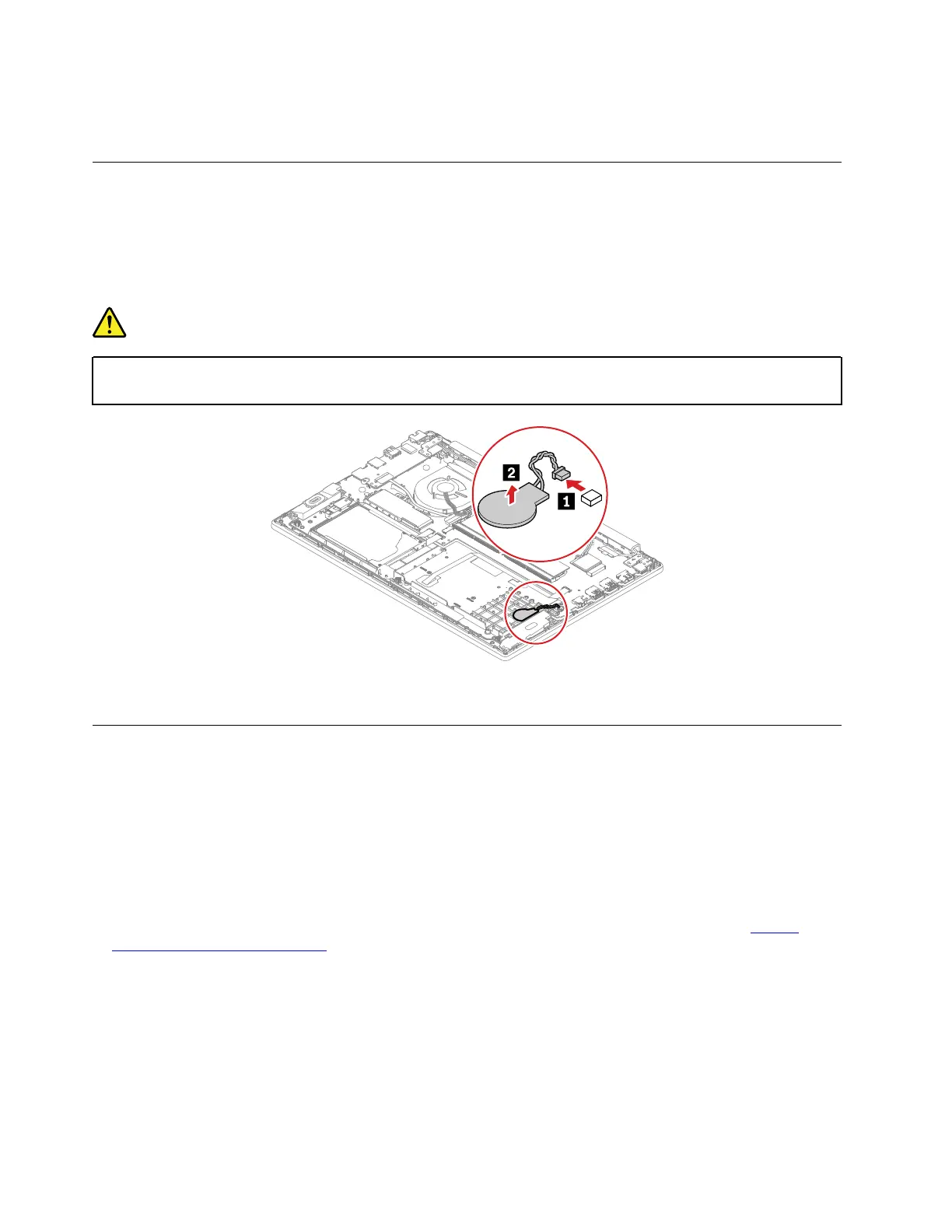
1080 Coin-cell battery
For access, remove these FRUs in order:
• “1010 Base cover assembly” on page 60
• “1020 Built-in battery” on page 62
Removal steps of the coin-cell battery
DANGER
Use only the authorized battery specified for your computer. Any other battery could ignite or
explode.
When installing: Ensure that the connector is attached firmly.
1090 Keyboard
For access, remove these FRUs in order:
• “1010 Base cover assembly” on page 60
Removal steps of the keyboard
Notes:
• Depending on the model, your computer might look different from the illustrations in this topic.
• If the keyboard must be removed to access other FRUs, you need the keyboard removal tool (product part
number: 01LX856) to remove the keyboard. You can purchase the tool as a separate FRU at:
https://
support.lenovo.com/partslookup
70 E590, R590, and E595 Hardware Maintenance Manual



 To Next Page