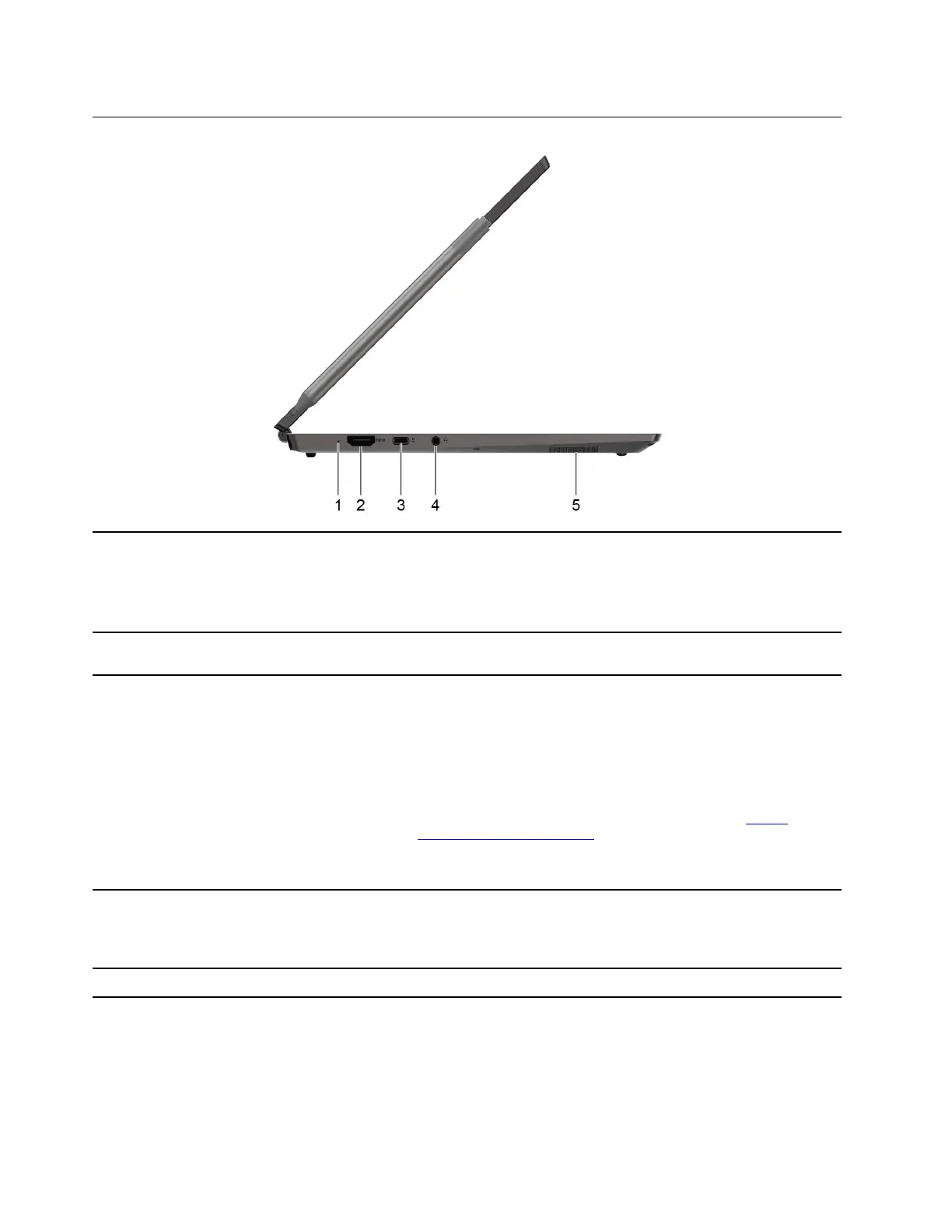
Left
1. Charging light
Indicate whether the computer is connected to ac power.
• Solid white: Connected to ac power; battery capacity 91%–100%
• Solid amber: Connected to ac power; battery capacity 1%–90%
• Off: Not connected to ac power
2. HDMI
TM
connector
Connect to a compatible digital audio device or video monitor, such
as an HDTV.
3. Power connector/USB-C
TM
connector
• Charge your computer with the included power cord and USB-C
power adapter.
• Charge USB-C compatible devices with an output voltage of 5 V
and output current of 3 A.
• Transfer data at USB 3.2 speed, up to 10 Gbps.
• Connect to USB-C accessories to help expand your computer
functionality. To purchase USB-C accessories, go to
https://
www.lenovo.com/accessories
.
Note: When the battery power is below 10%, the connected USB-C
accessories might not work correctly.
4. Combo audio jack Connect to headphones or headsets with a 3.5 mm (0.14 inch), 4-pole
plug.
Note: This jack does not support standalone external microphones. If
you use headsets, choose one with a single plug.
5. Speaker
Produce sound.
4 User Guide




 To Next Page