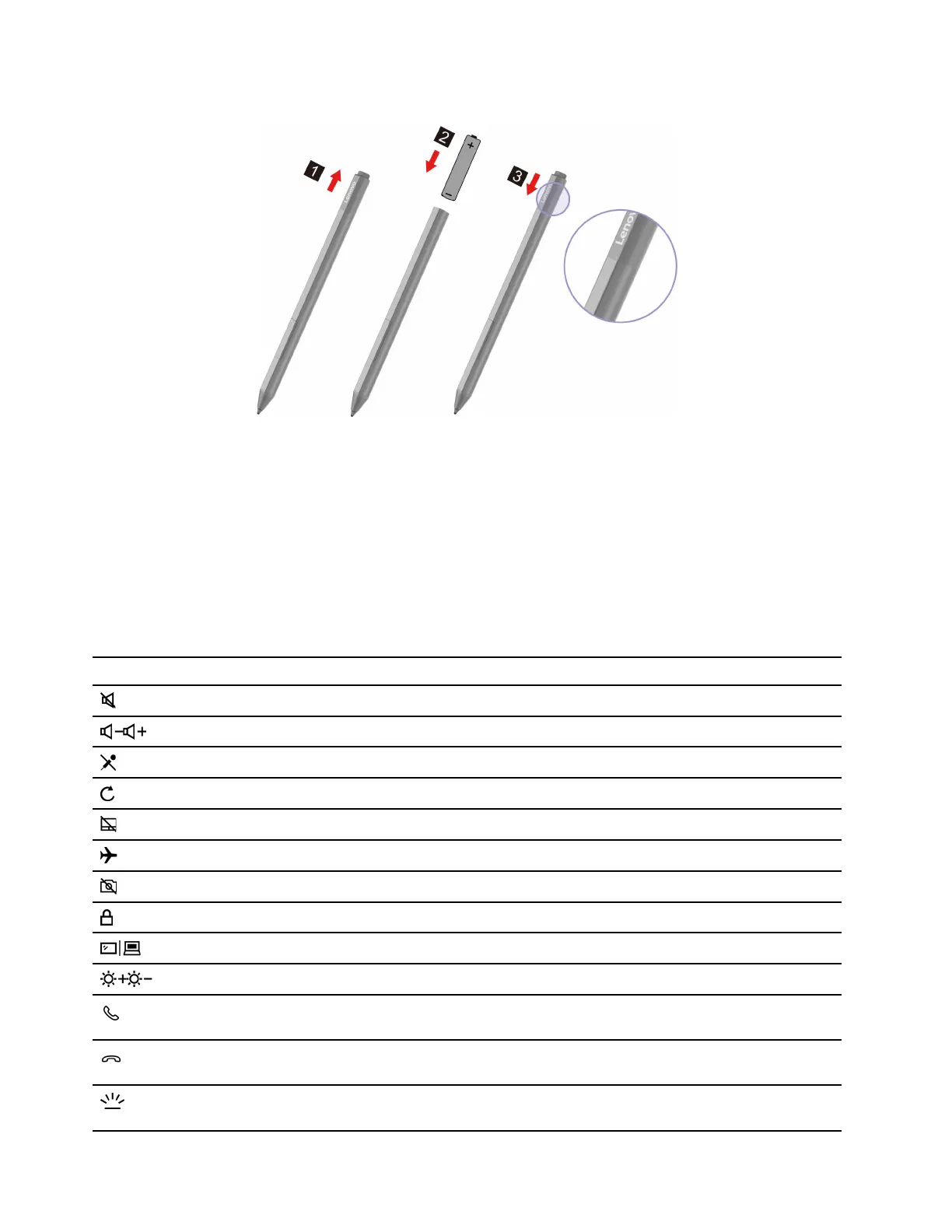
Install pen battery
Notes:
• AAAA alkaline battery may not be included in some countries and regions. Please purchase separately.
• Please handle the Lenovo Precision Pen with care. The pen contains sensitive electronic components
including a battery. Dropping it may cause damage.
Keyboard hotkeys
Some keys on the keyboard are printed with icons. These keys are called hotkeys and can be pressed alone
or in combination with the Fn key to open certain apps or change certain settings quickly. The functions of
the hotkeys are symbolized by the icons printed on them.
Hotkey Function
Mute/Unmute sound.
Decrease/Increase system volume.
Mute/Unmute the microphone.
Reload Web pages or refresh the screen.
Enable/Disable the touchpad.
Turn airplane mode on and off.
Enable/Disable the integrated camera.
Lock the screen.
Switch display devices.
Increase/Decrease screen brightness.
Answer Skype for Business
TM
calls.
Note: Supported on select versions of Skype for Business.
Hang up Skype for Business calls.
Note: Supported on select versions of Skype for Business.
Turn on/off or adjust the brightness of the keyboard backlight.
Note: This hotkey must be used with the Fn key.
14 User Guide




 To Next Page