•ForWindows8:ClickthebatterystatusiconintheWindowsnoticationarea,andthenclickMorepower
options➙Choosewhatthepowerbuttonsdo.
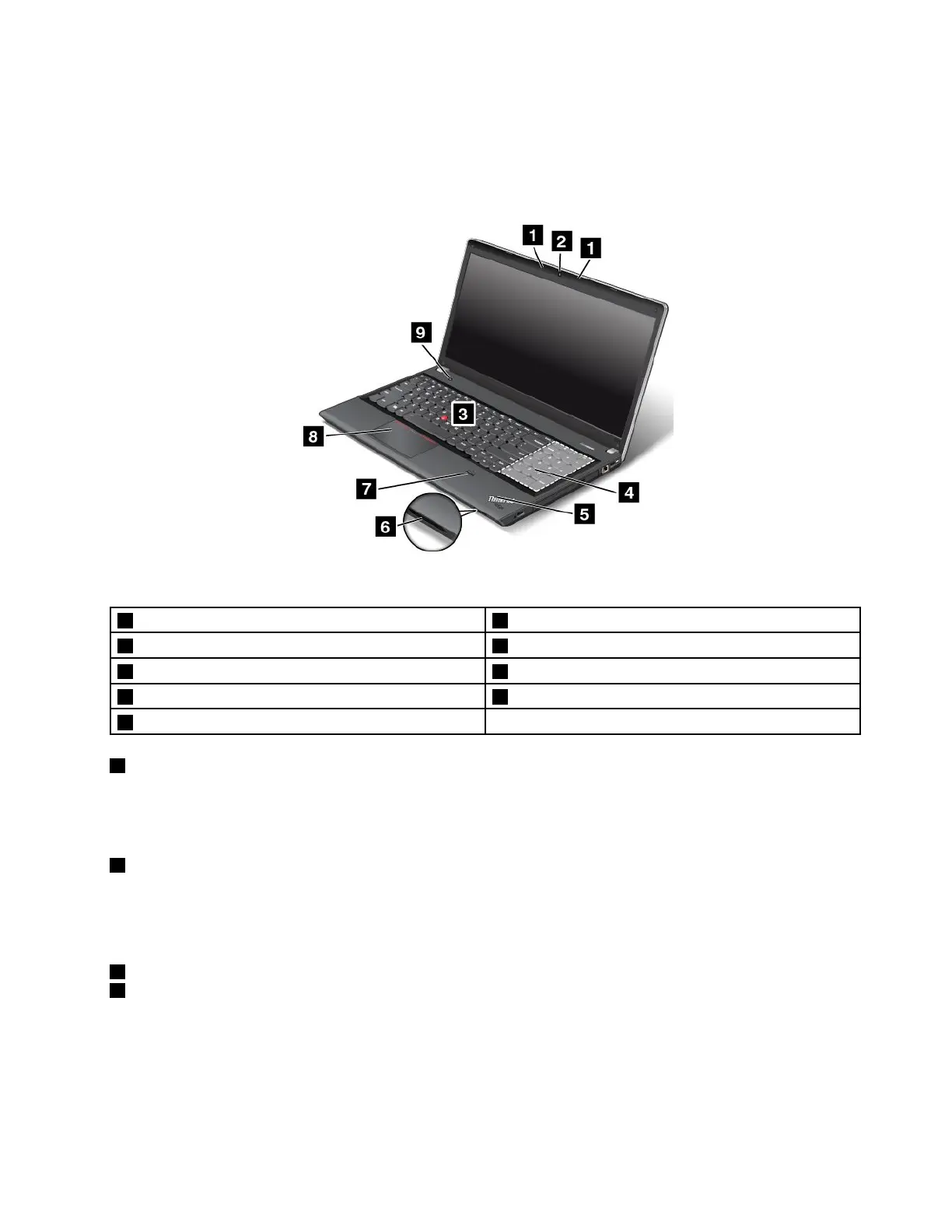
ThinkPadEdgeE531frontview
Figure2.ThinkPadEdgeE531frontview
1Built-inmicrophones6Mediacardreaderslot
2Integratedcamera7Fingerprintreader
3TrackPointpointingstick8Touchpad
4Numerickeypad9Powerbutton
5Systemstatusindicator(illuminatedThinkPadlogo)
1Built-inmicrophones
Thebuilt-inmicrophonescapturesoundandvoicewhenusedwithaprogramcapableofhandlingaudio.
Dependingonyourmodel,yourcomputermightcomewithonemicrophone.
2Integratedcamera
Yourcomputerhasanintegratedcamera.Usethecameratotakepicturesorholdavideoconference.For
moreinformationabouthowtousethecamera,referto“Usingtheintegratedcamera”onpage42
.
ThinkPadpointingdevice
3TrackPointpointingstick
8Touchpad
ThekeyboardcontainstheThinkPadpointingdevice.Pointing,selecting,anddraggingareallpartofasingle
processthatyoucanperformwithoutmovingyourngersfromatypingposition.Formoreinformation,see
“UsingtheThinkPadpointingdevice”onpage29
.
Chapter1.Productoverview3












 To Next Page