•:
ForWindows8:OpenstheSettingscharm.
ForWindows7:OpensControlPanel.
•:
ForWindows8:OpenstheSearchcharm.
ForWindows7:OpensWindowsSearch.
•:Viewstheprogramsthatyouhaveopened.
•
:
ForWindows8:Viewsalltheprograms.
ForWindows7:OpensComputer.
•Fn+B:HasthesamefunctionastheBreakkey.
•Fn+P:HasthesamefunctionasthePausekey.
•Fn+S:HasthesamefunctionastheSysRqkey.
•Fn+K:HasthesamefunctionastheScrLKkey.
2Windowskey
OntheWindows7operatingsystem,presstheWindowskeytoopentheStartmenu.OntheWindows8
operatingsystem,presstheWindowskeytoswitchbetweenthecurrentworkspaceandtheStartscreen.
ForinformationaboutusingtheWindowskeywithotherkeys,refertothehelpinformationsystemofthe
Windowsoperatingsystem.
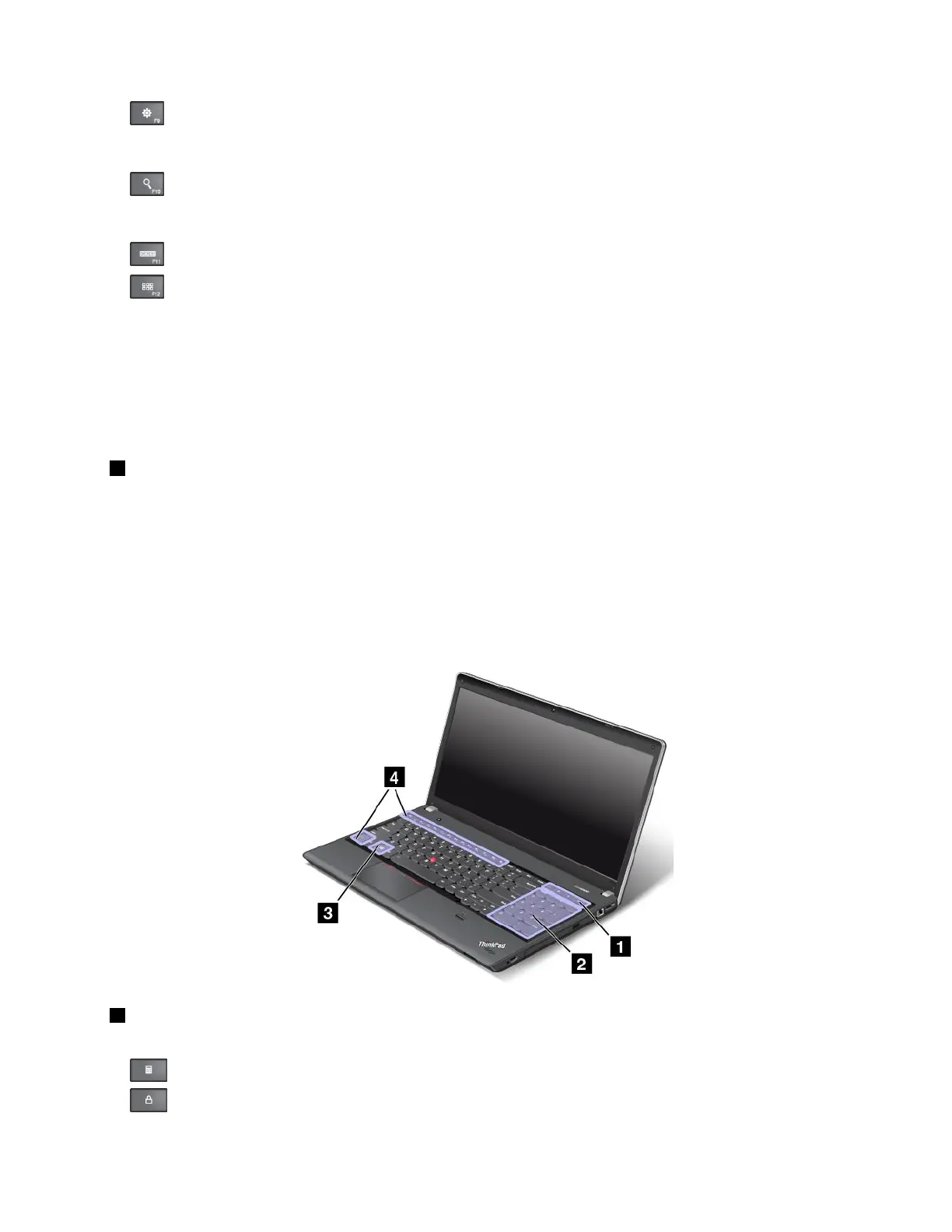
ThinkPadEdgeE531specialkeys
ThefollowinggureshowsthelocationsofmainspecialkeysforThinkPadEdgeE531.
1Additionalshortcutkeys
Yourcomputermighthavefouradditionalshortcutkeys:
•:Launchescalculator
•:Locksoperatingsystem
Chapter2.Usingyourcomputer27












 To Next Page