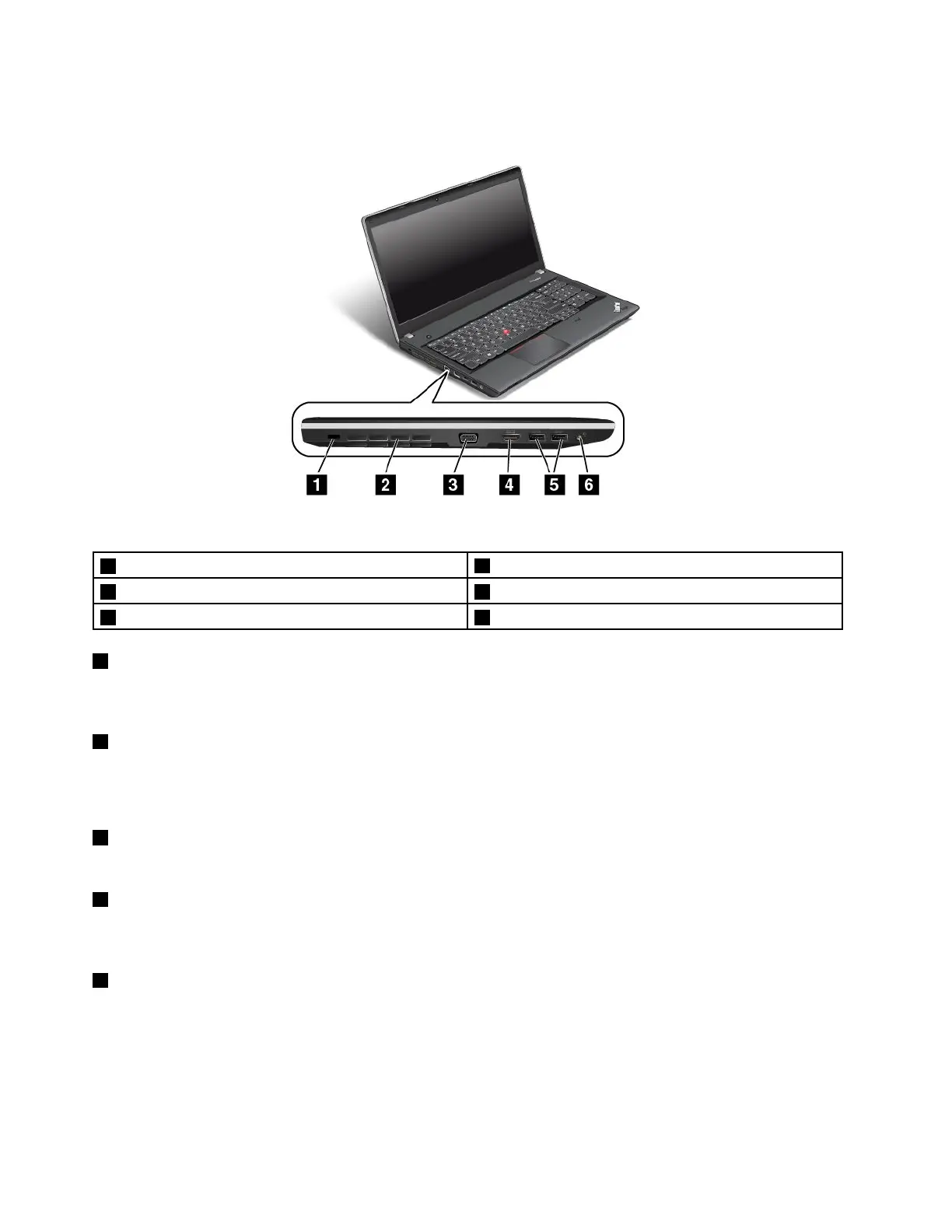
ThinkPadEdgeE531left-sideview
Figure5.ThinkPadEdgeE531left-sideview
1Securitykeyhole
4HDMIport
2Fanlouvers(left)5USB3.0connectors
3VGAconnector6Comboaudiojack
1Securitykeyhole
Purchaseasecuritycablelockthattsthiskeyholetolockyourcomputertoastationaryobjecttoprotect
yourcomputerfromtheft.
2Fanlouvers(left)
Theinternalfanandlouversenableairtocirculateinthecomputerandcoolthecentralprocessor.
Note:Toavoidimpedingairow,donotplaceanyobstacleinfrontofthefan.
3VGAconnector
AttachaVGAcompatiblemonitororprojectortoyourcomputertodisplaythecomputeroutput.
4HDMIport
YourcomputersupportstheHDMIport,adigitalaudio,andvideointerfacethatcanconnectacompatible
digitalaudiodeviceorvideomonitor,suchasanHDTV.
5USB3.0connectors
TheUSB3.0connectorsareusedforconnectingdevicescompatiblewithaUSBinterface,suchasa
USBprinteroradigitalcamera.
Note:WhenyouattachaUSBcabletotheconnector,ensurethattheUSBmarkisfacingupward.
Otherwisetheconnectormightbedamaged.
8UserGuide












 To Next Page