Tasks
Touchgestures(touchmodelsonly)
Mouseactions
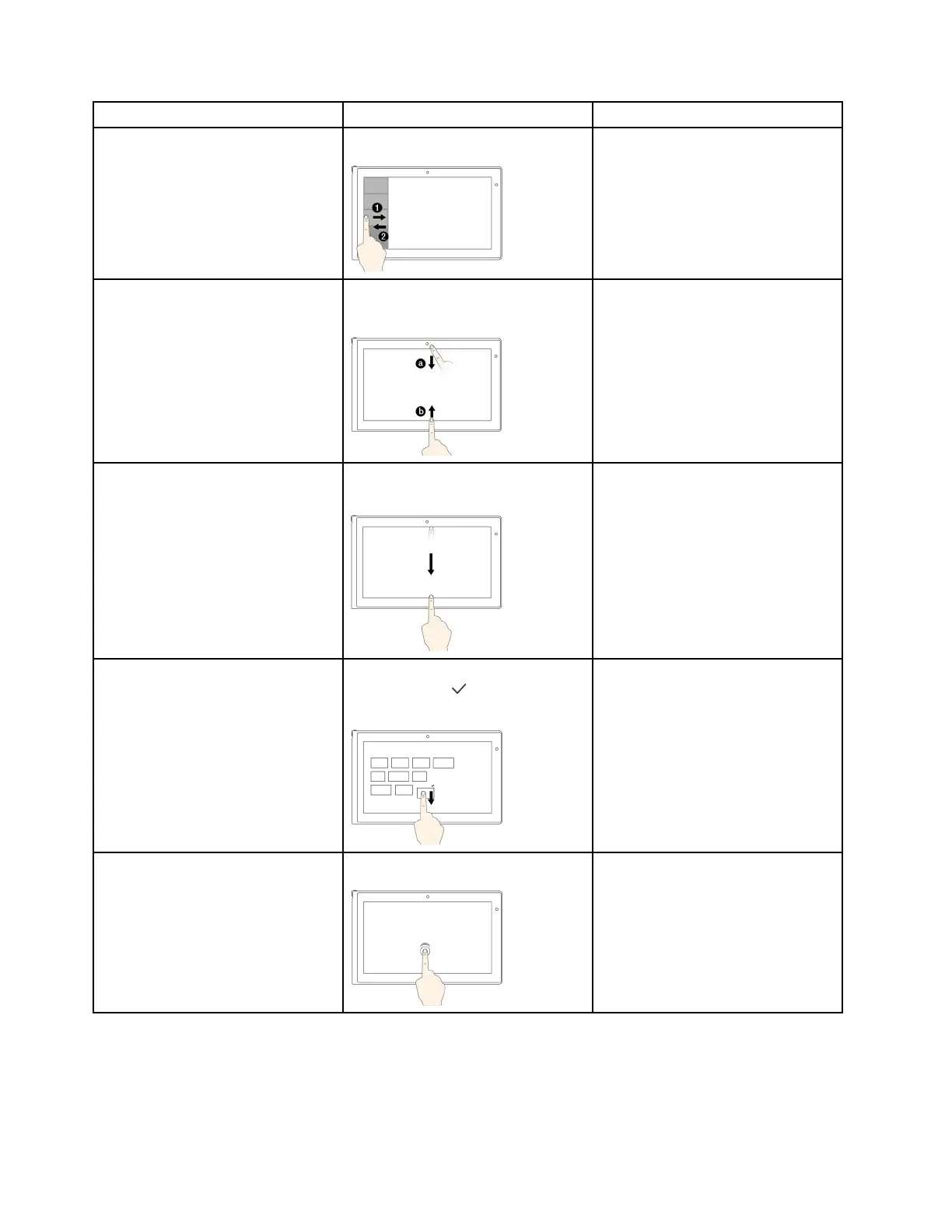
Toviewtherecentlyusedapplications
orselectanapplicationfromthelist
Swipeinandoutontheleftedge.
Movethepointertotheupper-left
cornerofyourscreen,andthenmove
itdownward.
Toviewallapplicationsonthe
Startscreenorviewtheapplication
commandsonanopenapplication,
suchasCopy,Save,andDelete,
dependingontheapplications
Swipeinfromthetoporbottomedge.
Right-clickablankareaonthe
Startscreenorright-clickanopen
application.
Toclosethecurrentapplication
Swipeinfromthetopedgetothe
bottom.
Clickthetopoftheapplication,and
thendragittothebottomofyour
screen.
Toenlargeorreducethesizeofan
icon,removeaniconfromtheStart
screen,orremoveanapplication
Movethedesiredicondownward
untilatickicon(
)isdisplayed,then
releaseyournger.
Right-clickthedesiredicon.
ToopenanapplicationontheStart
screenorperformanactiononan
openapplication,suchasCopy,
Save,andDelete,dependingonthe
application
Tap.
Click.
24UserGuide












 To Next Page