Chapter6.Specialkeys
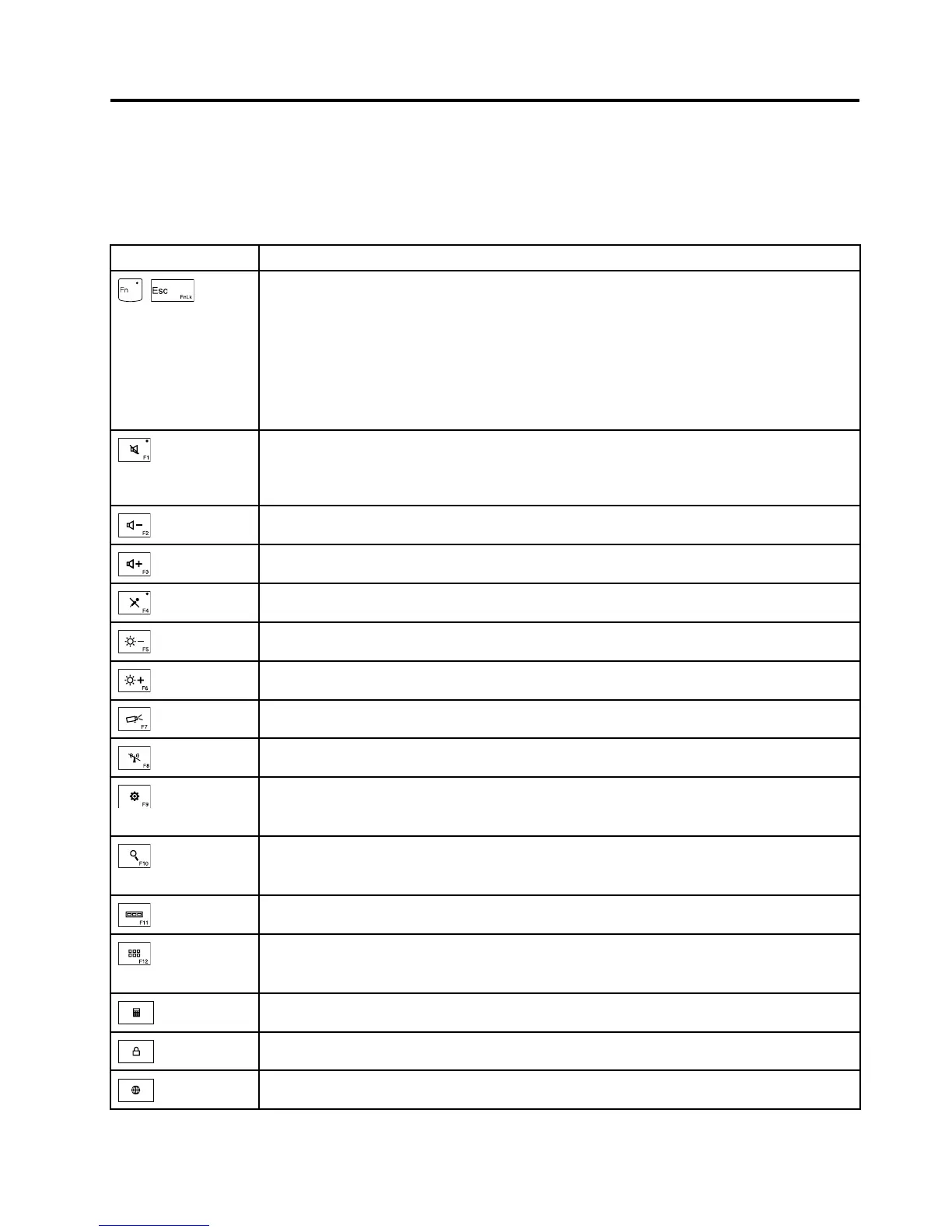
Thefollowingtabledescribesthefunctionsoffunctionkeysandkeycombinations.
Table8.Specialkeys
Specialkey
Description
+
EnablesordisablestheFnLockfunction.
WhentheFnLockfunctionisdisabled:TheFnLockindicatorisoff(defaultmode).To
initiatethespecialfunctionofeachkey,pressthefunctionkeysdirectly.ToinputF1–F12,
presstheFnkeyandthecorrespondingfunctionkey.
WhentheFnLockfunctionisenabled:TheFnLockindicatorturnson.Toinitiatethe
specialfunctionofeachkey,presstheFnkeyandthecorrespondingfunctionkey.Toinput
F1–F12,pressthefunctionkeysdirectly.
Mutesorunmutesthespeakers.
Ifyoumutethesoundandturnoffyourcomputer,thesoundwillremainmutedwhenyouturn
onyourcomputeragain.Toturnonthesound,pressF1,F2,orF3.
Decreasesthespeakervolume.
Increasesthespeakervolume.
Mutesorunmutesthemicrophones.
Darkensthedisplay.
Brightensthedisplay.
Switchesthedisplayoutputlocation.
Enablesordisablesthebuilt-inwirelessnetworkingfeatures.
ForWindows8:OpenstheSettingscharm.
ForWindows7:OpensControlPanel.
ForWindows8:OpenstheSearchcharm.
ForWindows7:OpensWindowsSearch.
Viewstheprogramsthatyouhaveopened.
ForWindows8:Viewsalltheprograms.
ForWindows7:OpensComputer.
Launchesthecalculator.
Lockstheoperatingsystem.
Opensthedefaultbrowser.
©CopyrightLenovo2013
47














 To Next Page