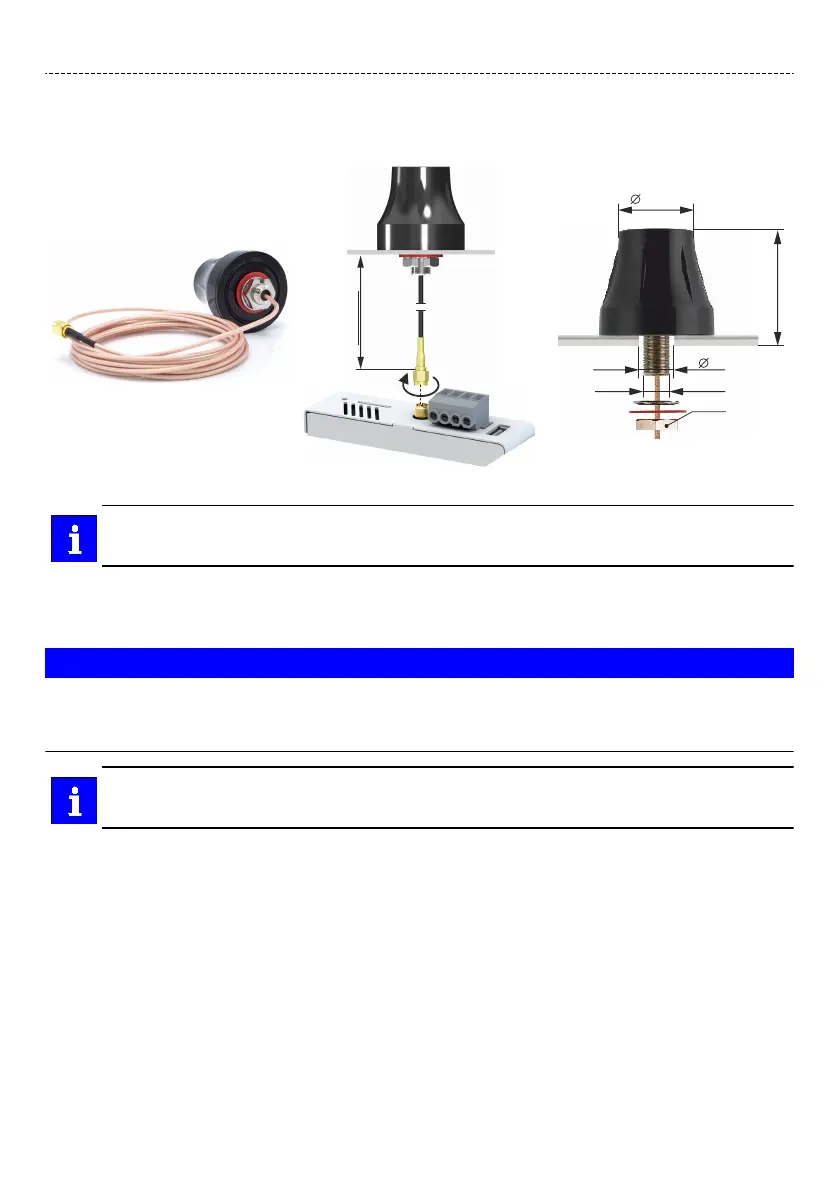
Mounng the screw antenna
The following example shows how to mount the RP-SMA screw antenna (x5ZAG020000S) to the Wi-Fi
antenna connecon of the IoT Gateway x520.
RP-SMA screw antenna (x5ZAG020000S)
For the 4G antenna connecon of the IoT Gateways x530/x540 the LTE-SMA screw antenna
(x5ZAG040000S) is available with idencal dimensions.
Installing a SIM card
For IoT Gateways x530 and x540 only.
NOTICE
Incorrect handling of the SIM card.
Malfuncon of the device.
▶
Insert or remove the SIM card only when the device is switched o.
The SIM card slot is suitable for a mini-SIM card (form factor 2FF). The SIM card is not included with
the device.
Insert the SIM card with light pressure unl you hear a clicking sound. This is approximately 1 mm inside the
device. Release the SIM card and the SIM card remains in the device. The end of the SIM card should be
aligned with the outside of the housing.
Removing a SIM card
The SIM card can be unlocked by gently pressing it in. When unlocking, the SIM card is parally ejected so
that you can easily remove the card.
Electrical installaon
Installing a SIM card
29


 To Next Page